


Pangkalahatang-ideya
I-access ang maraming AI chat sa isang sidebar. Walang API keys, walang limitasyon, privacy muna.
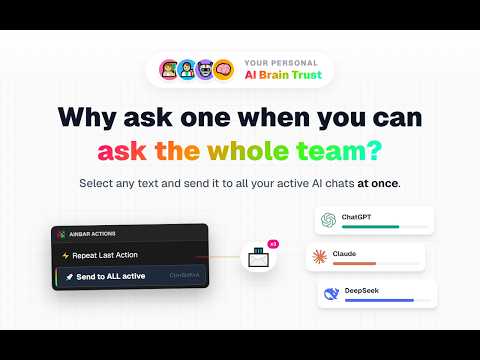
🤖 AiNBar — AI in Bar, Native AI in Browser Sidebar (Beta) Quick Highlights (Key Features): • Multi AI Chat & Compare: Open multiple popular AI web chats in one browser sidebar. Send one prompt to several AI providers and compare answers side by side in real time. • Chat with Webpage: Extract page content instantly. Ask AI to summarize, translate, or explain articles without copy paste. • Screenshot to AI (OCR): Capture any screen area and send it directly to AI to analyze code, solve tasks, or get visual feedback. • Selection to Chat: Highlight any text on any page → right click → send to AI instantly. • Native Experience (No API & Privacy First): Uses original AI web interfaces. Keep your existing accounts and limits, no third party servers, no proxies, no middlemen, and no API keys required. AiNBar brings multiple AI web chats directly into your browser side panel on any website. It is not an API client or a chatbot wrapper — AiNBar connects you directly to the original AI services, allowing you to use your existing accounts natively. 🖱️ Selection to Chat — Instant AI from any page Instantly send highlighted text from any webpage to your AI chats using the right click context menu or global hotkeys. Ask questions, summarize articles, explain code, translate content, or compare responses — without manual copy paste or leaving the page. 🌐 Ask AI about Page Extract the content of your active tab and ask questions about articles, documentation, blog posts, and web pages without manual copy paste. 📸 AI Screenshot & Visual Capture Capture any area of your screen and instantly send it to AI for OCR, analyze code, get design feedback, understand visuals, or solve tasks from images. ⚡ Multi AI chat workflow — compare answers in real time Open multiple AI chats in one panel and compare answers side side in real time. Send one prompt to multiple AI chats at once and instantly compare different AI responses to the same question. 🤖 Native AI in browser sidebar — no API, no wrappers Work with original AI chat interfaces exactly as on their official websites. No API keys, no tokens, no proxies, no middlemen. AiNBar does not replace or reprocess AI — it connects you directly to your existing AI services. 🆓 Use your existing AI subscriptions & limits Your current AI subscriptions and accounts continue to work exactly as they are. AiNBar does not change pricing, usage limits, or tokens — you use the same access, same models, and same rules provided by the original AI platforms. 🖥️ Floating Mode - Flexible Workspace Need more space or prefer working outside the sidebar? Open AI chats in a separate resizable floating window (Floating Mode) and work with multiple models without leaving your active tab. Floating Mode gives you a flexible workspace designed to multitask side by side. 🧩 Quick Prompt Wrappers Apply reusable prompt templates such as "Summarize", "Code Review", or "Explain for Quiz" to text and screenshots before sending them to AI. 🔍 Full Prompt Audit Review, edit, and control exactly what data is being sent to each AI provider before you hit enter. 🖥️ Unified AI sidebar experience Access multiple AI chats in a single browser side panel on any website — docs, search results, emails, articles, and tools. No tab switching, no separate apps, no context loss. 🛠️ Supported AI chats (currently) AiNBar currently supports the most popular AI chat interfaces directly in the sidebar. We are actively expanding and adding new AI chat providers based on user feedback. 🔒 Privacy & Security First AiNBar is designed with privacy in mind. Unlike other tools, we do not act as a middleman: • Direct Connection: Your prompts and screenshots go directly to your AI providers. • No Third Party Servers: We do not collect, store, or intercept your data. • Secure & Native: The extension works entirely within your browser, respecting the security protocols of your official AI accounts. 🎯 Who is AiNBar for? • Users who want native AI chats in a browser side panel • Anyone who wants to compare multiple AI chats side by side • People who compare AI answers across different AI providers • Users who want to keep their existing AI subscriptions and access • Developers, students, researchers, writers, and productivity users • Companies where API access is restricted 🚧 AiNBar is under active development. Core functionality is ready, and new features are continuously added based on user feedback. 🚀 Install AiNBar and work with AI directly — open multiple AI chats, use original AI interfaces, capture screenshots, read page context, and compare answers, all from your browser side panel. 💡 If you enjoy AiNBar, please don't hesitate to leave a 5-star review — it really helps us improve!
Mga Detalye
- Bersyon0.7.6
- Na-updateOktubre 22, 2026
- Laki854KiB
- Mga Wika52 (na) wika
- DeveloperWebsite
Email
pidevex.extensions@gmail.com - Hindi traderHindi tinukoy ng developer na ito ang sarili bilang trader. Para sa mga consumer sa European Union, pakitandaang hindi naaangkop ang mga karapatan ng consumer sa mga kontrata sa pagitan mo at ng developer na ito.
Privacy

Inihayag ng AiNBar - AI Chats at Copilot sa Sidebar ang sumusunod na impormasyon tungkol sa pagkolekta at paggamit ng iyong data. Makikita ang mas detalyadong impormasyon sa privacy policy ng developer.
Pinapangasiwaan ng AiNBar - AI Chats at Copilot sa Sidebar ang sumusunod:
Ipinapahayag ng developer na ito na ang iyong data ay
- Hindi ibinebenta sa mga third party na hindi kabilang sa mga naaprubahang sitwasyon ng paggamit
- Hindi ginagamit o inililipat para sa mga layuning hindi nauugnay sa pangunahing functionality ng item
- Hindi ginagamit o inililipat para tukuyin ang pagiging creditworthy o para sa mga layunin ng pagpapautang


