

AIMode: AI Text Analysis, YouTube Subtitles & Amazon Price Tracker

Overview
AI text analysis, live YouTube subtitles, and an Amazon price tracker. Your all-in-one assistant with Google Gemini
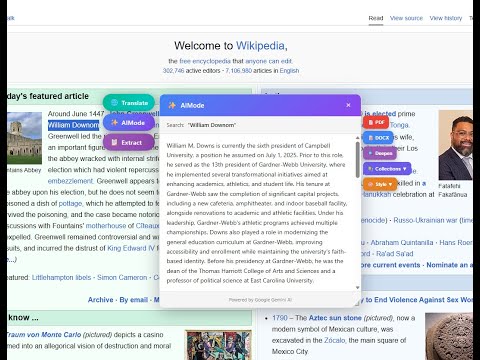
AI Mode: The Ultimate AI-Powered Browser Suite Elevate your digital workflow with AI Mode. More than just an extension, it’s a sophisticated command center that integrates Google Gemini and ChatGPT directly into your browsing experience. From instant mind-mapping to smart news reading, AI Mode is built for the modern professional. In an era of information overload, AI Mode acts as your intelligent filter. We’ve combined world-class AI text analysis, YouTube automation, Amazon price tracking, and advanced organizational tools into a single, elegant interface. 🚀 NEW & EXCLUSIVE FEATURES 🧠 Instant Mind-Map Generation (ChatGPT & Gemini) Visualize complex ideas instantly. Transform long AI conversations or dense articles into structured, interactive mind maps. Visual Learning: Convert ChatGPT or Gemini responses into visual diagrams to better understand relationships between concepts. One-Click Creation: Generate a full map of your research in seconds. Strategic Planning: Ideal for brainstorming, project mapping, and academic study. 🏷️ Smart Conversation Tags Take control of your AI history. No more scrolling through endless lists of unnamed chats. Organize by Context: Assign custom tags to your AI interactions (e.g., "Work," "Research," "Coding," "Personal"). Instant Retrieval: Filter your saved conversations by tags to find exactly what you need, when you need it. Seamless Management: Categorize your knowledge base for maximum productivity. 📰 Google News Reader (Distraction-Free) Experience news with surgical precision. Our specialized reader strips away the noise. Drag-and-Drop Reading: Drag any article from Google News into the AI Mode sidebar for a clean, ad-free reading experience. AI Translation & Summary: Instantly translate news from 11+ languages or generate a bulleted summary of the day's headlines. Knowledge Export: Save news insights directly to your collections or export them as PDF/Markdown. 🛠 THE COMPLETE FEATURE SUITE 📺 YouTube Intelligence & Transcripts Stop watching; start knowing. Extract the essence of any video content. Full Transcription: Get complete, time-stamped text from any YouTube video. Live AI Subtitles: Multilingual subtitle overlays with customizable styles (font, size, color). AI Summary: Get a high-level overview of video content powered by Gemini. 💰 Amazon Price Tracker & Shopping Assistant Shop smarter with data-driven insights. Interactive History: View the full price evolution of any product with beautiful charts. Price Alerts: Set custom thresholds (5% to 30%) and get notified of price drops. Market Insight: See the lowest price ever recorded to ensure you're getting a true deal. 📑 Advanced Collection Manager Your personal library for the web. Unified Storage: Save AI responses, extracted text, and web links into organized folders. Professional Export: Turn your research into high-quality PDF, DOCX, or Markdown files. 💎 WHY PROFESSIONALS CHOOSE AI MODE Privacy First: We believe your data is your business. AI Mode does not track your browsing activity or store your personal searches on external servers. Multi-Model Support: Harness the power of Google Gemini or connect your own API keys for a tailored experience. Modern Interface: A clean, tabbed settings hub that fits perfectly with your browser’s aesthetics. Multilingual Power: Full support for English, Italian, Spanish, French, German, Portuguese, and Chinese. ✨ HOW TO GET STARTED Install AI Mode: Add the extension to your browser. Highlight & Interact: Select any text to trigger the AI menu or open the sidebar for deep analysis. Visualize: Use the Mind-Map tool to see your ideas take shape. Organize: Use Tags and Collections to build your personal knowledge vault. 🌐 CONNECT WITH US Join thousands of users who are redefining productivity. Official Website: https://theaimode.app Support: Detailed tutorials and "How To" guides available on our site. Stop searching. Start discovering. Download AI Mode today.
0 out of 5No ratings
Details
- Version2.6.2
- UpdatedMarch 30, 2026
- FeaturesOffers in-app purchases
- Size576KiB
- Languages6 languages
- DeveloperCristea-Florian HrizuWebsite
Piazza Don Rino Brasola 5 Cervarese Santa Croce, PD 35030 ITEmail
cristi@hrizu.eu - Non-traderThis developer has not identified itself as a trader. For consumers in the European Union, please note that consumer rights do not apply to contracts between you and this developer.
Privacy

AIMode: AI Text Analysis, YouTube Subtitles & Amazon Price Tracker has disclosed the following information regarding the collection and usage of your data. More detailed information can be found in the developer's privacy policy.
AIMode: AI Text Analysis, YouTube Subtitles & Amazon Price Tracker handles the following:
This developer declares that your data is
- Not being sold to third parties, outside of the approved use cases
- Not being used or transferred for purposes that are unrelated to the item's core functionality
- Not being used or transferred to determine creditworthiness or for lending purposes
Support
For help with questions, suggestions, or problems, please open this page on your desktop browser