


Overview
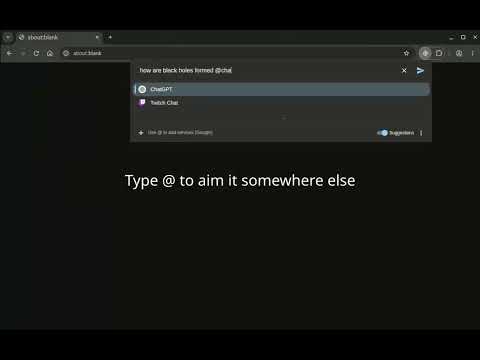
Ask everywhere. Query one or multiple AI, search, image, and other services from a single interface.
Search once. One search box for thousands of internet services. Aim keeps the services you use in a single search box. Press Ctrl+E (Command+E on Mac) and type what you are looking for. Send the search to Google, Wikipedia, YouTube, ChatGPT, Maps, or any other service you use. Install Aim, press Ctrl+E, and use it for your next search. Recent Updates: v3.0.0 (10 November 2026) - Rebuilt the popup as one search box for all services you use. - Choose a service with @..., or press Enter to use your default. - More than one service can be added to the same search. Each opens in a new tab. - Added a Suggestions switch (Alt+S) so query completions can be turned off. - Added recent searches, light/dark/system theme, language and country settings. - Support for legacy ! to lookup services. - The toolbar icon follows the browser's light or dark theme - ... and lots of little tweaks. v2.6.0 (24 February 2026) - Changed `Ctrl` modifier behavior to show a temporary first-favourite engine hint instead of switching the selected engine - Fixed modifier hint detection for `Shift + Alt` so the combined background-tab hint is shown reliably - Added default engines to improve onboarding experience (including Google Lucky, Wikipedia, ChatGPT, and others) v2.5.0 (23 February 2026) - Fixed Firefox extension popup not accepting focus reliably on open - Added `Ctrl` key modifier to temporarily override the selected engine with the first favourite engine (releasing `Ctrl` reverts automatically) v2.4.2 (11 February 2026) - Changed default keyboard shortcut from Ctrl+Shift+E to Ctrl+E for consistency across Chrome and Firefox (Ctrl+Shift+E conflicts with Firefox DevTools) - Added Ctrl+Shift+E as a legacy shortcut in Chrome for backward compatibility - Moved modifier key hints (Shift/Alt) inline to the left of the incognito icon instead of below the search bar v2.4.1 (3 February 2026) - Fixed installed page opening on every extension update; now only opens when reason is "install" v2.4.0 (January 2026) - New engine suggestions are shown at the bottom instead of at the top - Automatically save engines when selected from the "suggested engines" - Arrow Up now wraps to the bottom of the suggestions v2.3.0 (January 2026) - Added text hint that shows which key combinations (`ALT`, `SHIFT`, or both) will open searches in a new tab, new window, or background tab - Changed wording from "Search <engine>" to "Use <engine>" - Added installed/uninstalled pages v2.2.1 (October 2025) - Added ALT+I keyboard shortcut to toggle incognito mode while keeping focus on search field v2.2.0 (June 2025) - Added incognito mode to disable network suggestions - Only shows your favorite engines when incognito is active - Added incognito toggle button next to settings v2.1.4 (April 2025) - Enhanced visual feedback with blue border around empty search box v2.1.3 (March 2025) - Fixed context menu to respect your custom engine sorting - Increased context menu engine limit from 10 to 15 v2.1.2 (December 2024) - Fixed context menu sorting issues v2.1.0 (December 2024) - Improved Ctrl+Shift+E shortcut support - Bypassed Google Lucky redirect page - Added context menu sorting v2.0.0 (November 2024) - Initial release
5 out of 52 ratings
Details
- Version3.0.0
- UpdatedNovember 10, 2026
- Offered bySwede
- Size796KiB
- LanguagesEnglish
- DeveloperSwede
189 Ashmore Rd Benowa, QLD 4217 AUEmail
contact@swede.com.au - Non-traderThis developer has not identified itself as a trader. For consumers in the European Union, please note that consumer rights do not apply to contracts between you and this developer.
Privacy

This developer declares that your data is
- Not being sold to third parties, outside of the approved use cases
- Not being used or transferred for purposes that are unrelated to the item's core functionality
- Not being used or transferred to determine creditworthiness or for lending purposes
Support
For help with questions, suggestions, or problems, please open this page on your desktop browser