


खास जानकारी
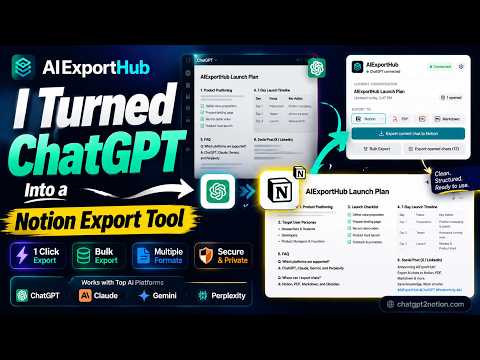
Export supported AI conversations to your Notion workspace or save them locally as Markdown and PDF files.
ChatGPT, Claude, Gemini, और Perplexity की बातचीतों को Notion, Markdown, Obsidian, या PDF में bulk export करें — वह भी एक ही Chrome extension से। 🚀 SUPPORTED EXPORT WORKFLOWS • मौजूदा conversation को export करें। • पूरी supported conversation history का bulk export करें। • सभी उपलब्ध conversations export करें या केवल latest loaded page को export करें। • Export से पहले individual conversations चुनें। • Loaded conversations को search करें, select all करें, deselect all करें, और complete histories load करें। • Platform-specific Projects, group chats, archived chats, Gems, और Spaces export करें। • उन conversations को skip करें जो पहले ही export हो चुकी हैं। • Stable long-running jobs के लिए delay configure करें। • Progress monitor करें, active job cancel करें, failed items को retry करें, और export history देखें। 🤖 PLATFORM FEATURES CHATGPT • Regular conversations, selected chats, Projects, group chats, और archived conversations export करें। • Authenticated source tab के माध्यम से generated sandbox files डाउनलोड करें। • Uploaded attachments, generated documents, images, Markdown files, और अन्य supported assets को सुरक्षित रखें। • Filters, pagination, progress, cancellation, organized folders, export summaries, और offline HTML index के साथ Library images और files का bulk download करें। CLAUDE • Individual chats, complete history, selected conversations, पूरे Projects, या selected Project conversations export करें। • Attachments, generated files, linked assets, images, SVG visualizations, और readable artifacts को सुरक्षित रखें। • Multiple data structures के माध्यम से लौटाए गए attachment records को deduplicate करें। • Generated child pages को duplicate page links के बिना उनके source messages के पास रखें। GEMINI • Individual chats, complete history, selected conversations, Gems, और selected Gem conversations export करें। • हर output target में supported images और media को सुरक्षित रखें। • Light, dark, या eye-care PDF themes और readable message-card styles चुनें। PERPLEXITY • Answers, citations, sources, और related questions सहित threads export करें। • Individual threads चुनें या selected Spaces से conversations export करें। • History export को date के अनुसार filter करें और जब platform job को rate limit करे तब साफ़ तरीके से रुकें। • Uploaded images, files, generated research documents, code assets, और downloadable binary assets को सुरक्षित रखें। • Assets, plan results, media blocks, inline media, canvas, और unified asset responses में generated images को detect करें। • जब वही generated image multiple API structures के माध्यम से दिखाई दे, तो उसे deduplicate करें। 📝 AI CHATS को NOTION में EXPORT करें Multi-platform AI conversation history को एक organized knowledge base में बदलें। • Structured metadata के साथ chats को selected database में sync करें। • Title, platform, source URL, timestamps, message count, tags, Projects, Gems, Spaces, और अन्य उपलब्ध fields store करें। • Overwrite या duplicate-safe synchronization behavior चुनें। • Supported images, documents, PDFs, और अन्य files को सीधे अपने workspace में upload करें। • Upload से पहले connected source tab से authenticated attachments प्राप्त करें। • Child pages को ऊपर duplicate करने के बजाय, उन messages के पास insert करें जिन्होंने उन्हें बनाया। • Export dashboard से selected database को सीधे खोलें। • Standard या enhanced formatting चुनें। Image upload और file upload डिफ़ॉल्ट रूप से enabled हैं। 📄 AI CHATS को MARKDOWN और OBSIDIAN में EXPORT करें Local backup, knowledge management, documentation, publishing, और version control के लिए साफ़ और portable files बनाएं। • Prompts, answers, sources, related questions, metadata, और readable artifacts export करें। • Images को sibling images folder में डाउनलोड करें। • Files को sibling attachments folder में डाउनलोड करें। • Links को rewrite करें ताकि downloaded local assets इस्तेमाल हों। • Readable generated documents को inline सुरक्षित रखें। • Folders और filename patterns configure करें। Image और file downloads डिफ़ॉल्ट रूप से enabled हैं। किसी intermediate cloud workspace की आवश्यकता नहीं है। 📑 AI CHATS को PDF में EXPORT करें Readable layouts और embedded media के साथ polished, portable conversation records बनाएं। • Message cards और structured metadata के साथ prompts और answers render करें। • Download की गई chat images को सीधे document में embed करें। • Supported non-image files को exported PDF के साथ attachments के रूप में डाउनलोड करें। • Conversation में readable generated documents और code को सुरक्षित रखें। • Multiple color themes और message styles चुनें। Image और file handling डिफ़ॉल्ट रूप से enabled है। 📂 ORGANIZATION AND CONTROL • Custom download directories। • Configurable filename patterns। • Projects, Gems, Spaces, archived chats, और supported collections के लिए platform-aware subfolders। • Bulk job शुरू करने से पहले export summary। • Persistent target और export preferences। • Success, warning, failure, और retry के लिए स्पष्ट feedback। • Selection lists में लंबे titles को सुरक्षित रूप से truncate किया जाता है, जबकि पूरा title hover पर उपलब्ध रहता है। 🔐 LOCAL-FIRST PRIVACY Local files आपके browser में generate होती हैं। Cloud synchronization केवल तब होता है जब आप स्पष्ट रूप से अपने workspace को authorize करते हैं और उसे export target के रूप में चुनते हैं। Extension इनका उपयोग करती है: • Tabs permission, ताकि आपके द्वारा खोले गए supported AI pages को खोजा और उनसे communicate किया जा सके। • Storage permission, ताकि settings, account state, और job progress सहेजी जा सके। • Downloads permission, ताकि notes, documents, images, और attachments आपके computer पर save किए जा सकें। • Supported platform access, ताकि conversations पढ़ी जा सकें और वे files प्राप्त की जा सकें जिन्हें आप export करना चुनते हैं। • Workspace API access, केवल तब जब आप अपना account connect करते हैं। 🌐 WEBSITE https://chatgpt2notion.com/products/aiexporthub-hero/ 📧 SUPPORT chatgpt2notion@gmail.com
वर्णन
- वर्शन8.7.0
- पिछली बार अपडेट होने की तारीख:27 अक्टूबर 2026
- सुविधाएंइन-ऐप्लिकेशन खरीदारी ऑफ़र करता है
- आकार2.3MiB
- भाषाएं18 भाषाएं
- डेवलपर
- गैर-व्यापारीइस डेवलपर ने अपनी पहचान व्यापारी के तौर पर ज़ाहिर नहीं की है. अगर आप यूरोपियन संघ के किसी देश में रहने वाले उपभोक्ता हैं, तो आपके और डेवलपर के बीच हुए समझौते पर उपभोक्ता के अधिकार लागू नहीं होंगे.
निजता

AIExportHub: Bulk Export AI Chats में यह जानकारी दी गई है कि आपके डेटा को कैसे इकट्ठा और इस्तेमाल किया जाता है. ज़्यादा जानकारी के लिए, डेवलपर की privacy policy देखें.
AIExportHub: Bulk Export AI Chats, निजता से जुड़े इस डेटा को मैनेज करता है:
डेवलपर ने एलान किया है कि आपका डेटा
- जिन मामलों में इस्तेमाल की मंज़ूरी दी गई है उनके अलावा, किसी भी तीसरे पक्ष को नहीं बेचा जाता
- किसी ऐसे मकसद से इस्तेमाल या ट्रांसफ़र नहीं किया जाता जो आइटम के मुख्य फंक्शन के हिसाब से ज़रूरी नहीं है
- क़र्ज़ लेने या क़र्ज़ देने की स्थिति तय करने के लिए इस्तेमाल या ट्रांसफ़र नहीं किया जाता


