


Overview
Export chats from popular AI platforms to PDF, DOCX, HTML, Markdown, and JSON with images, formatting, and selective export.
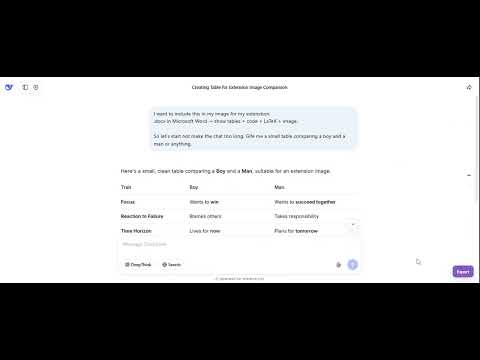
AI Chat Exporter Pro Export conversations from ChatGPT, Claude, Gemini, Grok, and DeepSeek into beautifully formatted documents for research, documentation, education, development, and archiving. AI Chat Exporter Pro preserves the structure of your AI conversations—including code blocks, tables, images, links, mathematical formulas, and rich formatting—making it easy to save and share your work in professional-quality documents. Supported AI Platforms ✓ ChatGPT ✓ Claude ✓ Gemini ✓ Grok ✓ DeepSeek Key Features Export Entire Chats or Selected Messages Choose whether to export the complete conversation or only the responses you need. High-Quality Document Generation Documents preserve conversation flow with support for: • Code blocks • Tables • Links • Images • Mathematical formulas (KaTeX) • Markdown formatting • Emojis Advanced PDF & DOCX Customization Customize your exported documents with options including: • Page size • Orientation • Margins • Light or Dark theme • Font family • Font size • Table of Contents • Header information • Branding controls • Page breaks Built for Long Conversations Designed to handle lengthy research sessions, tutorials, technical discussions, and large AI conversations reliably. The extension is optimized for the supported AI platforms to accurately preserve conversation layout, formatting, media, and structured content while adapting to platform-specific differences. Privacy First Most export formats are processed entirely within your browser. To provide consistent formatting, improved image handling, and reliable document generation, **PDF exports are securely processed through Workpent's PDF conversion service** before being downloaded. No account is required to use the extension. Common Uses • Save research conversations • Archive AI-assisted coding sessions • Export technical documentation • Preserve educational materials • Share project discussions • Generate client deliverables • Keep permanent records of important AI conversations Getting Started 1. Install AI Chat Exporter Pro. 2. Open a supported AI platform. 3. Open the conversation you want to export. 4. Click the extension icon. 5. Choose your preferred export format. 6. Download your document. Support Website: https://chatexport.workpent.com Email: [support@chatexport.workpent.com] If AI Chat Exporter Pro helps your workflow, please consider leaving a review. Your feedback helps us continue improving the extension. ❤️ Changelog: v0.5.2 • Added direct Chrome and Edge review links. • Improved PDF and DOCX code block rendering. v0.5.3 • Improved Markdown and JSON code formatting. v0.5.4 • Added advanced PDF and DOCX customization options. • Improved document layouts and themes. • Added clickable table of contents. • Improved HTML and DOCX rendering. v0.5.5 • Improved light-theme code block spacing. v0.5.6 • Added KaTeX mathematical formula support across all export formats. • Added Selective Export for ChatGPT and DeepSeek. • Added ChatGPT inline image support. • Added Claude generated image support. • Added Claude uploaded image support. • Added Claude pasted thumbnail support. • Added Claude Artifacts support. v0.5.7. i. Added advanced export options for PDF/DOCX: page size/orientation/margins, theme (light/dark), font & size selector, user info (name/email/date) in header, page-break-per-prompt, TOC, and branding/icon toggles. ii. Improved layouts: user/assistant alignment, better bubbles, dark-mode backgrounds (PDF/HTML/DOCX), clickable TOC entries, header title/filename obey overrides, emoji font support. iii. HTML export polished to mirror chat themes; DOCX respects theme, fonts, and sizing v0.5.8. i. Fixed Grok to HTML export alignment: user right, assistant left with correct icons.
4.1 out of 514 ratings
Details
- Version0.6.3
- UpdatedAugust 2, 2026
- Offered byWorkpent
- Size2.18MiB
- Languages15 languages
- Developer
Email
support@workpent.com - Non-traderThis developer has not identified itself as a trader. For consumers in the European Union, please note that consumer rights do not apply to contracts between you and this developer.
Privacy

AIChatExporterPro has disclosed the following information regarding the collection and usage of your data. More detailed information can be found in the developer's privacy policy.
AIChatExporterPro handles the following:
This developer declares that your data is
- Not being sold to third parties, outside of the approved use cases
- Not being used or transferred for purposes that are unrelated to the item's core functionality
- Not being used or transferred to determine creditworthiness or for lending purposes
Support
For help with questions, suggestions, or problems, visit the developer's support site