


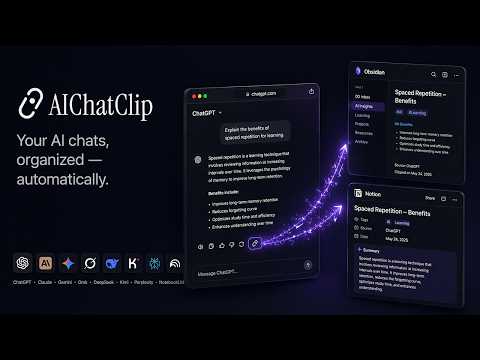
Overview
Save & backup ChatGPT, Claude, Gemini chats to Obsidian or Notion as Markdown. 8 AI services, one click, AI auto-organizes. Free.
Save and backup your AI chat conversations to Obsidian or Notion with one click. Works with all major AI chat services. Export AI chat responses as clean Markdown — no more lost conversations, no more manual copy-paste. ━━━━━━━━━━━━━━━━━━━━━━━━━━━━ Why AIChatClip? ━━━━━━━━━━━━━━━━━━━━━━━━━━━━ • Save AI conversations to Obsidian — automatically synced as Markdown notes • Export responses to your knowledge base with one click • Backup chats before they get buried in history • Build a personal AI knowledge base — never lose a valuable response again • Auto-organize with AI-generated titles, tags, and smart folder classification (Pro) • Not just export — real-time sync, so your vault stays up to date ━━━━━━━━━━━━━━━━━━━━━━━━━━━━ How It Works ━━━━━━━━━━━━━━━━━━━━━━━━━━━━ A clip button appears next to every AI response — blending seamlessly into each service's native UI. No clutter, no visual noise. Just a small icon that sits right where you'd expect it, alongside the existing action buttons. Click it to instantly save the conversation — including the user prompt, assistant response (converted to clean Markdown), chat title, and page URL. ━━━━━━━━━━━━━━━━━━━━━━━━━━━━ Three Ways to Use ━━━━━━━━━━━━━━━━━━━━━━━━━━━━ 1. Webhook Mode (Free, no account required) Set up any webhook URL in the extension popup. Every clip is sent as a JSON POST request with optional custom headers for authentication. Works with any service that accepts incoming webhooks, or your own server. Test webhooks directly from the popup before going live. 2. Obsidian / Notion Sync (Free plan) Connect your AIChatClip account and choose Obsidian or Notion as your destination. Clipped conversations are automatically synced as clean Markdown notes (Obsidian) or database entries (Notion). 3. AI-Powered Organization (Pro plan) Everything in the free plan, plus AI-powered organization: • Auto-generated titles, tags, and summaries • Smart folder classification — clips land in the right folder automatically • Customizable file naming templates and tag rules • Notion database sync with category management ━━━━━━━━━━━━━━━━━━━━━━━━━━━━ Extension Popup ━━━━━━━━━━━━━━━━━━━━━━━━━━━━ • Visual connection status showing Extension → Server → Destination at a glance • Switch between Obsidian and Notion as your sync destination • Recent clips history with direct links back to conversations • Webhook management with custom headers, test sending, and delivery logs • Available in English, 日本語, 中文, 한국어, Русский, and Español ━━━━━━━━━━━━━━━━━━━━━━━━━━━━ Design Philosophy ━━━━━━━━━━━━━━━━━━━━━━━━━━━━ The clip button is designed to feel native to each AI service. It matches the size, shape, color, and hover behavior of the existing action buttons so it never feels like an intrusive add-on. ━━━━━━━━━━━━━━━━━━━━━━━━━━━━ Privacy ━━━━━━━━━━━━━━━━━━━━━━━━━━━━ • No data is collected or stored unless you explicitly configure a webhook or connect an AIChatClip account • Conversations are processed only when you click the clip button • Open source: https://github.com/aichatclip/extension-aichatclip Your AI conversations deserve a backup. Don't let them get lost in endless chat history. ━━━━━━━━━━━━━━━━━━━━━━━━━━━━ What's New in v1.1.4 ━━━━━━━━━━━━━━━━━━━━━━━━━━━━ • Further reduced false-positives in the background self-diagnostics — the check now allows a 2-minute grace period after you send a message before it considers a missing response a real problem. Slow thinking modes (o1/o3, Claude extended thinking, deep research) no longer trigger spurious "broken clip button" reports while the model is still preparing its reply ━━━━━━━━━━━━━━━━━━━━━━━━━━━━ What's New in v1.1.3 ━━━━━━━━━━━━━━━━━━━━━━━━━━━━ • Fixed a false-positive in the background self-diagnostics added in v1.1.2 — opening a new, empty chat no longer gets flagged as "clip button broken". The check now waits until you've actually sent a message before treating a missing response as a real problem • Installs that were stuck in a broken state from the previous version are cleared automatically the next time the extension starts ━━━━━━━━━━━━━━━━━━━━━━━━━━━━ What's New in v1.1.2 ━━━━━━━━━━━━━━━━━━━━━━━━━━━━ • Redesigned setup flow — adaptive single-task view that detects your current state and shows only what's needed next; destination selection and connection are now on one screen • Fixed: clicking the clip button with no destination configured no longer shows a false success — now shows an error and a tooltip that takes you directly to setup • Background self-diagnostics — the extension silently monitors for broken clip buttons caused by AI service UI updates and reports issues to the developer automatically (can be disabled in the popup)
0 out of 5No ratings
Details
- Version1.1.4
- UpdatedApril 23, 2026
- FeaturesOffers in-app purchases
- Size722KiB
- Languages7 languages
- DeveloperWebsite
Email
tohshima115@gmail.com - Non-traderThis developer has not identified itself as a trader. For consumers in the European Union, please note that consumer rights do not apply to contracts between you and this developer.
Privacy

AIChatClip – Save ChatGPT & Claude to Obsidian / Notion has disclosed the following information regarding the collection and usage of your data. More detailed information can be found in the developer's privacy policy.
AIChatClip – Save ChatGPT & Claude to Obsidian / Notion handles the following:
This developer declares that your data is
- Not being sold to third parties, outside of the approved use cases
- Not being used or transferred for purposes that are unrelated to the item's core functionality
- Not being used or transferred to determine creditworthiness or for lending purposes
Support
For help with questions, suggestions, or problems, visit the developer's support site