

AI Zoo
2 ratings
)
Overview
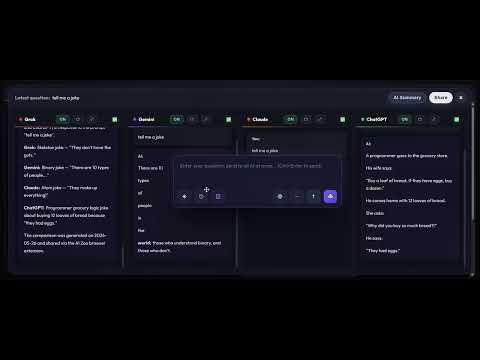
Compare multiple leading AI chatbots side-by-side in a single, unified workspace
AI Zoo maximizes the value of your free AI platform accounts! No more switching back and forth between browser tabs, no more repeatedly copying and pasting the same prompt, and no more relying on your memory to distinguish which model said what. AI Zoo lets you operate five leading AI platforms (Grok, Gemini, Claude, ChatGPT, and Meta AI at meta.ai) side-by-side in a single, unified workspace: type once, broadcast simultaneously, directly compare responses, and ultimately select any AI to help synthesize the entire multi-model debate into a clean summary. This is not just a simple time-saving utility, but a constant learning assistant that significantly elevates the quality of your answers through synthesis and aggregation. By combining the free accounts of multiple platforms, you can save a massive amount of subscription fees while still obtaining exceptionally high-quality results! AI Zoo's Powerful Features: - Five AI Platforms Side-by-Side: Use Grok, Gemini, Claude, ChatGPT, and Meta AI simultaneously on a single screen. - Send to All: Type your question once and broadcast it directly to all enabled platforms. - Send to Single AI: Selectively send prompts to a specific platform when precise targeting is needed. - Smart Compare Panel: Extract and organize responses from all platforms into a clean, side-by-side comparison view. - AI Smart Summary: Choose any of the active models with one click to summarize and analyze responses from other platforms. - Maximized Focus Mode: Zoom into a single view for deep focus, and cycle through views smoothly using outline chevrons or keyboard shortcuts (Ctrl + Left/Right arrows). - Session History Switcher: Seamlessly manage and toggle between conversation groups without losing track. - Draggable Control Panel: Position your floatable, glassmorphic input box anywhere on the screen with smart coordinate memory. - Native Multi-Lingual Support: Modern interface available in multiple major world languages. Perfect For: - Obtaining multiple AI perspectives before writing, coding, researching, translating, or planning. - Comparing how different models reason through the exact same question. - Testing and optimizing prompts to see which platform is best suited for your task. - Rapidly distilling fragmented answers into a single, cohesive, and actionable conclusion. - Upgrading your workflow if you are tired of being slowed down by countless browser tabs. Privacy & Security: AI Zoo does not use external servers or collect your conversation history. All interactions occur directly between your browser and the official AI platforms. Local preferences, such as panel coordinates and session history URLs, are stored 100% locally in your browser storage. Important Notice: AI Zoo is an independent productivity tool. We are not officially affiliated with, endorsed by, or in partnership with any of the supported AI platforms. All product names, logos, and brands are property of their respective owners. Users must log into their own accounts to access each service. Availability and functionality may vary depending on updates made by their respective platforms. ⚠️ Risk Warning & Disclaimer Please read carefully before installation: AI Zoo operates by integration with the official web interfaces of various AI platforms to streamline your workflow. While the extension only facilitates simultaneous input and side-by-side viewing, there is a technical possibility that such automated behavioral patterns (e.g., synchronized prompt broadcasting) may be flagged by certain platforms' automated detection systems or anti-bot mechanisms. By installing and using AI Zoo, you acknowledge and agree that: Account Risk: You assume all risks associated with the use of this extension, including but not limited to account restrictions, temporary suspension, or permanent banning by third-party AI providers. Limitation of Liability: The developers of AI Zoo shall not be held liable or responsible for any account enforcement actions, data loss, subscription service interruptions, or any direct/indirect damages arising from the use of this software. Compliance: You are solely responsible for ensuring that your usage complies with the Terms of Service of each respective AI platform.
3 out of 52 ratings
Details
- Version1.4.3
- UpdatedOctober 9, 2026
- Offered byifanoski
- Size185KiB
- Languages7 languages
- Developer
Email
ifanoski@gmail.com - Non-traderThis developer has not identified itself as a trader. For consumers in the European Union, please note that consumer rights do not apply to contracts between you and this developer.
Privacy

This developer declares that your data is
- Not being sold to third parties, outside of the approved use cases
- Not being used or transferred for purposes that are unrelated to the item's core functionality
- Not being used or transferred to determine creditworthiness or for lending purposes
Support
For help with questions, suggestions, or problems, visit the developer's support site