

WebAI — AI Web Assistant
5 ratings
)
Overview
AI-powered browser assistant. Chat with Claude AI to get help with any webpage.
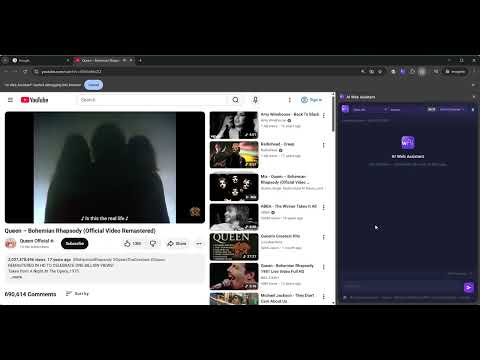
AI Web Assistant brings powerful AI directly into your browser sidebar. Chat with Claude AI models to get instant help with any webpage you're viewing. FEATURES • Side Panel Chat — Open the AI assistant in your browser's side panel. Ask questions about the current page, get summaries, or request help with any task. • Multiple AI Models — Choose between Claude models (Opus, Sonnet, Haiku) and switch anytime from the dropdown. • Page-Aware — The AI sees your current page context including headings, text content, links, and interactive elements. Ask "what is this page about?" and get an instant answer. • Multi-Session Support — Chat on multiple tabs simultaneously. Each tab gets its own conversation. Switch between tabs and your chat history is preserved. • Browser Interaction — Ask the AI to help you navigate pages, find information, fill forms, or extract data. The AI can read page content and interact with elements on your behalf. • Session History — View your past conversations from the Settings page. Select any previous session to read the full chat history. • Balance & Payments — Top up your account balance with cryptocurrency. Click your balance to add funds via secure crypto payment. • Dark & Light Themes — Choose your preferred theme from Settings. • Task Notifications — Get a desktop notification when the AI finishes a task and you're on a different tab. Click the notification to jump back to the tab. Enable in Settings. HOW IT WORKS 1. Click the AI Web Assistant icon to open the side panel 2. Select your preferred AI model from the dropdown 3. Type your question or request in the chat input 4. The AI responds with helpful information about your current page or any topic 5. Continue the conversation — the AI remembers context within each session SUPPORTED AI MODELS Claude by Anthropic: • Claude Opus 5 — Most capable, best for complex analysis • Claude Opus 4.8 / 4.7 / 4.6 — Previous Opus generations • Claude Sonnet 5 — Fast and capable, great balance of speed and quality • Claude Sonnet 4.6 — Previous generation Sonnet • Claude Haiku 4.5 — Fastest responses, ideal for quick questions The available model list is served from our server and may change over time — the dropdown in the side panel always shows the current selection. USE CASES • Research — Ask the AI to summarize articles, extract key points, or explain complex content on any webpage • Shopping — Compare products, find deals, read and summarize reviews across multiple tabs • Learning — Get explanations of technical documentation, code examples, or educational content • Productivity — Draft emails, write responses, organize information from web pages • Web Development — Analyze page structure, inspect elements, debug layout issues • Data Extraction — Pull specific information from tables, lists, or structured content • Translation — Get translations and explanations of content in foreign languages • Accessibility — Get descriptions of page content, navigate complex sites with AI assistance PRIVACY & SECURITY • Your conversations are sent to the provider of the model you select (Anthropic for Claude) for processing • Chat history is stored on our servers for session continuity • No data is sold or shared with third parties • The extension only accesses page content when you actively chat with the AI • All communication uses HTTPS encryption REQUIREMENTS • A web browser that supports Chrome extensions (Chrome, Edge, Brave, Vivaldi, Arc) • An AI Web Assistant account (sign up at webai.pc.am) • Account balance for AI usage (top up via crypto payment) SUPPORT Visit webai.pc.am for account management, billing, and support.
5 out of 55 ratings
Details
- Version1.5.9
- UpdatedSeptember 10, 2026
- FeaturesOffers in-app purchases
- Size146KiB
- LanguagesEnglish (United States)
- Developer
Email
vahagnsookiasyan@gmail.com - Non-traderThis developer has not identified itself as a trader. For consumers in the European Union, please note that consumer rights do not apply to contracts between you and this developer.
Privacy

WebAI — AI Web Assistant has disclosed the following information regarding the collection and usage of your data. More detailed information can be found in the developer's privacy policy.
WebAI — AI Web Assistant handles the following:
This developer declares that your data is
- Not being sold to third parties, outside of the approved use cases
- Not being used or transferred for purposes that are unrelated to the item's core functionality
- Not being used or transferred to determine creditworthiness or for lending purposes