

AI Voice Assistant – Smart Browser Copilot

Tổng quan
AI assistant that works inside your browser tab. Ask by voice and get instant, context-aware AI responses.
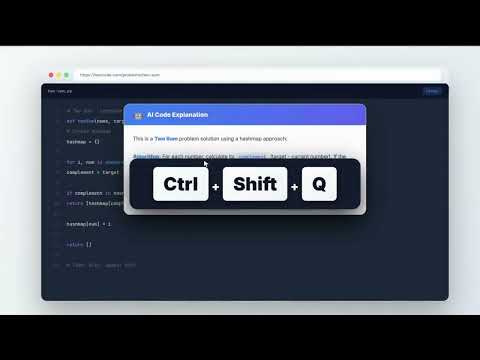
AI Voice Assistant – Smart Browser Copilot Instant AI help on any webpage. No tab switching. AI Voice Assistant is a context-aware browser extension that brings AI directly into the page you're viewing. You can ask questions by voice, analyze on-screen content, or select text and instantly run AI-powered actions — all without switching tabs or copying content. It's built to reduce friction, eliminate repetitive steps, and help you stay focused while browsing, reading, researching, or working. 🚀 CORE FEATURES 🎙️ Ask AI by Voice (Hands-Free) Use voice commands to ask questions and get instant AI responses based on the current webpage. No typing, no prompt writing, and no context loss — AI understands what's on your screen. Great for hands-free use, multitasking, and uninterrupted workflows. 🗣️ Wake Word Detection Say "Hey Assistant" to start recording — completely hands-free. No keyboard shortcuts needed. Just speak the wake word and ask your question. Uses on-device speech recognition for privacy — no audio is stored while listening. Customize your wake word in settings. 🔇 Auto-Stop on Silence Recording automatically stops when you finish speaking. No need to press a button to end — just pause, and AI processes your request. Adjustable silence duration (1-5 seconds) to match your speaking style. Combine with Wake Word for a fully hands-free experience. ⚡ Quick Actions (Instant AI Tasks on Selected Text) Quick Actions let you perform common AI tasks in one step. Simply select text on any webpage and trigger an action like: Summarize content in short or detailed form Explain complex text in simple terms Rewrite or rephrase content Translate text Extract key points or insights You can also create custom Quick Actions for tasks you repeat often. This turns multi-step AI workflows (copy → paste → prompt → adjust) into a single click. No prompt engineering. No switching tabs. Just select and run. 📸 Screen Read & Visual Understanding Ask AI questions about what's visible on your screen: Code snippets and error messages Articles, documents, and webpages Charts, diagrams, and visuals AI analyzes screenshots and on-screen content to provide relevant, contextual responses. 🔍 Real-Time Web Search Mode For questions that need live or up-to-date information, Web Search mode lets AI fetch and summarize current data directly from your browser. ⚡ SMART MODES Voice Mode – AI answers based on the current tab Screen Read Mode – AI help using screenshots and visuals Web Search Mode – AI answers powered by real-time web data Switch instantly using keyboard shortcuts. 🎯 WHY USE AI VOICE ASSISTANT? ✔ No tab switching or copy-paste ✔ Voice + text-based workflows ✔ Wake word activation — say "Hey Assistant" to start ✔ Auto-stop on silence — no button press to end ✔ Instant AI actions on selected content ✔ Custom actions for repetitive tasks ✔ Context-aware responses ✔ Works on any website ✔ Faster, cleaner, more focused browsing 👥 WHO IT'S FOR Professionals working with content and research Developers reading documentation or debugging issues Writers, marketers, and analysts handling text Anyone who frequently uses AI while browsing ⚙️ HOW IT WORKS Open any webpage Ask a question by voice (or just say "Hey Assistant") Trigger an instant AI action or response Get results without leaving the page 🔒 PRIVACY & SECURITY Your privacy matters. Audio is recorded only when you activate it. Wake word detection uses on-device processing — no audio is stored while listening. There is no background listening and no unnecessary data storage. 🚀 GET STARTED Install AI Voice Assistant and turn your browser into a smart, AI-powered workspace. Talk to AI. Select text. Run instant actions. Stay focused.
4,3/57 lượt xếp hạng
Chi tiết
- Phiên bản4.1.6
- Đã cập nhật16 tháng 2, 2026
- Tính năngCung cấp tính năng mua trong ứng dụng
- Kích thước105KiB
- Ngôn ngữEnglish (United States)
- Nhà phát triểnTrang web
Email
support@aivoiceassistant.in - Người bán phi thương mạiNhà phát triển này không tự nhận mình là người bán. Đối với người tiêu dùng ở Liên minh Châu Âu, xin lưu ý rằng các quyền của người tiêu dùng không được áp dụng trong hợp đồng giữa bạn và nhà phát triển này.
Quyền riêng tư

AI Voice Assistant – Smart Browser Copilot đã công bố thông tin sau đây liên quan đến việc thu thập và sử dụng dữ liệu của bạn. Bạn có thể xem thêm thông tin chi tiết trong privacy policy của nhà phát triển.
AI Voice Assistant – Smart Browser Copilot xử lý dữ liệu sau:
Nhà phát triển này tuyên bố rằng dữ liệu của bạn
- Không được bán cho bên thứ ba, ngoài những trường hợp sử dụng đã được phê duyệt
- Không được sử dụng hoặc chuyển nhượng cho các mục đích không liên quan đến chức năng chính của mặt hàng
- Không được sử dụng hoặc chuyển nhượng để xác định khả năng thanh toán nợ hoặc phục vụ mục đích cho vay
Hỗ trợ
Nếu bạn có câu hỏi, ý kiến đề xuất hoặc gặp vấn đề, vui lòng mở trang này bằng trình duyệt dành cho máy tính để được trợ giúp