


Overview
Translate the pending fields of the WPML translation editor with AI, using your own API key.
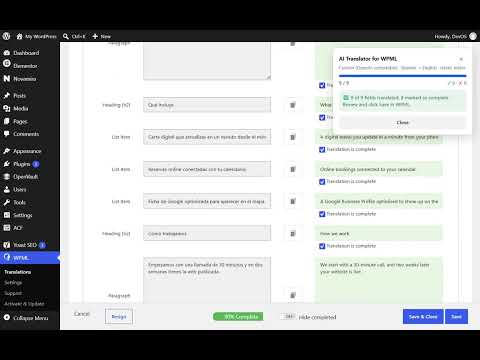
AI Translator for WPML fills in the WPML translation editor for you, using the AI provider and the API key you choose. How it works 1. Open a translation job in the WPML translation editor (classic editor or Advanced Translation Editor). 2. Click the extension icon and press "Translate pending fields". 3. The extension sends each pending field to your AI provider and pastes the translation into the editor. A small panel shows the progress. 4. Review the result and click Save in WPML, as you would with a manual translation. What it does - Works with the main AI providers, and with any OpenAI-compatible endpoint, including models running on your own computer. - Keeps HTML tags, links, shortcodes and placeholders (%s, {name}) in place, and checks each answer before pasting it. Suspicious answers are retried with another model or highlighted in orange for you to review. - Splits long fields into blocks, translates repeated texts only once and switches to the next model when one is overloaded or out of quota. - Detects the source and target languages from the editor; you can also set them by hand. - Optional: marks the translated fields as complete in the classic editor (never the doubtful ones). - Project instructions and glossary: add your own rules ("do not translate the brand name", preferred terms, tone) to every request. - Interface in English and Spanish. Privacy Your API keys are stored only in this browser and are never synced. The texts and your key go directly from your browser to the AI provider you choose. Nothing is sent to OpenVault: no server, no analytics, no tracking. You pay your AI provider directly for what you translate, with your own account. Need to translate a whole site? This extension translates one job at a time, in the editor you have open. AI Translator for WPML Pro is a WordPress plugin that translates the whole site in the background, with translation memory (you never pay twice for the same text), cost per language, an API key stored encrypted on the server and shared by the team, and support for Elementor through WPML String Translation: https://openvault.pro/plugins/openvault-ai-translator-for-wpml AI Translator for WPML is made by OpenVault. It is not affiliated with, endorsed by or sponsored by OnTheGoSystems or WPML. WPML is a trademark of its owner.
0 out of 5No ratings
Details
- Version2.0.1
- UpdatedNovember 24, 2026
- Size47.28KiB
- Languages2 languages
- DeveloperDiego Meijide GarciaWebsite
Pl. Agramar, 3, 2ºE Oleiros, La Coruña 15172 ESEmail
dev@agenciarse.comPhone
+34 623 10 60 00 - TraderThis developer has identified itself as a trader per the definition from the European Union and committed to only offer products or services that comply with EU laws.
Privacy

AI Translator for WPML has disclosed the following information regarding the collection and usage of your data. More detailed information can be found in the developer's privacy policy.
AI Translator for WPML handles the following:
This developer declares that your data is
- Not being sold to third parties, outside of the approved use cases
- Not being used or transferred for purposes that are unrelated to the item's core functionality
- Not being used or transferred to determine creditworthiness or for lending purposes
Support
For help with questions, suggestions, or problems, please open this page on your desktop browser