

AI Tab Organizer
22 ratings
)
Overview
Organizes tabs into groups using AI with one click
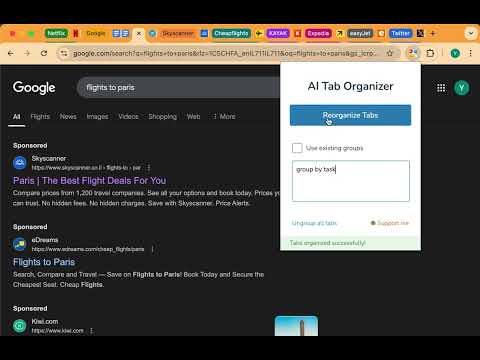
AI Tab Organizer uses AI to categorize and group your open tabs. With one click, it uses tab titles, shortened URLs, and your optional instructions to create logical groups and help keep your browser organized. Key features: - AI-powered tab classification - Automatic creation of tab groups - Option to preserve existing tab groups - Custom grouping instructions - Review and approve suggested groups before applying them - Quick ungroup function that preserves pinned tabs What's New in 1.5.2: Pinned tabs stay untouched, including tabs pinned while reviewing proposed groups. Organize up to 1,000 unpinned tabs per window. Fixes organization targeting the wrong browser window. AI requests continue to use an authenticated server with private provider credentials and usage limits. How it works: 1. Click the extension icon to open the interface 2. Optionally add instructions such as "group by domain" or "group by topic" 3. Click "Organize Tabs" 4. Review the suggested groups, or enable automatic approval in settings Data used for organization: When you organize tabs, minimized tab titles, URL domains and paths, and optional instructions are sent to our Google Cloud backend and processed by Groq, with Anthropic as a fallback. URL query strings, fragments, and embedded URL credentials are removed before transmission. We do not intentionally store tab titles, URLs, or instructions on our backend or in analytics. Pending approval data may be stored locally. Firebase provides anonymous session authentication and usage analytics. Pseudonymous identifiers, authentication tokens, and operational connection information such as IP addresses support the service and abuse prevention. No name, email, or password is requested from you. Usage limits apply. See the linked privacy policy for details.
4.4 out of 522 ratings
Details
- Version1.5.2
- UpdatedOctober 24, 2026
- Offered byLGboim
- Size189KiB
- LanguagesEnglish
- Developer
Email
lgboim@gmail.com - Non-traderThis developer has not identified itself as a trader. For consumers in the European Union, please note that consumer rights do not apply to contracts between you and this developer.
Privacy

AI Tab Organizer has disclosed the following information regarding the collection and usage of your data. More detailed information can be found in the developer's privacy policy.
AI Tab Organizer handles the following:
This developer declares that your data is
- Not being sold to third parties, outside of the approved use cases
- Not being used or transferred for purposes that are unrelated to the item's core functionality
- Not being used or transferred to determine creditworthiness or for lending purposes