


Overview
AI SEO tools inside ChatGPT, Claude and Gemini: Search Console audit, traffic drops, keyword clusters, AI citations, schema.
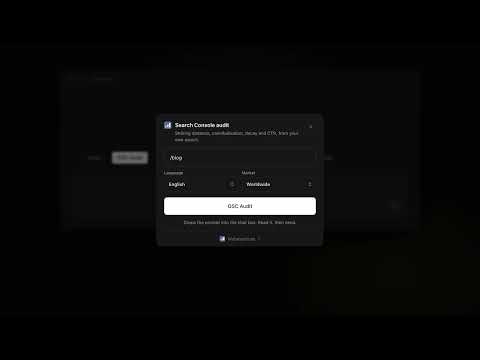
Most AI SEO tools only generate. Ask one for search volume or keyword difficulty and you get a confident table that nothing measured, and then you plan a quarter of work around it. This extension starts from your own Google Search Console data, which is measured, free and already yours. Every figure it cannot retrieve is labelled a guess, so you always know which half of the answer you are reading. WHY I BUILT THIS I opened Search Console after a quiet month on my own site. Average position had gone from 29 to 16.4. Click-through rate had nearly doubled, 1.4% to 2.6%. Two green arrows, both of them real. Clicks were down 65%. Impressions were down 73%. Both things were true at once. The queries I ranked eightieth for had stopped being shown at all, and the smaller, better set of impressions that remained left a flattering average behind them. The dashboard was not wrong. It just answered in an order that made the collapse easy to miss. Then I pasted that export into the AI SEO tools I had open. Every one of them led with position and click-through, because those are the numbers that look like progress, and put clicks somewhere further down. One offered to estimate my search volume while it was at it. So this one opens with clicks, before anything else, and says plainly whether they rose or fell. THE EIGHT SEO TOOLS ✓ GSC Audit: attach your Search Console export and get striking distance pages scored by impressions and the gap to page one, keyword cannibalisation with a decision per query, decaying pages split by cause, and rewritten titles and meta descriptions for the worst click-through rates. An SEO audit of what is already ranking, not a checklist of theoretical fixes. ✓ Traffic Drop: diagnose lost rankings in the order a technical SEO would. Whether the page even renders for a crawler, then robots rules, noindex tags, canonicals, sitemaps and redirects. An algorithm update is considered last, and only if the dates actually line up. ✓ Keyword Clusters: a seed keyword becomes ten themes, long-tail terms per theme, search intent, difficulty, and click-worthy titles and meta descriptions, as one table. Keyword research that ends in an SEO content plan rather than a spreadsheet to sort. ✓ AI Citations: get quoted by AI Overviews, AI Mode, ChatGPT search, Perplexity and Copilot. Query fan-out, a citability score for a page you own, answer-first structure, and the JSON-LD to match. LLM SEO, GEO and AEO without the acronym argument. ✓ Competitor Gap: paste a URL that outranks you. It fetches the live page, proves it read it, finds what is missing, and writes the replacement. On-page SEO measured against a page already beating you, not against a generic score. ✓ Content Refresh: audit a page you own against what currently ranks. What has gone stale, what the winners cover that you do not, and the exact rewrites. ✓ Article Draft: a first draft a human finishes, ending with the three things only you can add. ✓ Schema Markup: valid JSON-LD for any Schema.org type, with clear placeholders where a value is unknown. It never invents a price, a rating or a date, because wrong structured data is worse than none. HOW IT WORKS 1. Install the extension, then open ChatGPT, Claude or Gemini. 2. A toolbar appears above the message box. Pick the SEO tool you want. 3. Fill in the one or two fields it asks for. Language and market are remembered. 4. The prompt lands in the chat box. Read it, edit it, then press send yourself. HOW THIS DIFFERS FROM AN SEO PROMPT PACK ✓ It is diagnostic, not only generative. Two of the eight tools tell you what is wrong before anything gets written. Most SEO extensions only write. ✓ It reads the page before writing about it. Every URL tool fetches the page and prints an evidence block first: the real title, the real headings, two direct quotes. If the page will not load, it says why and stops, rather than writing confidently about a page it never saw. ✓ It separates measured from guessed. Three data modes, and the first line of every answer states which one you are in. ✓ It never sends for you. The prompt waits in the composer, and it appends rather than wiping the note you were part way through writing. ✓ It remembers your settings. Language, market and data source stay where you left them, across eighteen languages and fifteen markets. PRIVACY No account. No sign-up. No API key. The extension makes no network requests of any kind. It has no background page, no analytics and no server. Nothing you type reaches anyone but the chat you typed it into, and your preferences stay in your own browser. Requested permissions are exactly three websites, chatgpt.com, claude.ai and gemini.google.com, and nothing else. Free, with no usage limits.
0 out of 5No ratings
Details
- Version1.0.0
- UpdatedOctober 7, 2026
- Size27.31KiB
- LanguagesEnglish
- DeveloperBishwas BhandariWebsite
Barbardiya Municipality-6, Bardiya Manpur Barbardiya 21804 NPEmail
bishwasbh@gmail.comPhone
+977 981-4579063 - TraderThis developer has identified itself as a trader per the definition from the European Union and committed to only offer products or services that comply with EU laws.
Privacy

This developer declares that your data is
- Not being sold to third parties, outside of the approved use cases
- Not being used or transferred for purposes that are unrelated to the item's core functionality
- Not being used or transferred to determine creditworthiness or for lending purposes
Support
For help with questions, suggestions, or problems, visit the developer's support site