

AI SEO & Rank Tracker for ChatGPT & Claude (GEO)

Overview
Track your site's rank & citations in ChatGPT and Claude AI search. GEO visibility reports, share of voice, keyword & CSV export.
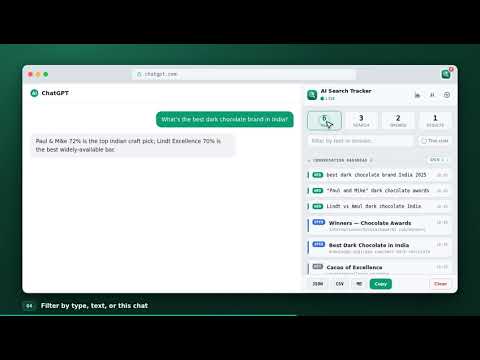
AI Search Tracker shows you the real web search queries ChatGPT and Claude run and every source URL they open while browsing — then lets you filter, analyze, copy, and export them to JSON, CSV, or Markdown. When ChatGPT answers with the web, it quietly fires a set of search queries and reads a list of pages. Normally you only see a few "Searched the web" chips. This tracker captures the full picture, live, in a clean popup. WHAT IT CAPTURES • Web search queries — the exact search terms ChatGPT sends • Image search queries — what it looks up in image search • Opened / cited pages — the source URLs ChatGPT actually reads and cites • Result URLs — the full list of links returned by each search Every item is tagged, grouped by conversation, and time-stamped. FEATURES • Live capture as ChatGPT browses — no copy-paste • Search / filter box across queries, page titles, and domains • Stat tiles that double as one-click filters (Searches, Opened, Results) • "This chat" view — see only the conversation in your active tab • Collapsible conversation groups with "Open all URLs" in background tabs • Per-entry copy and delete • Export to JSON, CSV, and Markdown, or copy the visible list • Clean, fast, light-theme popup • Works on chatgpt.com, chat.openai.com, and claude.ai — entries tagged per engine WHO IT'S FOR • Built-in insights: top cited domains, queries per chat, and a full list of the AI's own search queries (copy it as a keyword list) • Domain watchlist with GEO gap report: how often your site is RETRIEVED vs actually CITED, its average position in AI search results, and share of voice — tag domains "mine" vs "rival" to compare against competitors • Desktop alerts when a watched domain gets cited (optional) • One-click PDF reports: a shareable GEO visibility report per watched domain, or the full search trail of any conversation • SEO & content researchers auditing how AI search surfaces sources • Prompt engineers debugging ChatGPT's browsing and retrieval • Marketers tracking which domains ChatGPT cites (AI/GEO visibility) • Researchers and analysts who need the source list behind an answer • Anyone who wants a record of what ChatGPT actually searched PRIVACY Your captured searches stay on your device in local browser storage. The extension only reads your own ChatGPT tab's browsing activity to display it back to you. No tracking, no analytics, no accounts — nothing ever leaves your browser. Free, with no paid tier. HOW TO USE 1. Install and open chatgpt.com 2. Ask something that makes ChatGPT search the web 3. Click the toolbar icon to see every query and source, live 4. Filter, copy, or export
5 out of 51 rating
Details
- Version1.2.0
- UpdatedSeptember 4, 2026
- Size102KiB
- LanguagesEnglish
- DeveloperPURVANSH PARMARWebsite
32,bada bagh,behind hanuman temple bedla udaipur, Rajasthan 313001 INEmail
purvanshparmar15@gmail.comPhone
+91 76270 42587 - TraderThis developer has identified itself as a trader per the definition from the European Union and committed to only offer products or services that comply with EU laws.
Privacy

This developer declares that your data is
- Not being sold to third parties, outside of the approved use cases
- Not being used or transferred for purposes that are unrelated to the item's core functionality
- Not being used or transferred to determine creditworthiness or for lending purposes