


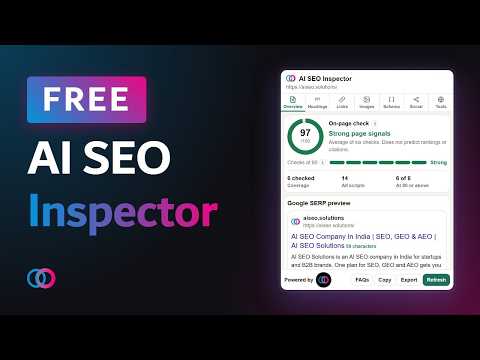
Overview
Check the open page: title, description, headings, links, images, schema, and social tags. Runs on your device.
AI SEO Inspector checks the page you have open and shows the result in Chrome's side panel. It reads the title, meta description, canonical, headings, links, images, JSON-LD, and social tags on your device. HOW TO USE IT 1. Open an http or https page in Chrome 116 or newer. 2. Open the side panel and select AI SEO Inspector. 3. Start on Overview. The score ring is the average of headings, links, images, schema, social tags, and tools. Title length and description length sit outside that average. 4. Open the tab you want to inspect: Headings, Links, Images, Schema, Social, or Tools. 5. Click Refresh after the page changes. 6. Copy a section, or export the report as CSV, Excel, or PDF. The file stays on your computer. HOW TO READ THE SCORE Green is 80 or above, orange is 50 to 79, and red is under 50. These bands are editorial checks. They are not a search ranking, and they do not predict whether a page will be cited. Title length is green from 50 to 60 characters, orange from 30 to 49, and red outside that range. Description length is green from 120 to 160 characters, orange from 70 to 119, and red outside that range. A green length can still be a weak sentence. Headings start at 100. The score drops when there is no visible H1, more than one visible H1, or no H2. Hidden headings are listed and left out of the score. Links checks up to 20 unique addresses on the same site. If none are checked, the score stays at 70. A response of 400 or higher lowers the score. A timeout stays unverified. Images with no pictures on the page score 80. Missing alt text lowers the score. An empty alt is treated as decorative, not missing. Schema scores 80 when at least one JSON-LD type is found, and 35 when none is found. A type name means the script was detected. It is not a certificate that the markup is valid. JSON-LD that does not parse is shown as a warning. Social starts at 30 and rises when og:title, og:description, og:image, or twitter:card is present. Tools starts at 30 and rises when robots.txt, sitemap.xml, or llms.txt is found, and when GPTBot is allowed. llms.txt is optional. Allowed is not proof that an AI product will cite the page. A bot that is not mentioned simply has no rule of its own. The overview can also flag a missing title, a missing description, noindex, a canonical on another host, images without alt text, and same-site links that returned 400 or higher. ADVANTAGES You review the open page without leaving it. The checks run in your browser. Page content is not sent to AI SEO Solutions. A local export gives a writer or developer the same list you are looking at. Each tab separates length, structure, links, images, schema, social tags, and crawler files, so you can see which part needs work. PRIVACY Requests for robots.txt, sitemap.xml, llms.txt, llms-full.txt, and a limited set of same-site links go from your browser to the site you are viewing. They do not include your cookies, and they do not send the page to the developer. Copy and export stay on your device. Homepage: https://aiseo.solutions Support: https://aiseo.solutions/contact-us/ Privacy policy: https://sandeepjootoor.github.io/ai-seo-inspector-privacy/ Guide: https://aiseo.solutions/blog/ai-seo-inspector
0 out of 5No ratings
Details
- Version1.1.0
- UpdatedOctober 15, 2026
- Size44.02KiB
- LanguagesEnglish
- DeveloperWebsite
Email
support@aiseo.solutions - Non-traderThis developer has not identified itself as a trader. For consumers in the European Union, please note that consumer rights do not apply to contracts between you and this developer.
Privacy

AI SEO Inspector 1.1 has disclosed the following information regarding the collection and usage of your data. More detailed information can be found in the developer's privacy policy.
AI SEO Inspector 1.1 handles the following:
This developer declares that your data is
- Not being sold to third parties, outside of the approved use cases
- Not being used or transferred for purposes that are unrelated to the item's core functionality
- Not being used or transferred to determine creditworthiness or for lending purposes
Support
For help with questions, suggestions, or problems, visit the developer's support site