

AI Safe Share

Overview
Protect your privacy on ChatGPT & Gemini. Blurs chat history, pins, notebooks & profile info — ideal for screen sharing.
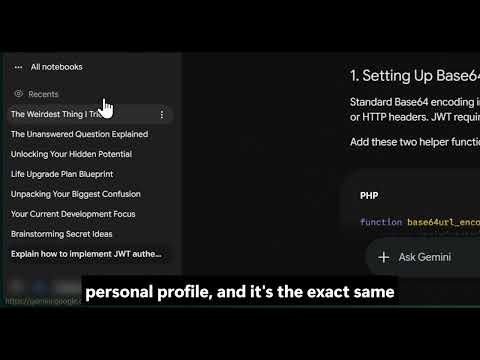
🔒 AI Safe Share — Privacy Shield for ChatGPT & Gemini Are you a developer, educator, or content creator who uses ChatGPT or Gemini while screen sharing, recording tutorials, or streaming? AI Safe Share protects your sensitive sidebar information from being exposed on screen. ━━━━━━━━━━━━━━━━━━━━━━━━━━━━━━━━ 🛡️ WHAT IT DOES AI Safe Share automatically blurs private information in the ChatGPT and Gemini sidebars so that viewers of your screen cannot see your personal data — while you continue working normally. Protected elements include: • 📌 Pinned Chats (ChatGPT) — hides your bookmarked conversations • 🕐 Recent Chats — blurs your chat history list • 👤 Profile Info — hides your name and avatar • 📓 Notebooks (Gemini) — blurs your notebook list ━━━━━━━━━━━━━━━━━━━━━━━━━━━━━━━━ ⚙️ HOW IT WORKS 1. Click the AI Safe Share icon in your toolbar — the side panel opens 2. Toggle protection ON for ChatGPT, Gemini, or both 3. Choose exactly which items to hide — pinned chats, recents, profile, notebooks 4. Your preferences are saved and synced across all your Chrome browsers You can also click the 👁 eye button that appears directly in the ChatGPT and Gemini sidebars to instantly toggle any section — without opening the panel. ━━━━━━━━━━━━━━━━━━━━━━━━━━━━━━━━ ✨ KEY FEATURES ✅ Per-item control — hide only what you want, keep the rest visible ✅ Smart state restore — toggling off then on again restores your exact previous settings ✅ Works on both ChatGPT (chatgpt.com) and Gemini (gemini.google.com) ✅ Syncs across devices via Chrome sync ✅ Zero tracking — your data never leaves your browser ✅ Lightweight — no slowdowns, no background network requests ✅ Open feedback loop — report bugs and request features directly from the extension ━━━━━━━━━━━━━━━━━━━━━━━━━━━━━━━━ 🔐 PRIVACY FIRST AI Safe Share does not collect, transmit, or store any of your conversation data. All settings are stored locally using Chrome's built-in sync storage. No analytics, no tracking, no data harvesting. ━━━━━━━━━━━━━━━━━━━━━━━━━━━━━━━━ 💬 FEEDBACK & SUPPORT We're actively improving AI Safe Share. Your feedback matters: 🐛 Report a bug: https://forms.gle/jKdLN4ifP7fjJy2c7 💡 Request a feature: https://forms.gle/XYJUCivt2Rr5n37Z7 💬 Share feedback: https://forms.gle/kmNwnjsi4WpuJ8hQ7 Built with ❤️ by DL Dev Solutions
0 out of 5No ratings
Details
- Version1.0.0
- UpdatedJune 28, 2026
- Size1.2MiB
- LanguagesEnglish
- Developer
Email
dldevssolutions@gmail.com - Non-traderThis developer has not identified itself as a trader. For consumers in the European Union, please note that consumer rights do not apply to contracts between you and this developer.
Privacy

This developer declares that your data is
- Not being sold to third parties, outside of the approved use cases
- Not being used or transferred for purposes that are unrelated to the item's core functionality
- Not being used or transferred to determine creditworthiness or for lending purposes
Support
For help with questions, suggestions, or problems, visit the developer's support site