


Overview
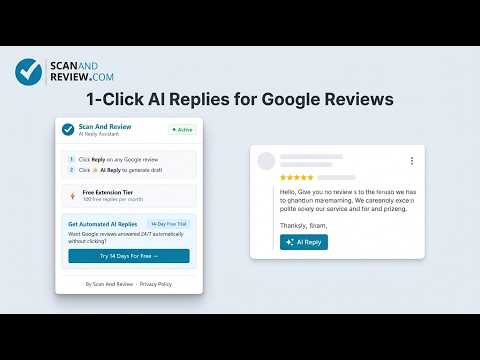
Respond to Google reviews with AI in one click, inside Google Business Profile, Maps and Search. 100 free replies a month.
Reply to every Google review in seconds. Scan And Review adds an "AI Reply" button to the reply box in Google Business Profile, Google Maps and Google Search. One click reads the review and writes a personal, natural reply that you can edit before you post. WHY BUSINESS OWNERS USE IT • Replies sound human, not like a template. The AI uses the reviewer's name, the star rating and what they actually wrote. • Works where you already answer reviews: business.google.com, Google Maps and the Google Search business panel. • You stay in control. Nothing is posted automatically. The draft goes into Google's reply box and you click Post yourself. • Free: 100 AI replies a month, no account needed. HOW IT WORKS 1. Open your reviews in Google Business Profile, Maps or Search. 2. Click Reply on a review. 3. Click ✨ AI Reply. A draft appears in the reply box. 4. Edit if you like, then click Post. FINE-TUNE EACH REPLY • Tone: warm, professional or casual • 🔄 Try another: get a different version • ⚡ Shorter: cut the reply down • 👔 More professional: make it more formal • ✕ Clear: start over GOOD FOR NEGATIVE REVIEWS TOO A 1-star review needs a calm, careful answer. The AI acknowledges the problem, apologises where it fits and invites the customer to get in touch, without arguing. WHO IT IS FOR Local business owners who want to answer their reviews quickly, and agencies that manage several Business Profiles for their clients. WHY REPLYING MATTERS Customers read your replies. Answering reviews shows you care, and a consistent habit of replying is part of a healthy Google Business Profile. PRIVACY The extension stays idle until you open a Google review reply box. Review text, star rating and reviewer name are sent to our server only when you click AI Reply, and only to write the draft. Your settings are stored in Chrome. We do not sell data. Full policy: https://scanandreview.com/privacy-policy#chrome-extension-ai-reply-assistant WANT REPLIES WITHOUT CLICKING? The full Scan And Review service can answer new reviews automatically, around the clock. Try it free for 14 days at https://scanandreview.com Not affiliated with or endorsed by Google. Google, Google Maps and Google Business Profile are trademarks of Google LLC.
0 out of 5No ratings
Details
- Version1.0.1
- UpdatedNovember 17, 2026
- Size32.24KiB
- LanguagesEnglish
- DeveloperGB Systems UGWebsite
Spitalhofstraße 82 Passau 94032 DEEmail
support@scanandreview.comPhone
+49 1575 1448698 - TraderThis developer has identified itself as a trader per the definition from the European Union and committed to only offer products or services that comply with EU laws.
Privacy

AI Review Response for Google Reviews - Scan And Review has disclosed the following information regarding the collection and usage of your data. More detailed information can be found in the developer's privacy policy.
AI Review Response for Google Reviews - Scan And Review handles the following:
This developer declares that your data is
- Not being sold to third parties, outside of the approved use cases
- Not being used or transferred for purposes that are unrelated to the item's core functionality
- Not being used or transferred to determine creditworthiness or for lending purposes
Support
For help with questions, suggestions, or problems, visit the developer's support site