

AI Reply Generator for X (Twitter) – PikuZen AI Post & Reply Assistant

Overview
AI reply generator for X (Twitter). Write replies, posts & DMs with ChatGPT, Gemini or Grok. 42 languages, custom tones and prompts.
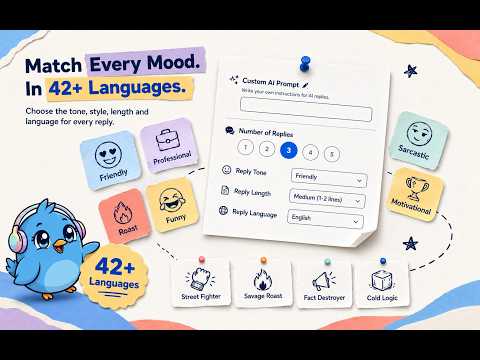
Write replies, create posts and draft direct messages on X (Twitter) in one click with PikuZen, an AI writing assistant. PikuZen uses ChatGPT, Gemini or Grok to generate drafts based on the conversation you are viewing and the instructions you provide. Choose your tone, writing style, language and length, then compare reply options before publishing. No API key required. Use the AI account you are already signed in to and work directly inside X or the side panel. Built for creators, professionals, community managers and brand accounts worldwide. Supports 42 languages, with a free plan that includes separate daily allowances for posts and replies, Smart Drafts, Grow replies and direct messages. WHAT PEOPLE USE PIKUZEN FOR • Write relevant replies to posts and comments without repeatedly copying conversations into a separate AI chat • Turn a rough idea, topic or announcement into a finished X post • Draft customer responses, follow-up messages and new conversations in X Direct Messages • Respond across languages while choosing the tone and length that fit each conversation • Work through comments using your own criteria for which conversations to include or skip • Discover relevant discussions on your feed and prepare replies for your review • Reuse custom instructions and saved prompts across your daily writing • Compare different ways to express a response before choosing the version you want to publish • Prepare professional responses, casual conversations, supportive replies or humorous comments from the same writing interface • Keep recurring writing preferences available through saved prompts instead of entering the same instructions each time CORE WRITING TOOLS 1. AI REPLY GENERATOR Generate 1 to 5 reply options from the post or conversation you are viewing. Choose a tone, writing style, language and length, or add your own instructions. Give the AI a specific direction: acknowledge someone’s point, ask a follow-up question, offer a polite correction, thank a supporter or explain your perspective. PikuZen combines your instructions with the available conversation context to prepare draft responses. Compare the options, choose the one that expresses your intent and make any edits you need. You decide what is published. Useful for everyday conversations, creator engagement, professional discussions and replies from brand or community accounts. 2. AI POST AND TWEET CREATOR Turn an idea, topic or instruction into post drafts directly from the X compose box. Describe what you want to communicate and choose your writing preferences. Prepare updates, announcements, discussion starters, product messages or a clearer version of a rough idea. Your instructions can describe the audience, points to include, tone to use and preferred length. Use a saved prompt when you regularly create similar kinds of posts. Review the generated options, adjust the wording and choose what to publish. PikuZen helps with drafting while you retain the final editorial decision. 3. AI DIRECT MESSAGES Draft replies to existing conversations or create new messages from the X message box. Explain what the message should achieve, or generate a draft using the conversation context. For example, prepare a response to a customer question, follow up on an earlier discussion, thank someone for their interest or introduce the purpose of a new conversation. Choose the tone, language and length that fit the recipient and situation. Review the draft, add any details it needs and send it yourself. You can disable AI in Direct Messages if you only want assistance with public posts and replies. 4. SMART DRAFTS Work through a batch of comments with filters you define. Describe which comments should receive a draft and which should be skipped. Combine those instructions with your writing preferences to prepare replies for the conversations you choose to address. You can control: • Which comments to include, described in your own words • Which comments to skip • Tone, writing style and language • Reply length and emoji preferences • How many replies to prepare in a session • The delay between drafts through Natural Pacing Smart Drafts processes replies sequentially and pauses at each draft so you can review, edit and press Reply before continuing. This workflow is useful when several comments need attention and you want to apply the same writing instructions while retaining individual review. 5. GROW MODE 🌱 Find relevant conversations on your X feed using your own instructions. Choose topics or keywords, specify posts or accounts to skip, and set the tone and guidelines for draft replies. Grow Mode can prepare reply suggestions for matching posts and their comments. For example, use your criteria to look for discussions related to your work, product category, professional interests or community. Explain the kind of contribution you want to make, such as asking a relevant question, sharing a perspective or answering a comment. Grow Mode helps you move from discovering a conversation to preparing a response. You review and publish each draft yourself, with built-in pacing between interactions. CHOOSE YOUR AI PROVIDER Switch between ChatGPT, Gemini and Grok using the account you are already signed in to. No API key setup is required. PikuZen connects the writing workflow to your chosen provider, so you can use your existing AI account for replies, posts and messages. AI Hub brings provider availability, active sessions and your daily PikuZen usage together in one view. You can also choose to load your preferred AI automatically when the panel opens. AI generation requires an internet connection and access to your selected provider. Available capabilities and usage depend on that provider and your account. CONTROL HOW EVERY DRAFT SOUNDS • 8 reply tones — Friendly, Professional, Casual, Humorous, Grateful, Witty, Supportive and Sarcastic • 6 writing-style presets — choose how factual, direct or playful your writing should sound • 14 prompt templates — starting points for community replies, thanking supporters, brand messages, polite corrections and other tasks • Custom instructions — add your own prompt to each generation request • Saved templates — keep and reuse the prompts that work for you • Flexible length — choose short, medium, long or a custom length • Language selection — choose a supported language or let PikuZen match the conversation • Optional image context — include post images with the text sent to your selected AI provider; off by default Use custom instructions to describe your preferred phrasing, explain the purpose of a reply, identify points to include or specify wording to avoid. Tone, style and instructions give you several ways to guide the draft. You can use the built-in options for a quick starting point or provide a more detailed prompt for a particular situation. MULTILINGUAL WRITING FOR A GLOBAL AUDIENCE PikuZen supports writing in 42 languages. Select the language you want to use or let the extension match the language of the conversation. The extension interface is also available in 42 languages, so both the writing controls and generated drafts can fit a multilingual workflow. Use the same drafting tools when engaging with audiences in different markets, responding to international customers or participating in conversations across languages. WORK INSIDE X OR THE SIDE PANEL Use PikuZen from X’s reply, post and message interfaces, or work from the side panel. The built-in X feed lets you browse posts and generate reply drafts without leaving the panel. Choose the workflow that fits the task you are handling. Personalise your workspace: • Choose from 5 button icons and 6 colours • Load your preferred AI provider when the panel opens • Save your custom instructions and prompt templates • Turn AI assistance in Direct Messages on or off • Check provider availability, sessions and daily usage in AI Hub • With Pro, export and import your settings, prompts and templates using Settings Backup Settings Backup helps you restore your configuration after reinstalling the extension, including the prompts and templates you have chosen to keep. FREE PLAN AND PRO Start with four separate daily allowances: • 10 AI posts and replies per day • 10 Smart Drafts per day • 10 Grow replies per day • 10 AI direct messages per day Using one allowance does not reduce the others. Every reply tone, writing-style preset, prompt template and all 42 languages are included in the free plan. Pro removes PikuZen’s daily caps and adds Settings Backup for exporting and importing your settings, prompts and templates. Pro changes your PikuZen allowance. Your selected AI provider’s own availability, account conditions and usage limits still apply. HOW TO GET STARTED 1. Install the PikuZen extension. 2. Sign in to the ChatGPT, Gemini or Grok account you want to use. 3. Open X (Twitter) and choose a post, reply or direct message. 4. Click the PikuZen button. 5. Choose your tone, style, language and length, or add a custom instruction. 6. Generate and compare the available drafts. 7. Review, edit and publish or send your chosen version yourself. For ongoing comment workflows, open Smart Drafts and set your inclusion and exclusion criteria. To discover relevant feed conversations, configure Grow Mode with the topics and instructions you want it to use. PRIVACY AND POSTING CONTROL • Your prompts and the conversation content needed for drafting are sent to the AI provider you select. • PikuZen does not operate its own server for processing your prompts and post content. • Your settings, custom instructions and saved templates are stored in your browser. • Instructions included in an AI request are sent to your selected provider as part of that request. • Post images are sent to the AI only when you enable image context. • Nothing is published or sent from your X account without your direct review and action. Local storage of preferences is separate from AI processing: the selected provider processes the content submitted for generation. PikuZen’s drafting features therefore require internet access. FREQUENTLY ASKED QUESTIONS What is PikuZen? PikuZen is an extension that helps you write AI-assisted replies, posts and direct messages on X (Twitter), using ChatGPT, Gemini or Grok. Do I need an API key? No. PikuZen uses the AI provider account you are already signed in to. You do not need to create or enter an API key. Do I need to sign in to an AI provider? Yes. You need access to the ChatGPT, Gemini or Grok account you want PikuZen to use. Is PikuZen free? Yes. The free plan includes four separate daily allowances: 10 posts and replies, 10 Smart Drafts, 10 Grow replies and 10 direct messages. All tones, writing styles, prompt templates and 42 languages are included. What does Pro add? Pro removes PikuZen’s daily caps and includes Settings Backup. It does not remove limits imposed by your chosen AI provider. Can I use my own writing instructions? Yes. Add a custom prompt to generation requests and save reusable templates. Use your instructions to guide the purpose, tone, length and wording of drafts. How many reply options can I generate? PikuZen can generate 1 to 5 reply options so you can compare different ways to respond before choosing one. Can I choose the reply language? Yes. Choose from 42 supported languages or let PikuZen match the language of the conversation. What is the difference between Smart Drafts and Grow Mode? Smart Drafts works through a batch of comments using your inclusion and exclusion criteria. Grow Mode helps you discover matching conversations on your feed and prepare replies to posts and their comments. Both retain your review before posting. Does PikuZen automatically publish replies? By default, no. All responses are prepared as drafts under your control. Smart Drafts pauses at each draft so you can review, edit and submit it yourself, though you can also choose to post drafts directly if you prefer a faster workflow. Does PikuZen work offline? AI drafting requires an internet connection and access to ChatGPT, Gemini or Grok. Your settings and saved templates are stored locally in your browser. Where is my content processed? The prompts and conversation content submitted for drafting are processed by your selected AI provider. PikuZen does not run its own AI processing server. Are images sent to the AI automatically? No. Image context is off by default. Post images are included only when you enable that feature. Can I use PikuZen without the side panel? Yes. PikuZen also works directly inside X’s post, reply and direct-message interfaces. Can I save my settings and templates? Settings and saved templates are stored in your browser. Pro adds Settings Backup so you can export them to a file and import them later. SUPPORT For support, updates and feature requests: pikuzen.pyspace.in
4.5 out of 54 ratings
Details
- Version2.9.8
- UpdatedOctober 19, 2026
- FeaturesOffers in-app purchases
- Size1.3MiB
- Languages41 languages
- Developerpankaj yadavWebsite
post jahangirabad village nigree tehseel nawabgunj Barabanki, Uttar Pradesh 225203 INEmail
zen4bit@pyspace.inPhone
+91 98076 44112 - TraderThis developer has identified itself as a trader per the definition from the European Union and committed to only offer products or services that comply with EU laws.
Privacy

AI Reply Generator for X (Twitter) – PikuZen AI Post & Reply Assistant has disclosed the following information regarding the collection and usage of your data. More detailed information can be found in the developer's privacy policy.
AI Reply Generator for X (Twitter) – PikuZen AI Post & Reply Assistant handles the following:
This developer declares that your data is
- Not being sold to third parties, outside of the approved use cases
- Not being used or transferred for purposes that are unrelated to the item's core functionality
- Not being used or transferred to determine creditworthiness or for lending purposes
Support
For help with questions, suggestions, or problems, visit the developer's support site