

AI Prompt Generator: Prompt Optimizer & Library for ChatGPT, Claude

Overview
Write better AI prompts for ChatGPT, Claude & Gemini — an AI prompt maker, prompt optimizer and prompt library in one.
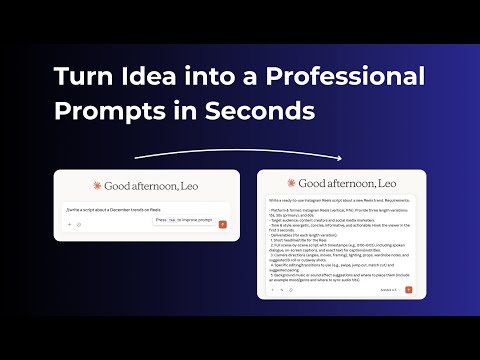
Tired of rewriting the same request five times before the AI finally understands you? Prompt Generator turns a rough idea into a clear, structured prompt in one click — inside any text field, on any website. It is two tools in one: an AI prompt generator that rewrites your draft, and a prompt library that keeps every prompt you liked one keystroke away. ━━━ THREE COMMANDS, NO EXTRA TAB ━━━ Everything runs where you already type. No copy-paste between tabs. 1. // — improve a prompt Type // followed by your rough text and press Tab. The prompt optimizer — part prompt enhancer, part prompt improver — rewrites it: adds role, context, structure and output format, and removes ambiguity. The improved version lands straight back in the field. 2. /// — open your prompt library Type /// to open your saved prompts. Keep typing to search — fuzzy search finds a prompt from a couple of letters. Press Tab or Enter to insert it. 3. //req — ask AI without leaving the page Type //req and a question, press Tab, and the answer appears right in the text field you were typing in. ━━━ WHAT YOU GET ━━━ • AI prompt generator — an AI prompt maker and prompt builder that turns one line into a full, structured prompt • Prompt optimizer — rewrite weak prompts using prompt engineering patterns • Personal AI prompt library — keep the ChatGPT prompts that worked, name them, edit them, search them • Curated prompt templates — a growing collection of prompts that already work, ready to copy into your library • An AI prompt writer on every page — a ChatGPT extension that does not stop at ChatGPT • Side panel — manage the whole library without leaving the page • Works in every text field — textarea, rich editors, contenteditable • Sync across devices — sign in with Google and your prompts follow you • 50+ interface languages ━━━ WORKS WHERE YOU WORK ━━━ Use it as a ChatGPT prompt generator or as a Claude prompt generator — the commands attach to the text field, not to a particular website, so there is nothing to set up site by site. The same three shortcuts behave identically in an AI chat such as ChatGPT, in an image or video tool, in your mailbox, in a document or in a ticket. If you can type there, you can improve a prompt there. ━━━ WHO IT IS FOR ━━━ Writers and marketers who live in AI chats all day. Developers who want a reusable prompt library instead of a scratch file. Designers writing image prompts. Students, researchers and support teams who send the same kind of request over and over. Anyone learning prompt engineering who wants to see what a well-formed prompt actually looks like. ━━━ WHY IT ASKS FOR ACCESS TO ALL SITES ━━━ The commands work in any text field, so the extension has to recognise text fields on the page you are on. That is the only thing site access is used for: detecting the field under your cursor and inserting text into it. Nothing on the page is read or sent anywhere until you trigger a command yourself with Tab. ━━━ PRIVACY ━━━ Your prompts stay yours. Only the text you send with a command is processed — nothing else on the page. Sign-in uses Google OAuth and requests your email and profile only. No page-content harvesting, no ad tracking, no data selling. Privacy policy: https://aipromts-pi.vercel.app/privacy Terms of service: https://aipromts-pi.vercel.app/terms ━━━ GETTING STARTED ━━━ 1. Install the extension and pin it to the toolbar. 2. Sign in with Google — this unlocks the AI commands and cross-device sync. 3. Open any site with a text field, type // and a few words, then press Tab. That is the whole onboarding. Questions, bugs, feature requests: leo.emirson@gmail.com Prompt Generator is an independent tool. It is not affiliated with, endorsed by or sponsored by any AI model provider. Product names are trademarks of their respective owners and are used here only to describe compatibility.
5 out of 55 ratings
Details
- Version1.3.0
- UpdatedSeptember 23, 2026
- Size166KiB
- Languages52 languages
- DeveloperWebsite
Email
leo.emirson@gmail.com - Non-traderThis developer has not identified itself as a trader. For consumers in the European Union, please note that consumer rights do not apply to contracts between you and this developer.
Privacy

AI Prompt Generator: Prompt Optimizer & Library for ChatGPT, Claude has disclosed the following information regarding the collection and usage of your data. More detailed information can be found in the developer's privacy policy.
AI Prompt Generator: Prompt Optimizer & Library for ChatGPT, Claude handles the following:
This developer declares that your data is
- Not being sold to third parties, outside of the approved use cases
- Not being used or transferred for purposes that are unrelated to the item's core functionality
- Not being used or transferred to determine creditworthiness or for lending purposes