


Overview
Pick your model: free Chrome Nano when compatible, or local/remote models to translate webpages, images, PDFs, and chat.
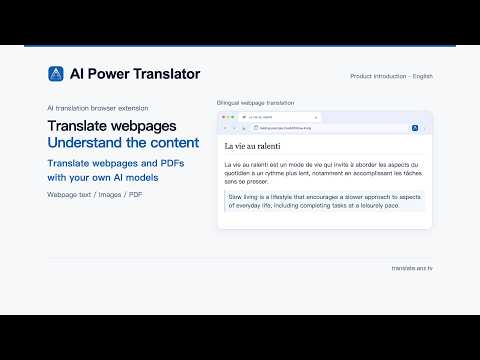
AI Power Translator AI Power Translator is a Chrome translation extension that puts the power of model choice entirely in your hands. Whether it's Chrome's built-in Nano model, a local model on your computer, a self-deployed or subscribed remote model, or cloud APIs with free quotas and traditional translation services like DeepL and Youdao, all of these can be connected. It not only supports translation of webpages, images, and PDFs, but also lets you ask follow-up questions and discuss based on the current webpage content. When browsing foreign-language articles, looking up information, or studying PDFs, you no longer have to be tied to a single translation service. You can read bilingual content side by side and select words to view translations and definitions; if you have questions after reading the translation, you can ask the AI questions about the current page to help you understand the context and core content. Model freedom, choose as needed Chrome built-in free Nano model Directly call the model built into the Chrome browser to complete text translation locally. Private and local models Supports connecting to large models running on your local computer to process data locally; you can also connect to remote models you have deployed yourself. Cloud APIs with free quotas No local deployment required; supports connecting to third-party services that offer free API quotas. Apply for an API Key and enter it in the settings to use. Mainstream cloud models and traditional translation services Supports connecting to large cloud models such as GPT and Claude, as well as professional translation services such as DeepL and Youdao. Note: When using cloud services, the content you submit will be received and processed by the corresponding service provider. Available languages, billing standards, and data privacy rules depend on the service you choose. This extension itself is completely free; if you use paid models or APIs, the related costs are charged by the service provider according to their rules. Core features Bilingual side-by-side webpage reading Present the translation while keeping the original text. When you encounter difficult sentences, you can directly select them for partial translation or analysis without leaving the current page. Ask follow-up questions with webpage context If you still have questions after reading the translation, you can ask the AI questions, follow up, and discuss the current webpage to further understand the content. Image text translation Click on a webpage image to call a model or service that supports the corresponding image processing capability and generate a translated image in the target language. Image translation functionality depends on the capabilities of the configured model or service. Immersive reading of foreign-language PDFs Supports bilingual reading of online PDFs and local PDF files, as well as word and paragraph translation. PDF translation capability depends on the configured model or service. Quick start Step 1: Basic configuration After installing the extension, open the settings page, choose your preferred translation method and complete the configuration, then open a foreign-language webpage to experience translation. Step 2: Use a free cloud API Choose a service provider that offers a free quota, apply for an API Key, and enter it in the extension settings. Step 3: Configure a local model or manage multiple models If you use a local model or need to manage multiple remote models but are not familiar with the configuration process, you can view the OmniProxy usage guide on the settings page. OmniProxy is a tool for connecting local and remote models, and the guide provides installation and usage steps for the command-line preview version. Cloud services and recommended models The following are service and model references. Free quotas, call rate limits, model availability, and regional restrictions are subject to the service provider's latest policies. Google AI Studio (United States) Recommended model: Gemini 3.5 Flash-Lite Model ID: gemini-3.5-flash-lite Description: Offers a free tier. Google free-tier requests may be used to improve its products; do not submit sensitive data. Application entry: https://aistudio.google.com Groq (United States) Recommended model: OpenAI GPT-OSS 120B Model ID: openai/gpt-oss-120b Description: Offers a free plan, suitable for cloud-based conversations and content Q&A. Application entry: https://console.groq.com Mistral AI (France) Recommended model: Mistral Small Model ID: mistral-small-latest Description: Offers a free tier; no credit card is required to apply. Application entry: https://console.mistral.ai OpenRouter (United States) Recommended model: OpenAI GPT-OSS 20B free version Model ID: openai/gpt-oss-20b:free Description: Aggregates free API endpoints; free accounts have a daily limit of 50 requests, and actual limits are subject to the service provider's policies. Application entry: https://openrouter.ai Local model configuration reference Please choose an appropriate model based on your device's memory or dedicated GPU VRAM size. The following configurations are for reference; actual resource requirements and performance will be affected by the model, context length, and runtime environment. Professional translation model reference: Hunyuan HY-MT2 Apple Silicon Mac, choose by memory: 16 GB memory mlx-community/Hy-MT2-1.8B-4bit 24 GB memory mlx-community/Hy-MT2-7B-4bit 32 GB memory mlx-community/Hy-MT2-7B-8bit 48 GB memory tencent/Hy-MT2-30B-A3B-GGUF:Q4_K_M 64 GB memory tencent/Hy-MT2-30B-A3B-GGUF:Q8_0 Dedicated GPU PC, choose by VRAM: 8 GB VRAM tencent/Hy-MT2-1.8B-GGUF:Q4_K_M 12–16 GB VRAM tencent/Hy-MT2-7B-GGUF:Q4_K_M 24 GB VRAM tencent/Hy-MT2-30B-A3B-GGUF:Q4_K_M 48 GB and above VRAM tencent/Hy-MT2-30B-A3B-GGUF:Q8_0 Local general conversation model reference: Q&A and webpage discussion If you need to balance webpage discussion, content Q&A, and text translation, you can refer to Google Gemma 4 or Qwen3.5. If you mainly use it for plain text translation, you can prioritize the HY-MT2 professional translation model above. Apple Silicon Mac, choose by memory: 16 GB memory mlx-community/Qwen3.5-4B-4bit or google/gemma-4-E4B-it-qat-q4_0-gguf 24 GB memory mlx-community/Qwen3.5-9B-4bit or google/gemma-4-12B-it-qat-q4_0-gguf 32 GB memory mlx-community/Qwen3.5-9B-MLX-8bit or google/gemma-4-26B-A4B-it-qat-q4_0-gguf 48 GB memory mlx-community/Qwen3.5-27B-4bit or google/gemma-4-26B-A4B-it-qat-q4_0-gguf 64 GB memory mlx-community/Qwen3.5-27B-8bit or google/gemma-4-31B-it-qat-q4_0-gguf Dedicated GPU PC, choose by VRAM: 8 GB VRAM Qwen3.5-4B Q4 or Gemma 4 E4B Q4 12–16 GB VRAM Qwen3.5-9B Q4 or Gemma 4 12B Q4 24 GB VRAM Qwen3.5-27B Q4 or Gemma 4 26B-A4B Q4 48 GB and above VRAM Qwen3.5-27B Q8 or Gemma 4 31B Q4 Selection tips: If your device model is older or there are many background programs running, it is recommended to choose a version with fewer parameters or a higher quantization level that uses less memory. Actual performance depends on hardware, model, and runtime environment. Why we built this We hope every user can freely choose a translation model they trust, overcoming language barriers while balancing cost and privacy.
0 out of 5No ratings
Details
- Version1.0.8
- UpdatedOctober 19, 2026
- Size10.61MiB
- Languages34 languages
- DeveloperWebsite
Email
hello@granoflow.com - Non-traderThis developer has not identified itself as a trader. For consumers in the European Union, please note that consumer rights do not apply to contracts between you and this developer.
Privacy

AI Power Translator has disclosed the following information regarding the collection and usage of your data. More detailed information can be found in the developer's privacy policy.
AI Power Translator handles the following:
This developer declares that your data is
- Not being sold to third parties, outside of the approved use cases
- Not being used or transferred for purposes that are unrelated to the item's core functionality
- Not being used or transferred to determine creditworthiness or for lending purposes
Support
For help with questions, suggestions, or problems, please open this page on your desktop browser