

AI Plus

Overview
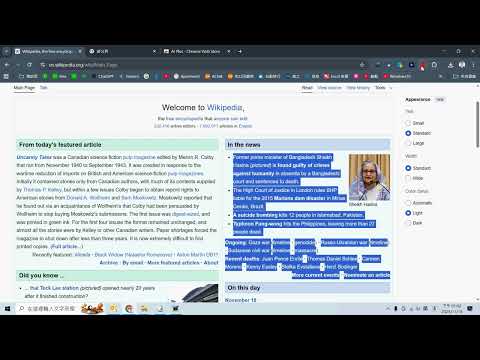
Click the icon to extract webpage text and send it to ChatGPT for analysis and response.
**AI Plus: The Ultimate Web Content Analyzer (Powered by Your ChatGPT API Key)** Are you tired of manually summarizing long articles, technical reports, or complex web content? AI Plus is a powerful, smart Chrome Extension designed for professionals who demand speed, precision, and complete control over their AI consumption. AI Plus securely uses **your own OpenAI API Key** (supporting GPT-3.5, GPT-4, and the latest models) to instantly analyze, summarize, and extract actionable insights from any webpage, delivering the results directly to your desktop. --- ### 🚀 Key Features and Dual Analysis Modes We offer two optimized modes to fit your workflow and manage your token costs effectively: #### 1. Full Webpage Analysis (Click the Icon) * **Action:** Simply click the AI Plus icon on your toolbar. * **Result:** The extension extracts the entire visible text content of the page (up to a safe limit) for comprehensive analysis, generating a full report, key arguments, and professional insights. #### 2. Token Saver Mode (Right-Click Selection) * **Action:** Highlight any specific text block on the page, then Right-Click and choose **"Analyze Selected Text with AI (Token Saver)"**. * **Result:** Perfect for isolating crucial paragraphs, quick Q&A, or replying to emails based on selected content. This mode minimizes API usage, helping you control your monthly token expenses. --- ### 🛡️ Why AI Plus is the Smart Choice (Low-Risk Model) Our core mission is high-value data processing, not high-liability data management. * **Low-Risk Data Focus:** AI Plus is purely a **knowledge extraction and data processing** tool. We **do not** interact with or store high-liability data (like financial transactions, banking records, or ERP operations). This focus ensures the extension is designed for reliable *insight generation* rather than mission-critical *data integrity*. * **Data Control & Privacy:** Since you use your personal OpenAI API key, all processing is tied to *your own* account. The generated report is immediately downloaded as a local `.txt` file, ensuring **maximum data privacy** and eliminating the risk of sensitive data being stored on a third-party server. * **Secured Access:** Access to the service is protected by an Authorization Password and linked to your client IP and Email, ensuring only authorized users can leverage the extension’s capabilities. --- ### ⚙️ Quick Setup Guide Getting started is simple. The entire process takes less than one minute: 1. **Right-Click** the AI Plus icon and select **"Set ChatGPT Parameters and Authorization"**. 2. Enter your **OpenAI API Key**, the desired **GPT Model** (`gpt-4o` recommended), and your custom **System Role Prompt**. 3. Fill in your **Contact Email** and the **Authorization Password** provided by your service administrator. 4. Click "Save Settings" and begin analyzing any webpage instantly! **Take control of your content analysis workflow today. Install AI Plus and transform how you process information.**
0 out of 5No ratings
Details
- Version3
- UpdatedDecember 30, 2025
- Size81.13KiB
- LanguagesEnglish (United States)
- Developer
Email
baoyitemple@gmail.com - Non-traderThis developer has not identified itself as a trader. For consumers in the European Union, please note that consumer rights do not apply to contracts between you and this developer.
Privacy

This developer declares that your data is
- Not being sold to third parties, outside of the approved use cases
- Not being used or transferred for purposes that are unrelated to the item's core functionality
- Not being used or transferred to determine creditworthiness or for lending purposes