

AI Log Anchor
2 ratings
)
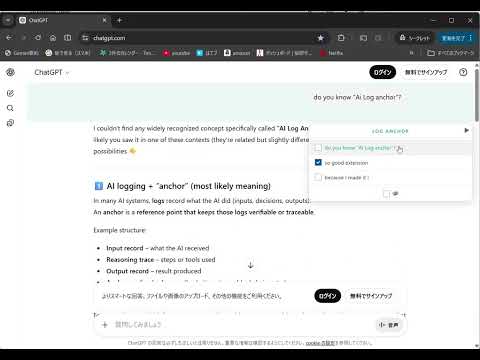
Overview
Unified Chat History Navigation System for Gemini, ChatGPT, Claude, and Grok.
Jump to any question in long chats with just one click. Are you tired of scrolling endlessly to find that specific prompt? If you use multiple AIs like Gemini, ChatGPT, Claude, and Grok, AI Log Anchor is the ultimate navigation tool for you. AI Log Anchor automatically detects your prompts and generates a smart Table of Contents (TOC) on the side of your screen. Eliminate the hassle of scrolling and navigate your AI conversations with ease. 🚀 Major Update: v2.4 is here! Refreshed UI: We’ve transitioned to a high-visibility, semi-transparent Light Mode. When minimized, the panel shrinks into an ultra-slim 24px bar, ensuring it never interferes with your AI workspace. Intuitive Control: Introducing "Click-to-Toggle" to prevent accidental triggers. Whether you place the panel on the left or right, the icons and buttons automatically reorient toward the center of the screen for a seamless, ergonomic experience. New Feature: Check & Filter: You can now mark specific responses and use the Filter function to display only what matters. Powered by hashing technology, this feature independently saves your selections for every chat thread while keeping local storage usage to an absolute minimum. Smart, lightweight log management for the multi-AI power user. If you find this tool helpful, please support us with a 5-star rating! 🚀 v2.3 Latest Update: Individual "ON/OFF" Settings per Site Now Available! From the extension's options screen, you can now individually enable or disable this extension for each site: Gemini, ChatGPT, Claude, and Grok. This provides flexibility for scenarios where you prefer to use the official features of a specific AI. 【Important】Regarding Hiding Official UI Elements (Table of Contents, etc.) While AI Log Anchor is enabled (ON), the following official features of each platform will be automatically hidden to prevent display overlaps or interference: 🚀 v2.2 Update: Better Control & Flexibility! Drag-and-Drop Layout: You can now drag the TOC panel and place it anywhere on the screen. The panel automatically collapses while dragging to keep your workspace clean. Intelligent Anchoring: Whether placed on the left or right, the panel expands inward, preventing it from going off-screen. Per-AI Position Saving: Your preferred position is saved individually for each service (Gemini, ChatGPT, etc.), allowing for a customized workspace. Enhanced Gemini Accuracy: Optimized text extraction to filter out unnecessary UI elements from the latest Gemini updates. 【Important: Name Change & Renewal】 Starting from version 2.0, this extension has been renamed from "Gemini History Navigator" to "AI Log Anchor" and has evolved into a multi-platform tool. ■ Permissions We have added permissions for the respective AI domains to detect chat history and generate the TOC on those sites. ■ Security and Privacy This extension processes data entirely within your browser to control the display. Your chat data is never sent to or stored on any external servers. You can use it with complete peace of mind. Note: Due to browser specifications, the extension may be temporarily disabled after the update. You can continue using all features by simply re-enabling it in your settings.
3 out of 52 ratings
Details
- Version2.5
- UpdatedMarch 12, 2026
- Offered bysolvenode.jp
- Size273KiB
- Languages2 languages
- Developersolvenode.jp
Email
info@solvenode.jp - Non-traderThis developer has not identified itself as a trader. For consumers in the European Union, please note that consumer rights do not apply to contracts between you and this developer.
Privacy

AI Log Anchor has disclosed the following information regarding the collection and usage of your data. More detailed information can be found in the developer's privacy policy.
AI Log Anchor handles the following:
This developer declares that your data is
- Not being sold to third parties, outside of the approved use cases
- Not being used or transferred for purposes that are unrelated to the item's core functionality
- Not being used or transferred to determine creditworthiness or for lending purposes