

AI Image Studio
11 ratings
)
Overview
Transform and reimagine any image with AI creativity
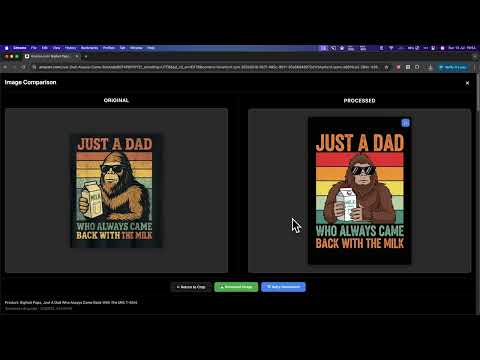
AI Image Studio - Transform and Reimagine Any Image with AI Creativity See an image you love while browsing? Hover over it, crop the region you want, and let AI transform it into something new, all without leaving the page. AI Image Studio brings the power of 20+ AI models from OpenAI, Google, Ideogram, and fal.ai directly into your browser. Whether you're a designer exploring variations, an e-commerce seller optimizing product photos, or a content creator looking for unique visuals, this extension turns any image on the web into your creative starting point. WHY AI IMAGE STUDIO? Work where you browse. No need to download images, open a separate AI tool, upload, wait, and download again. Just hover, crop, and generate, right on the page you're already viewing. Your workflow stays uninterrupted. One extension, 20+ AI models. Instead of juggling multiple AI tools, access OpenAI (GPT Image 1.5), Google (Imagen 4.0, Gemini), Ideogram v3, and fal.ai (SeeDream, Nano Banana, Kling), all from the same interface. Switch models in one click to find the style that fits. Not just generate, iterate. The Remix mode lets you have a conversation with AI about your image. "Make the background warmer." "Add a vintage feel." "Keep the product but change the setting." Each message refines the result, just like chatting with a designer. Keep everything organized. Every generation is saved in the Side Panel: a timeline of all your AI creations with calendar navigation. Go back to any image you generated last week, download it again, or use it as a starting point for new ideas. WHAT CAN YOU DO? Crop any image on any webpage Hover over any image and a crop button appears. Select exactly the region you want with professional tools: rotate, zoom, flip, and resize with pixel-level control. Works with 15+ image formats including AVIF, HEIC, and WebP. Transform with AI Choose from 20+ models across 4 providers. Each model has different strengths: OpenAI GPT Image 1.5: Photorealistic edits with transparent background support Google Imagen 4.0: Ultra/Standard/Fast quality modes for different budgets Gemini Flash: Multimodal generation using up to 3 reference images Ideogram v3: Best-in-class text rendering inside images fal.ai SeeDream: Style transfer with up to 4 input images Nano Banana: Google-powered editing with web search grounding Some models are free (Nano Banana Pro), others start from $0.03/image Two ways to generate: Standard Mode: AI analyzes the image first, then generates (best quality) Direct Mode: Skip analysis for 50-70% faster results Remix and refine Don't settle for the first result. Open Remix mode and chat with AI to iterate: "Make it more minimalist" "Change the color palette to earth tones" "Keep the layout but use a different style" Attach reference images for style guidance. Save your favorite remix presets for reuse. Compare before and after Instantly compare your original image with the AI-generated version side by side. A smooth diagonal animation sweeps between the two so you can spot every difference. Remove green screens Built-in chroma key removal powered by WebGL2. Remove green screen backgrounds in real time with despill correction, perfect for product photography and compositing. Turn images into videos Generate AI videos from any static image using OpenAI Sora 2 or fal.ai Kling 2.5/2.6, with native audio support and professional-quality motion. Drag and drop your own images Don't see the image you want on the page? Drag any image from your desktop directly into the extension. No webpage required. Analyze products for e-commerce Right-click any product image to run a comprehensive 14-section analysis: target audience, pricing strategy, SEO keywords, social media angles, competitive positioning, and 15-20 similar product ideas. Supports multiple languages for global market research. Build reusable prompt templates Save your best prompts as templates with smart variables like {PRODUCT_NAME} and {BRAND_NAME}. Templates auto-switch based on your generation mode so you always start with the right prompt. HOW IT WORKS Install and add your API key from OpenAI, Google AI, Ideogram, or fal.ai Browse any webpage, hover over an image and click "Crop", or right-click > "Transform with AI" Select your region, choose an AI model, and click Generate Remix the result, compare with the original, or download directly Find any past generation in the Side Panel timeline YOUR DATA STAYS YOURS API keys are stored locally on your device, never sent to our servers Images go directly from your browser to the AI provider, no intermediary No tracking, no analytics, no data collection Automatic data cleanup after 7-90 days (you choose) Minimal browser permissions PRICING Free: 5 AI generations per day Pro: Unlimited generations (subscription or lifetime purchase) You pay AI providers directly through your own API keys, no markup REQUIREMENTS Chrome 88 or higher API key from at least one provider (OpenAI, Google AI, Ideogram, or fal.ai) Optional: PhotoRoom API key for background removal
4.3 out of 511 ratings
Details
- Version4.5.0
- UpdatedSeptember 20, 2026
- Offered byVietnam Ecommerce Insights
- Size1.46MiB
- LanguagesEnglish
- Developer
Email
ai.dev@thuongtin.com - Non-traderThis developer has not identified itself as a trader. For consumers in the European Union, please note that consumer rights do not apply to contracts between you and this developer.
Privacy

This developer declares that your data is
- Not being sold to third parties, outside of the approved use cases
- Not being used or transferred for purposes that are unrelated to the item's core functionality
- Not being used or transferred to determine creditworthiness or for lending purposes