
Item logo image for AI Copilot, Workflow Assistant: Always on Top, Summary & Select-to-Ask

AI Copilot, Workflow Assistant: Always on Top, Summary & Select-to-Ask

https://pip.webext.store/
Featured
5.0(

10 ratings

)
Item media 5 (screenshot) for AI Copilot, Workflow Assistant: Always on Top, Summary & Select-to-Ask
Item media 6 (screenshot) for AI Copilot, Workflow Assistant: Always on Top, Summary & Select-to-Ask
Item video thumbnail
Item media 2 (screenshot) for AI Copilot, Workflow Assistant: Always on Top, Summary & Select-to-Ask
Item media 3 (screenshot) for AI Copilot, Workflow Assistant: Always on Top, Summary & Select-to-Ask
Item media 4 (screenshot) for AI Copilot, Workflow Assistant: Always on Top, Summary & Select-to-Ask
Item media 5 (screenshot) for AI Copilot, Workflow Assistant: Always on Top, Summary & Select-to-Ask
Item media 6 (screenshot) for AI Copilot, Workflow Assistant: Always on Top, Summary & Select-to-Ask
Item video thumbnail
Item media 2 (screenshot) for AI Copilot, Workflow Assistant: Always on Top, Summary & Select-to-Ask
Item video thumbnail
Item media 2 (screenshot) for AI Copilot, Workflow Assistant: Always on Top, Summary & Select-to-Ask
Item media 3 (screenshot) for AI Copilot, Workflow Assistant: Always on Top, Summary & Select-to-Ask
Item media 4 (screenshot) for AI Copilot, Workflow Assistant: Always on Top, Summary & Select-to-Ask
Item media 5 (screenshot) for AI Copilot, Workflow Assistant: Always on Top, Summary & Select-to-Ask
Item media 6 (screenshot) for AI Copilot, Workflow Assistant: Always on Top, Summary & Select-to-Ask

Overview

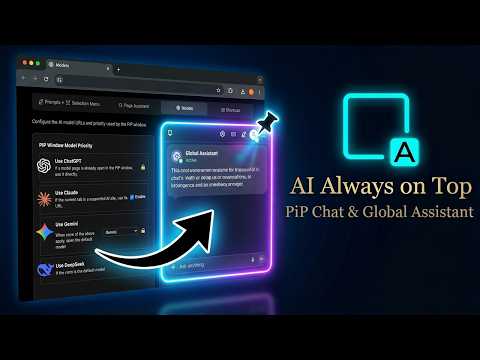
AI always on top, no screen switching. One-click page summary, select text to ask. Works with ChatGPT, Gemini, Claude & more.

📌 1. Floating Always-on-Top · Cross-page / Cross-window / Cross-app / No More Switching • Keep ChatGPT, Gemini, Claude, DeepSeek and 20+ AI pages as floating windows on top of all desktop windows. • Cross-page: browse any webpage and AI stays floating and visible. • Cross-window: stays on top of IDEs, documents and PDF readers. • Cross-app: not limited to the browser — summon it anytime over any desktop software. • Drag to move, minimize/restore; the drop entry stays after minimizing. • Drag text, images or files from any webpage, window or the desktop into the floating window to auto-fill and send. 📄 2. One-Click Page Summary · Analysis · Chat • Send the entire content of the current page (converted to a document) along with a prompt to AI in one click. • Built-in page assistants: summarize page, analyze page, chat about page, translate page. • Support custom page-assistant prompts to tailor the summary/analysis style. • With translation instructions for 55 languages, customize any prompt. 💡 3. Select-to-Ask · Ask on Selection • Select text on any webpage to instantly show a quick-action bar and apply a prompt in one click. • Built-in default prompts for search, summarize, translate, polish and extract text — all customizable. • 64 categorized prompt templates (text/image/file); add them to your personal list in one click. • The selection menu can be shown/hidden per domain so it doesn't disturb specific sites. • Selected content can be translated into 55 languages in one click. ━━━━━━━━━━━━━━━━━━━━ ⌨️ Global shortcuts (need customization; keys below are examples) Alt+X open/close PIP · Alt+S minimize/restore ━━━━━━━━━━━━━━━━━━━━ 🎯 Who It's For • Programmers & developers — AI floats above the IDE; drag error logs and code snippets in across apps. • Researchers & students — one-click summaries while reading papers, select-to-ask, translate and explain anytime. • Writers & operators — summarize web material in one click, select text to rewrite or translate. • Heavy multitaskers — keep AI within reach across windows and apps; say goodbye to tab fatigue. ━━━━━━━━━━━━━━━━━━━━ 🔒 Lightweight & Private • Built on Manifest V3 with a Service Worker background. • Uses the Document Picture-in-Picture API for the always-on-top window. • Shadow DOM isolates UI styles without polluting pages you visit. • User data and settings are stored locally via chrome.storage. ✨ Install now — keep AI floating at your fingertips, summarize pages, ask on selection.

Details

  • Version
    1.0.4
  • Updated
    November 12, 2026
  • Size
    281KiB
  • Languages
    13 languages
  • Developer
    Website
    Email
    lsy892462856@outlook.com
  • Non-trader
    This developer has not identified itself as a trader. For consumers in the European Union, please note that consumer rights do not apply to contracts between you and this developer.

Privacy

Manage extensions and learn how they're being used in your organization
The developer has disclosed that it will not collect or use your data. To learn more, see the developer’s privacy policy.

This developer declares that your data is

  • Not being sold to third parties, outside of the approved use cases
  • Not being used or transferred for purposes that are unrelated to the item's core functionality
  • Not being used or transferred to determine creditworthiness or for lending purposes

Support

Related

AI小窗

5.0

AI 小窗 | AI翻译 | 内容总结 | 快捷访问 | 无中转服务 | 支持通义千问、文心一言和ChatGPT

Flobro - Always on Top Floating Window

5.0

Keep any tab always on top in a floating window. Pin videos, docs or dashboards in a chromeless popup, or float above every app.

摸鱼小窗

0.0

点击一键将当前网页缩为纯净的悬浮小窗,支持自由拖拽、缩放,并支持自定义网站自动小窗打开。

Companion Window | Always on Top

4.9

Transform any webpage into a floating, always-on-top window for seamless multitasking and enhanced productivity

Always on Top Tab Window

0.0

Transfer the tab to a separate window, devoid of the tabs bar, navigation bar, and bookmark bar interface.

Universal PiP Pro - Auto Screenshots & Telegram

4.2

Advanced Picture-in-Picture with auto-screenshots, Telegram integration

AI Prompt Generator

5.0

Easy AI Prompt Generator: creative writing prompt enhancer for stories, coding, images and art. Boost results with ChatGPT Claude

Always on Top, PiP & Side Panel (3 in 1) - Super Pinned Window

0.0

Open any tab or link in an always-on-top PiP or a flexible popup window.

DeepSeek AI Easy Access Shortcut

5.0

Adds a convenient shortcut button to access DeepSeek AI on every tab

Floating ChatGPT

4.0

This extension for use ChatGPT in floating popup inside any website.

Always on Top: Floating Web Window (PiP)

4.0

One click to turn any tab, website, document, or video into an always-on-top floating window. Perfect for multi-tasking!

YouTube PiP Buttons

5.0

Adds Mini Player and PiP buttons to YouTube player.

AI小窗

5.0

AI 小窗 | AI翻译 | 内容总结 | 快捷访问 | 无中转服务 | 支持通义千问、文心一言和ChatGPT

Flobro - Always on Top Floating Window

5.0

Keep any tab always on top in a floating window. Pin videos, docs or dashboards in a chromeless popup, or float above every app.

摸鱼小窗

0.0

点击一键将当前网页缩为纯净的悬浮小窗,支持自由拖拽、缩放,并支持自定义网站自动小窗打开。

Companion Window | Always on Top

4.9

Transform any webpage into a floating, always-on-top window for seamless multitasking and enhanced productivity

Always on Top Tab Window

0.0

Transfer the tab to a separate window, devoid of the tabs bar, navigation bar, and bookmark bar interface.

Universal PiP Pro - Auto Screenshots & Telegram

4.2

Advanced Picture-in-Picture with auto-screenshots, Telegram integration

AI Prompt Generator

5.0

Easy AI Prompt Generator: creative writing prompt enhancer for stories, coding, images and art. Boost results with ChatGPT Claude

Always on Top, PiP & Side Panel (3 in 1) - Super Pinned Window

0.0

Open any tab or link in an always-on-top PiP or a flexible popup window.

Search
Clear search
Close search
Google apps
Main menu