


Overview
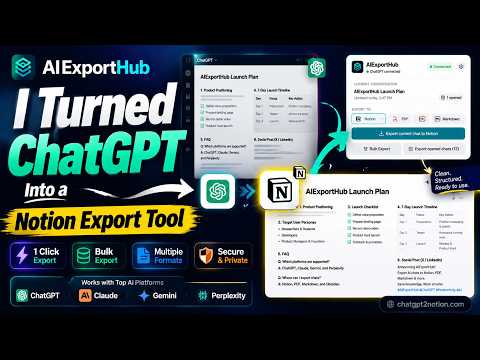
Export supported AI conversations to your Notion workspace or save them locally as Markdown and PDF files.
AIExportHub: Export AI Conversations Export AI conversations to Notion, Markdown, Obsidian, or PDF with one Chrome extension. AIExportHub helps you back up, organize, and preserve important AI conversations without manually copying content. Build a searchable second brain, maintain a personal knowledge base, create local archives, or generate polished documents directly from your browser. The extension works with supported AI conversation services, with support for more services added over time. EXPORT FORMATS Export to a connected Notion workspace, standard Markdown, Obsidian-compatible Markdown, or PDF. Each format is designed for long-term storage, knowledge management, and easy access to reusable information. CORE EXPORT FEATURES • Export the conversation currently open in your browser • Bulk export available conversation history • Select individual conversations before export • Search and filter loaded conversations • Skip conversations that were already exported • Resume interrupted jobs • Retry failed items • Monitor and cancel active jobs • Review export results and history • Save export preferences PRESERVE RICH CONVERSATION CONTENT When available from the source service, exports can preserve images and attachments, generated files and documents, code blocks, citations, metadata, timestamps, conversation hierarchy, and supported collection details. Available content may vary by source service and export format. EXPORT TO NOTION Create an organized, searchable knowledge base in your own workspace. • Export conversations to a selected database • Store structured conversation metadata • Upload supported images and files • Preserve available collection information • Avoid unwanted duplicates • Choose whether existing records should be skipped or overwritten • Apply readable page formatting Workspace access is used only after you explicitly authorize your own account. EXPORT TO MARKDOWN Create clean, portable files for documentation, publishing, version control, and long-term backup. • Preserve readable conversation formatting • Include YAML front matter when configured • Download images and attachments locally • Rewrite references to use downloaded assets • Configure filename patterns • Organize files into custom folders EXPORT TO OBSIDIAN Generate portable Markdown notes ready for your vault. • Use Obsidian-friendly formatting • Preserve local asset references • Include supported metadata • Organize notes and assets into folders No cloud storage is required for local exports. EXPORT TO PDF Generate readable conversation documents for sharing, printing, or archiving. • Choose from multiple visual themes • Preserve clear message layouts • Embed supported conversation images • Render readable code blocks • Include structured metadata • Save supported attachments beside the PDF DESIGNED FOR LARGE CONVERSATION LIBRARIES Manage large collections with built-in job controls. • Export all available or selected conversations • Track progress and review export summaries • Retry failed items without restarting successful work • Cancel running jobs • Configure delays for long-running exports • Retain export settings between sessions ORGANIZATION • Choose custom download locations • Configure filename templates • Use organized folder structures • Preserve available metadata • Prevent accidental duplicate exports PRIVACY AIExportHub follows a local-first design. Conversation processing and file generation happen inside your browser whenever possible. Cloud services are accessed only after you explicitly connect your own account and select a cloud destination. Your conversations are not uploaded to an intermediate cloud workspace for local exports. BROWSER PERMISSIONS The extension may request the following permissions: • Tabs: communicate with supported conversation pages that you open • Storage: retain settings, account state, and job progress • Downloads: save exported documents, images, and attachments • Host permissions: read conversations and retrieve files you choose to export • Workspace API access: create content only after you authorize your own account LEARN MORE https://chatgpt2notion.com/products/aiexporthub-hero/ SUPPORT chatgpt2notion@gmail.com
4.7 out of 523 ratings
Details
- Version5.1.0
- UpdatedJuly 26, 2026
- FeaturesOffers in-app purchases
- Size909KiB
- Languages18 languages
- Developer
- Non-traderThis developer has not identified itself as a trader. For consumers in the European Union, please note that consumer rights do not apply to contracts between you and this developer.
Privacy

AIExportHub: Bulk Export AI Chats has disclosed the following information regarding the collection and usage of your data. More detailed information can be found in the developer's privacy policy.
AIExportHub: Bulk Export AI Chats handles the following:
This developer declares that your data is
- Not being sold to third parties, outside of the approved use cases
- Not being used or transferred for purposes that are unrelated to the item's core functionality
- Not being used or transferred to determine creditworthiness or for lending purposes
Support
For help with questions, suggestions, or problems, please open this page on your desktop browser