Item logo image for AI-ChatNote

AI-ChatNote

5.0(

2 ratings

)
Item media 3 (screenshot) for AI-ChatNote
Item video thumbnail
Item media 2 (screenshot) for AI-ChatNote
Item media 3 (screenshot) for AI-ChatNote
Item video thumbnail
Item media 2 (screenshot) for AI-ChatNote
Item media 3 (screenshot) for AI-ChatNote

Overview

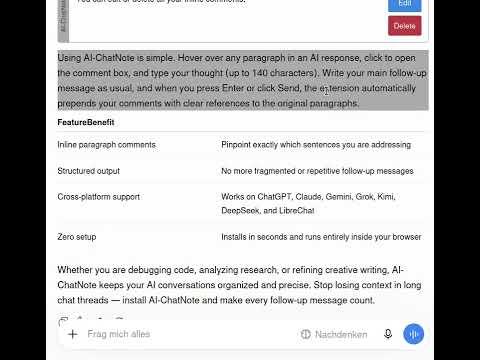
Comment on individual paragraphs in AI chat responses before sending your next message.

AI-ChatNote is a free browser extension for Chrome and Firefox that lets you add inline comments to individual paragraphs or bullet points, then process them all at once for faster, better results. Hover over a paragraph or bullet point to highlight it, click to add a comment, and move on. When you're done, hit Return and all your comments are applied in a single pass. Works with all major AI platforms. Caution: Switching models during a chat session disables ChatNote. You can reactivate it by reloading the page (F5). All data remains local to your browser. The extension only runs on the supported chat URLs listed in the manifest and does not transmit any information to external servers. Feedback: ChatNote(a)mail.de

Details

  • Version
    2.1.0
  • Updated
    September 8, 2026
  • Offered by
    MK2000
  • Size
    29.91KiB
  • Languages
    English
  • Developer
    Email
    chatnote@mail.de
  • Non-trader
    This developer has not identified itself as a trader. For consumers in the European Union, please note that consumer rights do not apply to contracts between you and this developer.

Privacy

Manage extensions and learn how they're being used in your organization

AI-ChatNote has disclosed the following information regarding the collection and usage of your data. More detailed information can be found in the developer's privacy policy.

AI-ChatNote handles the following:

Website content

This developer declares that your data is

  • Not being sold to third parties, outside of the approved use cases
  • Not being used or transferred for purposes that are unrelated to the item's core functionality
  • Not being used or transferred to determine creditworthiness or for lending purposes

Related

VibeBob

5.0

Add custom features to any website by chatting with AI.

Parallel Chat

0.0

Send one message to ChatGPT, Gemini, and Claude at the same time. Compare AI answers side-by-side in a single tab.

AI Chat Speed Booster

4.7

Speeds up AI chats by showing recent messages first and letting you load older ones on demand.

Stash AI – Bookmark AI Answers

0.0

Bookmark important AI answers and find them instantly later.

AIPrompter

0.0

Type / in any AI chat to instantly insert your saved prompt templates.

AIChatMerge

0.0

Use AI chats side by side: send one prompt, compare and merge responses, then refine the result through multi-model discussion.

Chat Distiller

0.0

Distill AI conversations into local notes with your own prompts.

Chat AI Ctrl+Enter Sender

4.1

Use 'Ctrl+Enter' for sending messages in AI chat services like ChatGPT. Prevents accidental sends and allows line breaks with Enter.

AI Markdown Download

5.0

Copy AI chat content as Markdown to your clipboard.

AIChats

0.0

在 Chrome 侧边栏中集中使用多个 AI 聊天网站,右键选中文本即可问 AI 或翻译

WhatsApp Rephraser

4.3

Rephrase your WhatsApp messages before sending.

Quibble

5.0

Review AI chat answers like a GitHub PR: select text, comment, and inject quoted fragments back into the prompt.

VibeBob

5.0

Add custom features to any website by chatting with AI.

Parallel Chat

0.0

Send one message to ChatGPT, Gemini, and Claude at the same time. Compare AI answers side-by-side in a single tab.

AI Chat Speed Booster

4.7

Speeds up AI chats by showing recent messages first and letting you load older ones on demand.

Stash AI – Bookmark AI Answers

0.0

Bookmark important AI answers and find them instantly later.

AIPrompter

0.0

Type / in any AI chat to instantly insert your saved prompt templates.

AIChatMerge

0.0

Use AI chats side by side: send one prompt, compare and merge responses, then refine the result through multi-model discussion.

Chat Distiller

0.0

Distill AI conversations into local notes with your own prompts.

Chat AI Ctrl+Enter Sender

4.1

Use 'Ctrl+Enter' for sending messages in AI chat services like ChatGPT. Prevents accidental sends and allows line breaks with Enter.

Google apps