Item logo image for AI ChatBot Tools Pro

AI ChatBot Tools Pro

ExtensionTools5 users
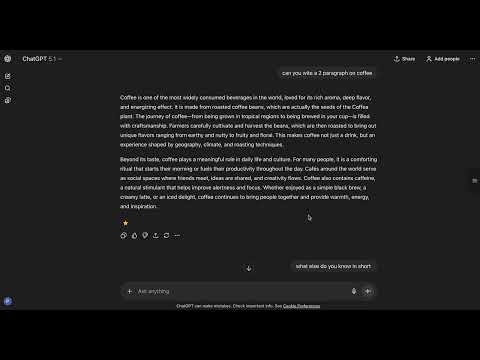
Item media 6 (screenshot) for AI ChatBot Tools Pro
Item video thumbnail
Item media 2 (screenshot) for AI ChatBot Tools Pro
Item media 3 (screenshot) for AI ChatBot Tools Pro
Item media 4 (screenshot) for AI ChatBot Tools Pro
Item media 5 (screenshot) for AI ChatBot Tools Pro
Item media 6 (screenshot) for AI ChatBot Tools Pro
Item video thumbnail
Item media 2 (screenshot) for AI ChatBot Tools Pro
Item media 3 (screenshot) for AI ChatBot Tools Pro
Item media 4 (screenshot) for AI ChatBot Tools Pro
Item media 5 (screenshot) for AI ChatBot Tools Pro
Item media 6 (screenshot) for AI ChatBot Tools Pro

Overview

Bookmark messages, clean AI signatures, navigate chats & export conversations. Essential tools for ChatGPT & Claude users.

# AI Chatbot Tools Pro - Your Essential ChatGPT Companion Transform your ChatGPT experience with professional-grade tools designed for power users, researchers, and professionals. ## 🎯 KEY FEATURES ### ✨ Smart Text Cleaning • Automatically removes AI signatures and closures when copying • Clean code snippets with one click • Side-by-side diff viewer to review changes before copying • Works on ChatGPT and Claude AI • Multiple cleaning strength levels (Minimal/Standard/Aggressive) • Intelligent code detection and preservation ### 📚 Advanced Bookmarks • Save important AI responses with notes and tags • Multi-tag filtering with checkboxes - select multiple tags at once • Cross-thread bookmark navigation - jump to bookmarks in different conversations • Group bookmarks by conversation thread • Filter bookmarks to show only current conversation • Bulk select and delete bookmarks • Search through all saved conversations instantly • Export bookmarks as Markdown, JSON, or plain text • Edit notes and tags anytime • Rich bookmark metadata: conversation title, timestamps, platform ### 🧭 Enhanced Navigation • Cross-thread navigation - bookmarks automatically navigate to the correct conversation • Quick jump to top/bottom of long conversations • Sidebar with searchable message history • Filter messages by role (user/assistant) • Navigate complex chats effortlessly • Message count and thread statistics • Fuzzy search with hash-based message matching ### 📊 Copy History • Track all cleaned text with before/after comparison • Review what was removed from AI responses • Access your copy history anytime • See exactly what changed in each cleaning operation ### ⚙️ Customizable Settings • Multiple cleaning strength levels • Code-specific cleaning modes for developers • Toggle diff viewer on/off for instant copying • Intelligent retry mechanism for cross-thread navigation • Customize your workflow to match your needs ### 🎨 Professional UI • Dark theme interface matching ChatGPT's design • Seamless integration with ChatGPT and Claude • Non-intrusive bookmark buttons next to each message • Floating sidebar toggle for easy access • Smooth animations and transitions • Tooltip hints for all features ## 💼 PERFECT FOR • **Developers** cleaning code snippets and saving technical solutions • **Researchers** organizing AI insights across multiple conversations • **Content creators** managing prompts and reference materials • **Students** archiving study materials and explanations • **Professionals** using ChatGPT daily for work tasks • **Writers** collecting AI-generated content without signatures • **Data analysts** bookmarking analysis patterns and techniques ## 🔒 PRIVACY FIRST • All data stored locally on your device • Zero data collection - we don't see your conversations • No analytics or tracking whatsoever • No external servers - everything processes locally • Open source friendly code • Your conversations remain 100% private • Bookmarks sync via Chrome's secure sync (optional) ## 🚀 GET STARTED Install the extension, refresh ChatGPT, and enjoy enhanced productivity immediately. No signup required, no configuration needed! ## 📖 HOW TO USE ### Text Cleaning 1. Copy any AI response (Ctrl+C or click copy button) 2. AI signatures removed automatically 3. Review changes in diff viewer (optional) 4. Paste clean text anywhere ### Bookmarking 1. Click the star icon next to any message 2. Add notes and tags for organization 3. Access bookmarks from the sidebar 4. Search, filter, and export anytime ### Navigation 1. Click the sidebar toggle button (right edge of screen) 2. Browse all messages in current conversation 3. Search across messages 4. Click bookmarks to jump to different conversations ### Advanced Features • **Tag Filtering:** Click "All Tags" dropdown and select multiple tags • **Current Thread:** Click "Current" to see only bookmarks from this chat • **Group by Thread:** Click "Group" to organize by conversation • **Bulk Delete:** Click "Select" to enter multi-select mode • **Export:** Click export icon to download as Markdown or JSON ## 💡 SUPPORT Found a bug or have a feature request? We're actively developing and listening to user feedback! **Need help?** - Check the sidebar tooltips for quick tips - Review the export feature to backup your bookmarks - All features work offline after installation Transform your ChatGPT workflow today with AI ChatBot Tools Pro! **Version:** 1.0.0 **Last Updated:** November 2024

Details

  • Version
    1.0.0
  • Updated
    December 3, 2025
  • Offered by
    Prathamesh Barve
  • Size
    140KiB
  • Languages
    English
  • Developer
    Email
    prathameshbarve6000@gmail.com
  • Non-trader
    This developer has not identified itself as a trader. For consumers in the European Union, please note that consumer rights do not apply to contracts between you and this developer.

Privacy

The developer has disclosed that it will not collect or use your data.

This developer declares that your data is

  • Not being sold to third parties, outside of the approved use cases
  • Not being used or transferred for purposes that are unrelated to the item's core functionality
  • Not being used or transferred to determine creditworthiness or for lending purposes
Google apps