

AI Chat Timeline
6 ratings
)
Overview
Adds structured timeline navigation to AI chat interfaces, works on ChatGPT and Claude.ai
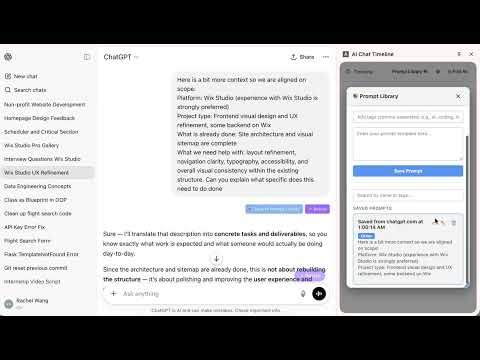
Tired of scrolling endlessly through long AI conversations? AI Chat Timeline transforms your ChatGPT and Claude experience by adding a structured Navigation panel. 🚀 KEY FEATURES Real-time Click Navigation Sidepanel works ChatGPT (chatgpt.com) and Claude.ai. Smart Pinning: "Pin" important clickable AI answers to Top. Prompt Library: Save your favorite or frequently used prompts. Revise your prompt: Optimize your prompts using built-in API support (Anthropic) or ChatGPT automation. 💡 WHY INSTALL AI CHAT TIMELINE? If you use AI for coding, writing, or complex research, your chats get long and messy. This extension acts as a "Table of Contents" for your AI, saving you time and keeping your workflow organized without ever leaving the page. 🔒 PRIVACY FIRST No data is sent to external servers (except to AI providers if you use the optional API Revise feature). All data is processed locally on your machine. No tracking, no ads.
5 out of 56 ratings
Details
- Version0.3.4
- UpdatedOctober 6, 2026
- Offered byRachelWanggg
- Size158KiB
- LanguagesEnglish
- DeveloperRuiqi Wang
500 El Camino Real santa clara, CA 95053 USEmail
rachelwangrq2@gmail.com - Non-traderThis developer has not identified itself as a trader. For consumers in the European Union, please note that consumer rights do not apply to contracts between you and this developer.
Privacy

AI Chat Timeline has disclosed the following information regarding the collection and usage of your data. More detailed information can be found in the developer's privacy policy.
AI Chat Timeline handles the following:
This developer declares that your data is
- Not being sold to third parties, outside of the approved use cases
- Not being used or transferred for purposes that are unrelated to the item's core functionality
- Not being used or transferred to determine creditworthiness or for lending purposes