

AI Chat RTL Support
7 ratings
)
Overview
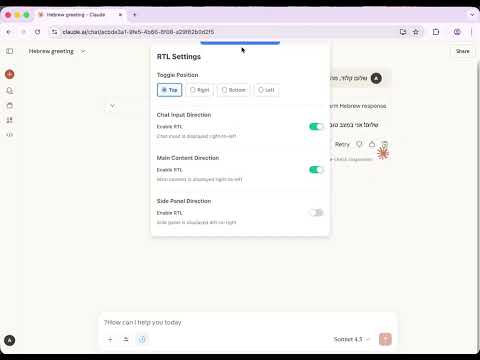
Add right-to-left text direction support to AI chat interfaces with independent toggles for input, content, and side panels
AI Chat RTL Support — The Smart RTL Solution ━━━━━━━━━━━━━━━━━━━━━━━━━━━━━━━━━━━━━━━━ ✦ WHY THIS EXTENSION? ━━━━━━━━━━━━━━━━━━━━━━━━━━━━━━━━━━━━━━━━ Unlike other RTL tools that apply settings globally, AI Chat RTL Support remembers your RTL preferences PER CHAT. Switch between English and Arabic/Hebrew conversations without constantly toggling settings — each chat keeps its own direction. Plus, it fixes broken math formulas. KaTeX equations render incorrectly in RTL mode on most AI platforms — this extension preserves them in LTR so your math stays readable. ━━━━━━━━━━━━━━━━━━━━━━━━━━━━━━━━━━━━━━━━ ✦ SUPPORTED PLATFORMS ━━━━━━━━━━━━━━━━━━━━━━━━━━━━━━━━━━━━━━━━ ▸ Claude.ai — Chat input, main content, and side panel RTL (independent toggles) ▸ ChatGPT — Input RTL + KaTeX math fix ▸ NotebookLM — Chat panel, studio panel, sources panel RTL + KaTeX fix ▸ Gemini — Chat input and main content RTL + KaTeX fix ━━━━━━━━━━━━━━━━━━━━━━━━━━━━━━━━━━━━━━━━ ✦ KEY FEATURES ━━━━━━━━━━━━━━━━━━━━━━━━━━━━━━━━━━━━━━━━ ◆ Per-Conversation Memory Each chat/notebook remembers its RTL settings. Return to any conversation and your preferences are already applied. ◆ KaTeX Math Fix Mathematical expressions stay left-to-right even when content is RTL. No more reversed equations or broken formulas. ◆ Smart Platform Detection The control panel automatically detects which AI platform you're on and shows only relevant options. ◆ Flexible Panel Position Place the control panel on any edge (top, right, bottom, left). Hover to reveal, move away to hide. ━━━━━━━━━━━━━━━━━━━━━━━━━━━━━━━━━━━━━━━━ ✦ HOW TO USE ━━━━━━━━━━━━━━━━━━━━━━━━━━━━━━━━━━━━━━━━ ① Go to any supported AI platform ② Hover over the blue trigger bar at the edge of your screen ③ Toggle RTL settings as needed ④ Settings auto-save per conversation ━━━━━━━━━━━━━━━━━━━━━━━━━━━━━━━━━━━━━━━━ ✦ PRIVACY & OPEN SOURCE ━━━━━━━━━━━━━━━━━━━━━━━━━━━━━━━━━━━━━━━━ No data collection. All settings stored locally in your browser. GitHub: github.com/anatoly314/llm-gui-rtl-browser-extension Created by Anatoly Tarnavsky
3.1 out of 57 ratings
Details
- Version0.11.0
- UpdatedDecember 11, 2025
- Offered byAnatoly Tarnavsky
- Size1.0MiB
- LanguagesEnglish
- Developer
Email
support@anatoly.dev - Non-traderThis developer has not identified itself as a trader. For consumers in the European Union, please note that consumer rights do not apply to contracts between you and this developer.
Privacy

This developer declares that your data is
- Not being sold to third parties, outside of the approved use cases
- Not being used or transferred for purposes that are unrelated to the item's core functionality
- Not being used or transferred to determine creditworthiness or for lending purposes
Support
For help with questions, suggestions, or problems, please open this page on your desktop browser