


개요
The Best AI chat platforms all in one place: GPT, Claude, Gemini, Grok, Copilot and more!
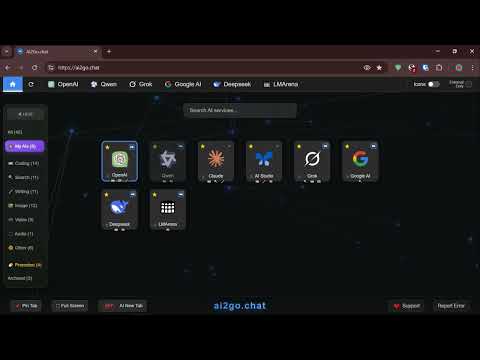
All the Best AI Chat platforms in one place, ready to use in your new tab or at www.ai2go.chat 🎯 Platforms ✓ ChatGPT ✓ Claude ✓ Gemini ✓ Grok ✓ Perplexity + More... 🔹 Never Run Out of Free Chats When you hit your daily limit on ChatGPT, instantly switch to Claude or Gemini. Keep chatting without waiting for resets or paying for upgrades. 🔹 Get Better Answers Ask the same question to different AI assistants and compare their responses. Some are better at coding, others at writing, research, or creative tasks. 🔹 Save Time and Hassle No more opening multiple browser tabs or bookmarking different AI websites. Everything is right there when you open a new tab. 🔹 Always Have a Backup When one AI service is down or slow, you have alternatives ready to go. Never lose productivity again. 🔹 Find the Right AI for Each Task Use ChatGPT for general questions, Claude for writing, Perplexity for research, or Copilot for work tasks - all from one place. 💡 How It Works Simple Tabs Click between different AI chats just like switching browser tabs. Each AI stays logged in and remembers your conversations. Your Conversations Stay Active Start a chat with ChatGPT, switch to Claude, then come back to ChatGPT - your conversation is still there waiting for you. Clean and Simple No clutter or distractions. Just a clean interface that gets out of your way so you can focus on your conversations. Saves Computer Memory Put unused AI tabs to "sleep" to keep your browser running smoothly while keeping all your chats saved. Organize Your Way Drag and drop to arrange the AI tabs in whatever order works best for you. Always There Replaces your new tab page, so every time you open a new tab, your AI assistants are ready to help. Benefits Simplified Workflow Reduce the need to manage multiple browser tabs when working with different platforms. Access all services from a single interface. Conversation Persistence Maintain active sessions with multiple platforms simultaneously. Return to conversations without losing context or history. Resource Management Optional sleep mode for inactive tabs helps optimize browser performance while preserving conversation state. Customization Organize platform tabs according to your preferences and workflow requirements. Privacy and Security Data Collection This extension does not collect, store, or access your conversations with chat services. All interactions occur directly between your browser and the official platforms. Authentication Login credentials are handled exclusively by the official service websites. The extension does not have access to your login information. Permissions The extension requests only the minimal permissions necessary for basic functionality. No tracking or monitoring of your browsing activity occurs. Local Processing All tab management and interface functionality happens locally on your device. No data is transmitted to external servers. Requirements • Existing accounts with desired services (free accounts are sufficient) • Chrome browser (latest version recommended) • Active login sessions with platforms in your browser Troubleshooting If a platform tab does not load properly, log into that service directly in a regular browser tab, then refresh the extension page. The extension will detect your authenticated session.
5점 만점에 3점평점 2개
세부정보
개인정보 보호

개발자가 사용자 데이터에 관해 다음과 같이 선언했습니다
- 승인된 사용 사례를 제외하고 서드 파티에 판매하지 않음
- 항목의 핵심 기능과 관련 없는 목적으로 사용하거나 전송하지 않음
- 신용도 판단 또는 대출 목적으로 사용하거나 전송하지 않음
지원
질문, 제안 또는 문제와 관련하여 도움이 필요하면 데스크톱 브라우저에서 이 페이지를 여세요.