

AI Chat Navigator: Боковая панель, интеллект-карта и экспорт

Обзор
Организуйте, просматривайте, визуализируйте, копируйте и экспортируйте диалоги на разных AI-платформах, таких как ChatGPT, Gemini,…
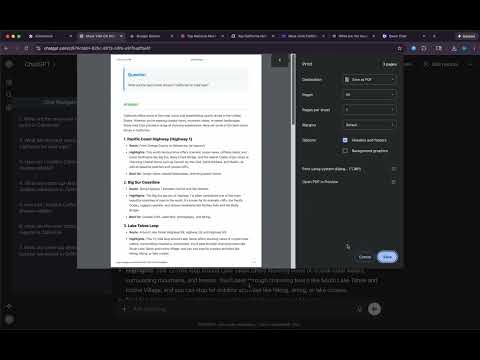
AI Chat Navigator is the original extension that adds a powerful, draggable navigation panel to your favorite AI chat websites — turning long threads into structured, searchable, and reusable knowledge. It works seamlessly with popular platforms such as ChatGPT and Gemini, along with five other leading AI chat platforms. 🚀🚀🚀 Core Features 1. Quick Overview - Thread Overview: Instantly view all questions/prompts in a conversation thread through the navigation panel. - Response Mindmap: Visualize any response as a mindmap for fast comprehension. 2. Navigation - Quick Jump: Click any item in the panel to jump directly to that question–answer pair in the conversation. - Real-Time Update: New messages are captured and added automatically. 3. Copy & Download (Per-Item + Batch) - Copy Options: - Copy in Markdown or plain text - Copy a single QA pair or the entire thread - Download Options: - Download in Markdown, TXT, or PDF - Download per QA pair or batch download all QAs 4. User-Friendly UI - Easy Open/Close: Open the panel by clicking the extension toolbar icon (or by refreshing the chat page). Close it from the panel header with the `×` button. - Draggable & Resizable Panel: Position and resize the navigation panel freely to match your workflow. - Adaptive Panel Height: Panel height adjusts automatically based on the number of questions/prompts. - Adaptive Panel Positioning: Panel position auto-adjusts to stay close to the chat area without overlapping key content. - Clean, On-Demand Controls: Action buttons and menus stay hidden until needed (revealed on hover). 5. Multi-Platform Support AI Chat Navigator works across major AI chat platforms such as ChatGPT, Claude, Gemini, DeepSeek, and Grok. It's also compatible with Perplexity and Qwen and more platforms are planned for future releases. Across supported platforms, core workflows are available in one consistent UI: - Navigation panel - Mindmap view - Per-item and batch copy/download 🎯🎯🎯 Why AI Chat Navigator? AI Chat Navigator revolutionizes how you use AI by turning scattered chat threads into structured, actionable knowledge. Whether you are researching, coding, studying, or brainstorming, this extension empowers you to: - Master Long Threads: Instantly view a clean outline of all questions/prompts in one conversation thread. - Access Info Faster: Click any item in the navigation panel to leap directly to that specific QA pair. - Visualize Complexity: Convert lengthy responses into clear Mindmaps for faster comprehension. - Own Your Data: Copy/Export your chat instantly in Markdown, TXT, or PDF formats with per-item and batch mode. - Work Seamlessly: Enjoy a draggable, resizable and auto-adaptable interface that supports Light/Dark themes across 7+ major AI platforms. Stop losing track of your best ideas in endless scrolling and start gaining instant clarity with structured navigation.
5 из 511 оценок
Подробности
- Версия1.5.0
- Обновлено12 марта 2026 г.
- Размер668KiB
- ЯзыкиПоддерживаемых языков: 11
- РазработчикСайт
Электронная почта
support@aichatnavigator.com - Не продавецРазработчик не указал для себя статус продавца. Просим клиентов из Европейского союза обратить внимание, что на сделки между вами и этим разработчиком не распространяются законы о защите прав потребителей.
Конфиденциальность

Этот разработчик утверждает, что ваши данные:
- Не продаются третьим лицам, за исключением разрешенных вариантов использования
- Не используются и не передаются в целях, не связанных с работой основных функций продукта
- Не используются и не передаются для определения платежеспособности или в целях кредитования
Поддержка
Чтобы сообщить об ошибках в работе продукта, задать вопрос или поделиться идеями, откройте эту страницу в браузере для компьютера.