

AI Chat Navigator: Navigation Sidebar, Mindmap & Export for ChatGPT & More

Overview
Navigate, search, visualize, copy and export your conversations on supported AI chat websites.
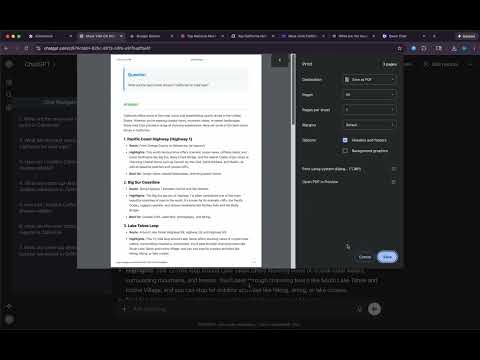
AI Chat Navigator is a browser extension that adds a powerful, draggable navigation panel to your favorite AI chat websites — turning long threads into structured, searchable, and reusable knowledge. Use the same navigation tools across supported AI chat websites. Conversation processing happens locally in your browser. The extension does not upload conversations or notes to the developer. Notes/layouts are stored locally; selected preferences may sync through Chrome. Copy, export, and backup actions put content in your clipboard or files you control. Back up local notes before uninstalling. Core Features 1. Quick Overview - Conversation Overview: Instantly view all questions/prompts in a conversation in a linear outline. - Response Overview: Instantly view all sections in a response in a linear outline or a tree-structured mindmap. 2. Navigation - Conversation Navigation: Click a prompt in the main navigation panel to jump directly to that prompt-response pair in the conversation. - Response Navigation: Click a section in the response navigation panel to jump directly to that section in the response. - Real-Time Update: New prompt and response sections are captured and added automatically. - Current-Position Highlight: The navigation panel highlights the prompt currently visible in the chat and keeps it in view as you scroll, so you never lose your place in long conversations. 3. Search - Prompt & response section search: Search the current conversation by keyword to instantly locate matching prompts and response sections, with matches highlighted directly in the navigation panel. 4. Copy & Download (Per-Item + Batch) - Copy Options: - Copy in Markdown or plain text - Copy a single QA pair or the entire thread - Download Options: - Download in Markdown, TXT, or PDF - Download per QA pair or batch download all QAs - Export the mindmap as SVG or PNG (full-map export) 5. User-Friendly UI - Draggable & Resizable Panel: Position and resize the navigation panel freely to match your workflow. - Adaptive Panel Height: Panel height adjusts automatically based on the number of questions/prompts. - Adaptive Panel Positioning: Panel position auto-adjusts to stay close to the chat area and input box without overlapping either. - Clean, On-Demand Controls: Action buttons and menus stay hidden until needed (revealed on hover). - Floating Icon & Chat Notes: Reopen the navigation panel from a compact floating icon and save your own notes for each conversation. 6. Multi-Platform Support Core workflows are available in one consistent UI across supported AI chat websites: - Main navigation panel - Response navigation panel - Mindmap view - Per-item and batch copy/download Why AI Chat Navigator? Whether you are researching, coding, studying, or brainstorming, AI Chat Navigator gives you a simple workflow: find what matters, understand it quickly, and reuse it anywhere. - Find: Scan or search the thread in the navigation panel and jump directly to the exact prompt, answer, or section you need. - Understand: Open a response outline or mindmap to break long answers into a clear structure that is easier to follow. - Reuse: Copy or export one QA pair or the full conversation in Markdown, TXT, or PDF for notes, docs, and future reference. The result is less scrolling, faster comprehension, and a more consistent workflow across major AI chat platforms in a clean, draggable, theme-aware interface. Stop losing track of your best ideas in endless scrolling and start gaining instant clarity with structured navigation.
5 out of 524 ratings
Details
- Version1.7.3
- UpdatedOctober 1, 2026
- Size846KiB
- Languages12 languages
- DeveloperWebsite
Email
support@aichatnavigator.com - Non-traderThis developer has not identified itself as a trader. For consumers in the European Union, please note that consumer rights do not apply to contracts between you and this developer.
Privacy

AI Chat Navigator: Navigation Sidebar, Mindmap & Export for ChatGPT & More has disclosed the following information regarding the collection and usage of your data. More detailed information can be found in the developer's privacy policy.
AI Chat Navigator: Navigation Sidebar, Mindmap & Export for ChatGPT & More handles the following:
This developer declares that your data is
- Not being sold to third parties, outside of the approved use cases
- Not being used or transferred for purposes that are unrelated to the item's core functionality
- Not being used or transferred to determine creditworthiness or for lending purposes
Support
For help with questions, suggestions, or problems, please open this page on your desktop browser