


Overview
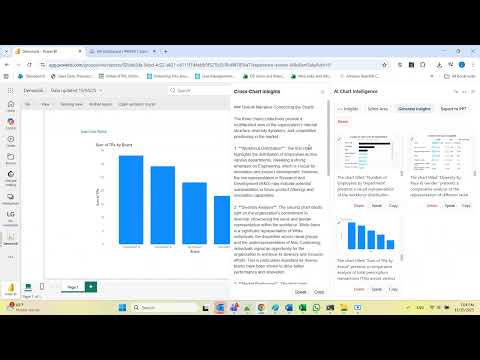
Analyze any chart instantly with AI. Get fast insights and summaries, download data,export and share in one click
*************************************************************************************** New: Download chart data directly to Excel or CSV — the feature you’ve been asking for! *************************************************************************************** Stop wasting hours preparing presentations, copying dashboards, or trying to interpret complex visuals. With AI Chart Intelligence, you can capture charts from any web dashboard, generate AI-powered insights, and export data instantly — all from your browser. Why You Need It * Spend less time interpreting dashboards. * Build reports, presentations, and QBRs in minutes, not hours. * Get plain-language insights from complex charts and graphs. * Share AI-generated summaries with colleagues instantly. Key Features 📸 Chart Capture: Snap charts, graphs, or visualizations directly from your browser. 🤖 AI-Powered Insights: Get instant explanations, trends, and key takeaways. 🗂 Gallery Mode: Save multiple charts and compare insights side-by-side. 📝 Cross-Chart Analysis: Combine charts to understand the bigger picture. 📋 Export & Share: Copy to clipboard or export to Excel, CSV, or PPT. 🔊 Text-to-Speech (TTS): Listen to insights for hands-free analysis. 🎛 Flexible Panel: Move, resize, and customize the extension panel while working. Works With All Major BI Tools * Microsoft Power BI * Tableau * Looker * Qlik * Any website with chart visualizations Who It’s For * Analysts * Business users * Decision-makers * Anyone who works with dashboards or online reports * Save hours, make smarter decisions, and share insights instantly. Privacy & Security * No browsing history tracking. * Charts are processed locally in your browser. * Data stays on your device unless you choose to reset it. Get Started in Seconds * Install the extension. * Open any chart or dashboard in your browser. * Click the extension icon → Select a chart → Get AI insights, Download, Export & share.
5 out of 58 ratings
Details
- Version2.18
- UpdatedMay 9, 2026
- Offered bygreenwaldliron
- Size36.47KiB
- LanguagesEnglish (United States)
- Developer
Email
greenwaldliron1@gmail.com - Non-traderThis developer has not identified itself as a trader. For consumers in the European Union, please note that consumer rights do not apply to contracts between you and this developer.
Privacy

This developer declares that your data is
- Not being sold to third parties, outside of the approved use cases
- Not being used or transferred for purposes that are unrelated to the item's core functionality
- Not being used or transferred to determine creditworthiness or for lending purposes
Support
For help with questions, suggestions, or problems, visit the developer's support site