Item logo image for AI Buddy

AI Buddy

5.0(

2 ratings

)
ExtensionTools7 users
Item media 6 (screenshot) for AI Buddy
Item video thumbnail
Item media 2 (screenshot) for AI Buddy
Item media 3 (screenshot) for AI Buddy
Item media 4 (screenshot) for AI Buddy
Item media 5 (screenshot) for AI Buddy
Item media 6 (screenshot) for AI Buddy
Item video thumbnail
Item media 2 (screenshot) for AI Buddy
Item media 3 (screenshot) for AI Buddy
Item media 4 (screenshot) for AI Buddy
Item media 5 (screenshot) for AI Buddy
Item media 6 (screenshot) for AI Buddy

Overview

Scenario-based AI sidebar actions for selected browser text.

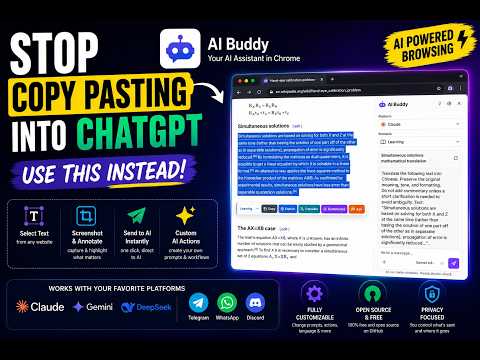
🚀 AI Buddy — Send Text & Screenshots to Your Favorite AI from Chrome’s Side Panel Stop copying text, switching tabs, and repeating prompts manually. AI Buddy lets you send selected text or annotated screenshots from any webpage directly to your preferred chat platform, right from Chrome’s side panel. ✨ Features 📝 Send Selected Text to AI Highlight text on any webpage and send it to ChatGPT, Claude, Gemini, DeepSeek, Microsoft Copilot, and more. 📸 Send Screenshots to AI Capture part of a webpage, annotate it, and send it with a prompt for visual analysis, explanations, OCR, UI feedback, debugging, and more. ⚡ One-Click AI Actions Use reusable prompt actions like: • Explain • Translate • Summarize • Draft Reply • Polish Writing • Brainstorm Ideas • Visualize Concepts • Ask a Custom Question 🧩 10 Starter Scenarios Switch between ready-made workflows for: • Learning • Workplace • Creative • Research • Writing • Coding • Marketing & Sales • Customer Support • Data Analysis • Planning 🧠 Smart Prompt Workflow AI Buddy combines selected content, screenshots, reusable prompts, global instructions, and response language settings so you get better answers with less typing. 🪟 Built for Chrome Side Panel Keep the source page visible while your AI or messaging platform opens beside it. No more switching back and forth between tabs. 🎛️ Send Behavior Controls Choose how each platform handles prompts: • Auto-send • Draft only • Paste only • Open side panel first In v1.2.2, Send Behavior is available directly in the side panel, so it is easier to review or change before sending. 💬 Messaging Platform Support Use WhatsApp Web, Telegram Web, and Discord as draft-first destinations, or switch them to Auto-send when you want faster delivery. 🔒 Privacy-Minded Design AI Buddy has no backend server for your prompts or chats. Your settings stay in Chrome storage, and selected content is sent only to the platform you choose when you trigger an action. 🎯 Perfect For • Students and researchers • Developers and designers • Writers and content creators • Customer support teams • Marketers and sales teams • Everyday AI power users 💡 Examples • Explain complex articles instantly • Translate foreign language content • Summarize long webpages • Send UI screenshots for debugging • Ask AI to analyze charts, images, or layouts • Draft emails and replies from selected text • Turn notes into tables, checklists, quizzes, flashcards, or Mermaid diagrams AI Buddy helps you work faster, stay focused, and unlock the full power of AI directly inside your browser.

Details

  • Version
    1.2.2
  • Updated
    June 9, 2026
  • Size
    859KiB
  • Languages
    English
  • Developer
    Email
    cws.aibuddy@gmail.com
  • Non-trader
    This developer has not identified itself as a trader. For consumers in the European Union, please note that consumer rights do not apply to contracts between you and this developer.

Privacy

Manage extensions and learn how they're being used in your organization

AI Buddy has disclosed the following information regarding the collection and usage of your data. More detailed information can be found in the developer's privacy policy.

AI Buddy handles the following:

Personal communications
User activity
Website content

This developer declares that your data is

  • Not being sold to third parties, outside of the approved use cases
  • Not being used or transferred for purposes that are unrelated to the item's core functionality
  • Not being used or transferred to determine creditworthiness or for lending purposes

Support

For help with questions, suggestions, or problems, visit the developer's support site

Google apps