

AI Bubble
1 rating
)
Overview
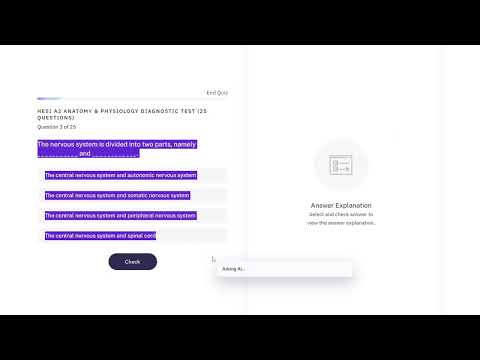
Ask AI about highlighted text or a snipped page area, then read the answer in a small page bubble.
AI Bubble lets you ask AI about highlighted text or any snipped area on a web page. Highlight text, right-click, and choose Ask AI about selected text, or use a keyboard shortcut to capture part of the page like a snipping tool. AI Bubble sends your selected text or image area to your configured Gemini API model and shows the response in a small bubble near your cursor. Features: - Ask AI about highlighted text - Snip part of a web page and ask AI about the image - Custom Gemini API key and model support - Optional keyboard shortcuts - Custom prompt style - Optional transparent response background - Simple setup guide with API key and model instructions AI Bubble is useful for summarizing text, explaining confusing content, solving questions from screenshots, reading charts, understanding errors, and quickly getting help without leaving the page. https://www.youtube.com/watch?v=Jvcj3HVWwUw Tutorial Link for Setup
5 out of 51 rating
Details
- Version1.0.0
- UpdatedJuly 20, 2026
- Offered byOrlandoDiaz
- Size43.9KiB
- LanguagesEnglish
- Developer
Email
orlandodiaz0709@gmail.com - Non-traderThis developer has not identified itself as a trader. For consumers in the European Union, please note that consumer rights do not apply to contracts between you and this developer.
Privacy

This developer declares that your data is
- Not being sold to third parties, outside of the approved use cases
- Not being used or transferred for purposes that are unrelated to the item's core functionality
- Not being used or transferred to determine creditworthiness or for lending purposes