

Ai BlurWeb | Instant Screen & Image Blur for Chrome

Overview
Auto-blur sensitive fields and maintain screenshot privacy.
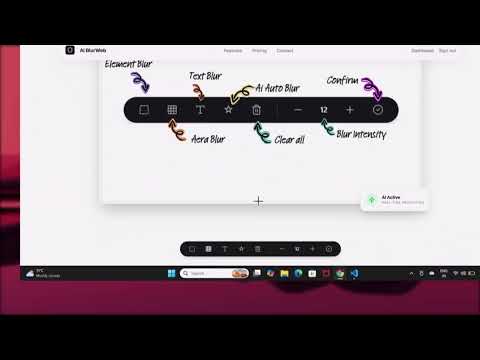
Protect your privacy and confidential data with a single click. AI BlurWeb is the ultimate privacy tool designed for professionals, content creators, and anyone who regularly shares their screen, records tutorials, or takes screenshots. Our extension ensures that your sensitive information—such as emails, passwords, financial data, and personal messages—remains securely hidden from prying eyes. Whether you are presenting in a live meeting, recording a video tutorial, or simply taking a screenshot to share with a colleague, AI BlurWeb gives you complete control over what stays visible and what gets blurred. 🌟 Key Features 🤖 Smart AI Auto-Blur: Let our intelligent AI automatically detect and blur common sensitive information on the page for you, saving you time and ensuring you never miss hiding confidential data. 🎯 Element Blur: Easily click on any specific image, input field, or layout element on a webpage to instantly blur it out. 📝 Text Blur: Highlight and blur specific sentences, names, or numbers within a paragraph without affecting the rest of the text. ⬛ Area Blur: Draw a custom rectangular blur box anywhere on your screen to hide entire sections of a website or web app at once. 💾 Persistent Privacy (Save & Remember): Your blurs are saved locally. If you navigate away or refresh the page, your blurred elements will remain safely hidden when you return. 🖱️ Quick Context Menu: Right-click on any element or text to instantly apply or remove a blur directly from your browser's native menu. 🛠️ On-Page Toolbar: Access all your blurring tools quickly via a sleek, unobtrusive toolbar that floats directly on the webpage for maximum efficiency. 🎛️ Adjustable Intensity: Control exactly how blurred your elements are to ensure the perfect balance between privacy and page aesthetics. 🔒 Privacy First Your privacy is our top priority. All blurring effects and data processing happen entirely locally within your browser. We do not track your web history, read your personal communications, or send website content to external servers. Your data stays on your device. Perfect for: Live presentations and webinars (Zoom, Teams, Meet) Recording video tutorials or software demos Taking secure screenshots for customer support or documentation Working in public spaces Install AI BlurWeb today and share your screen with absolute confidence!
4 out of 54 ratings
Details
- Version1.0.7
- UpdatedSeptember 12, 2026
- FeaturesOffers in-app purchases
- Size73.98KiB
- LanguagesEnglish
- DeveloperDEEPAK KUMAR MILAPCHAND JAINWebsite
11-19-7 Poolabhavi street mla office, onetown Vijayawada, Andhra Pradesh 520001 INEmail
aiblurweb@gmail.comPhone
+91 95020 64470 - TraderThis developer has identified itself as a trader per the definition from the European Union and committed to only offer products or services that comply with EU laws.
Privacy

Ai BlurWeb | Instant Screen & Image Blur for Chrome has disclosed the following information regarding the collection and usage of your data. More detailed information can be found in the developer's privacy policy.
Ai BlurWeb | Instant Screen & Image Blur for Chrome handles the following:
This developer declares that your data is
- Not being sold to third parties, outside of the approved use cases
- Not being used or transferred for purposes that are unrelated to the item's core functionality
- Not being used or transferred to determine creditworthiness or for lending purposes
Support
For help with questions, suggestions, or problems, please open this page on your desktop browser