


Overview
Fill web forms instantly with AI. Private, secure BYOK form filling free to install.
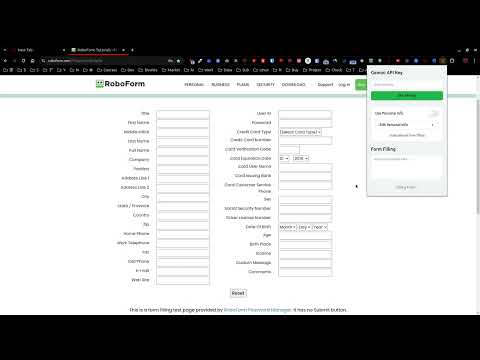
AI Auto Form Filler (BYOK) Fill web forms instantly with AI. Private, secure, and free to install. Tired of filling out the same information on every website? Auto Form Filler uses your own AI provider key to intelligently complete forms for you. Just provide a little context, and watch as the AI fills fields accurately and instantly. Key features AI-powered filling (bring your own key) Bring your own API key, from Google AI Studio, Agnes AI or OpenRouter. Each provider keeps its own key and its own model, so you can set up more than one and switch between them without losing a key. The default model is Google's rolling Flash Lite tag (gemini-flash-lite-latest), which always tracks the newest stable flash-lite and is free-tier, so there is no model to re-pick when Google retires an id. Agnes defaults to agnes-3.0-flash and OpenRouter to openrouter/free, its free router - none of the three is a pinned id, because a pinned id is a promise the provider does not keep. The models each provider publishes are fetched from the provider and listed in the settings, so the list stays current; you can still type any other model id yourself; check each provider's pricing. Multiple profiles Create custom profiles with unlimited fields for different scenarios: job applications, shopping accounts, contact forms, event registrations. Profiles auto-select per domain. Set it once, use it everywhere. Privacy first Your API key stays in your browser (never synced across devices). Profile data is sent only to the AI provider you chose. No external servers, no tracking, no analytics. Open source - audit the code yourself. Why it asks for access to all sites So it can recognise a form on the page you are on, and remember what you type on a site so the same site can be filled again later. On a site you have not excluded, it records what a form ends up holding and refills the empty fields on your next visit. Exclude any site from the popup, or switch the whole thing off in Settings. It skips password, hidden, read-only, and disabled fields and button-like controls, and only treats controls the page actually renders as fields. Two places it cannot run, by the browser's rules rather than its own: Chrome does not allow any extension to run on the Chrome Web Store, and Firefox blocks extension scripts on addons.mozilla.org, so forms on those two sites are neither remembered nor filled. Everywhere else it reads the same things: form controls, rich text boxes (a review editor built as a contenteditable), and forms inside iframes, including cross-origin ones, which are remembered under the host of the frame they are in. Remembers what fills your forms Remembers the values that end up in a form as you browse: what you type, what your browser's autofill enters, what the page fills in, and fills you approved. Fills the empty fields for you on your next visit. Password, hidden, read-only, and disabled fields are never recorded; button-like controls and anything the page hides are not treated as fields either. Exclude any single site, or turn the whole feature off in Settings. Nothing ever leaves your browser. Everything it remembers is listed in Settings, site by site: the question, the value, and what to do with it. Change a remembered value there instead of going back to the page, stop that field being filled on that site, or forget it and it is gone. Search boxes are left alone - neither remembered nor filled - unless you say otherwise. The launcher restores your last attempt when it recognises the same search term, and carries the switch to turn that off - on for every site, and yours to change. Offers to fill a form it recognises The first time you open a job application, a small card offers to fill it from your profile, naming the role and company it read off the page. It writes nothing until you click Fill, and that fill still goes through the review panel. Recognition is entirely local - no request is made, and nothing is sent anywhere. Lightning fast Detects form fields automatically (including Shadow DOM). Fills forms in seconds. Undo any fill with one click (stack-based undo). Keyboard shortcuts: Ctrl+Shift+F from anywhere, or Ctrl/Cmd+Enter inside the launcher. Review before applying A roomy review panel opens over the live page, so you can compare it with the form. Edit proposals and select individual fields before applying. Cancel or press Escape to leave every field untouched. A launcher that fits on the screen Chrome caps an extension popup at 600 pixels tall, and the launcher now uses every one of them - nothing is below the fold. Each switch explains itself behind a ? button beside it, so what it does is one click away rather than always in the way. Smart detection Automatically finds forms on any page. Multi-key field matching (name, id, label, aria-label). Works with text inputs, textareas, dropdowns, checkboxes, and radio buttons. Handles dynamic forms and SPAs. Replaces values already filled by your browser's autofill or the website by default - turn that off in Settings to keep what is already there. Free tier available The default model - Google's rolling flash-lite tag - is free-tier on Google AI Studio, so filling forms costs nothing to get started. OpenRouter's free router is free by definition. Higher usage can incur paid usage; check each provider's pricing page for current rates. Works alongside browser autofill Use your browser's autofill for saved names, addresses, passwords, and payment details. Auto Form Filler complements it by filling missing, unusual, or open-ended fields that it cannot infer. The popup replaces existing values by default, so browser-autofill and website-prefilled values are overwritten unless you turn that option off in Settings. As you browse, the extension also remembers what your forms end up holding - what you typed, what your browser's autofill filled in, or what an AI fill you approved - and fills the empty fields again on your next visit. Exclude any site you would rather it left alone, or turn it off entirely in Settings. Nothing is ever sent to us: the values stay in your own browser, and the watcher's values live in browser sync storage, so they follow you across your devices. How it works 1. Get an API key from Google AI Studio (https://aistudio.google.com/apikey), Agnes AI (https://platform.agnes-ai.com/settings/apiKeys) or OpenRouter (https://openrouter.ai/settings/keys) 2. Add your key in the extension settings 3. Keep the default model for your provider, or type a different model id - the models your provider publishes are fetched for you and listed in the settings, and you can still type any id you like 4. Create a profile with your information (optional) 5. Visit any form, click the extension icon 6. Add context like "Software engineer job application" 7. Click "Fill Form", review the values in the page-side panel, select the fields to keep, and click Apply Perfect for Job seekers applying to multiple positions. Online shoppers tired of entering shipping info. Event planners registering for conferences. Developers testing forms. Anyone who values their time. Security All profile data is stored locally in your browser. Review proposals stay in the page-side panel until you Apply or Cancel. API keys stored in local storage (not synced). Content Security Policy restricted to the three AI provider endpoints: https://generativelanguage.googleapis.com, https://apihub.agnes-ai.com and https://openrouter.ai - nothing else. No external servers, no tracking, no data collection. Requirements Chrome, Edge, or Firefox browser. An API key for Google AI Studio, Agnes AI or OpenRouter (each has a free tier or free models; heavier usage may be paid - check each provider's pricing). Note: This extension uses a BYOK (Bring Your Own Key) model. You provide your own API key, from Google AI Studio, Agnes AI or OpenRouter. This keeps the extension free to install and helps keep your data private; the provider you chose may charge you directly for usage above its free tier. Save time. Stay private. Fill forms effortlessly.
5 out of 51 rating
Details
- Version2.5.1
- UpdatedNovember 3, 2026
- Size271KiB
- LanguagesEnglish
- DeveloperWebsite
Email
draconwork@gmail.com - Non-traderThis developer has not identified itself as a trader. For consumers in the European Union, please note that consumer rights do not apply to contracts between you and this developer.
Privacy

This developer declares that your data is
- Not being sold to third parties, outside of the approved use cases
- Not being used or transferred for purposes that are unrelated to the item's core functionality
- Not being used or transferred to determine creditworthiness or for lending purposes
Support
For help with questions, suggestions, or problems, please open this page on your desktop browser