

Emoji Combos, Fancy Text & Symbols ✦ Copy & Paste
2 ratings
)
Overview
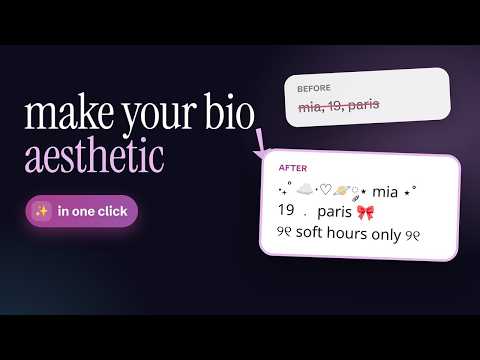
Aesthetic emoji combos, kaomoji, text symbols & fancy text fonts — copy & paste in one click. Cute symbols and letters anywhere.
Make your text sparkle in seconds. Browse aesthetic emoji combos, text symbols, kaomoji (˶ᵔ ᵕ ᵔ˶) and text art, restyle any message with the built-in fancy text generator, or grab the perfect emoji from a full picker — then copy & paste with one click. Perfect for bios, captions, comments, nicknames, chats and anywhere you type. THREE TOOLS IN ONE - 🧩 Combos — emoji combos, aesthetic symbols and text art sorted into themed categories. - 😀 Emoji — a full emoji picker with search, categories, skin tones and your own Recent. Emoji your computer can’t display are hidden automatically, so you never copy an empty box. - ✨ Fancy Text — a fancy font generator: type once, get dozens of font styles and decorative frames with live preview. NEW: SEASONAL & NEW CATEGORIES - 🎃 Holiday spotlight — around Halloween, Christmas, New Year, Valentine’s Day and Lunar New Year a seasonal tab appears by itself, full of fresh themed combos. - 🪪 Bio — ready-made profile bio templates and “about me” cards: just replace the name, birthday and city. - 💬 Discord — channel name styles, full server layouts, category headers, role names, welcome and rules messages. FANCY TEXT GENERATOR (FONT CHANGER) - Cursive, gothic, bold, bubble letters, small caps, upside down, glitch and many more — copy-paste Unicode fonts that work in bios, nicknames and comments. - Works beyond A–Z too: underline, overline, wavy, slashed, boxed and ringed letters work with any alphabet — Cyrillic, Greek, Arabic, Japanese and more. - 🔠 Big Text: write a short word or name in giant letters made of emoji squares, hearts or stars — stays straight wherever you paste it. - Frames & borders: coquette 🎀 ౨ৎ, gothic ♱ ☾☽, music 🎧, anime ★彡, kaomoji, multi-line banners and dividers — and you can pick the font for the letters inside the frame. WHY YOU’LL LOVE IT - 🔎 Search in your own language: find combos and emoji by typing words in your language, not only in English. - ⌨️ Keyboard-friendly: Ctrl+Shift+E (⌘+Shift+E on Mac) → type → Enter copies the top result. Arrow keys move around the cards. - 🖱 On click: Copy, Insert right into the page, or Copy + Insert (configurable). - 🖱 Right-click in any text field → “Insert from favorites” — your favorite combos without opening the popup. - ⭐️ Favorites, 🕘 Recent and an optional 🔥 Most Used tab for instant access. - 🗂 Make it yours: drag & drop categories into your own order, hide the ones you don’t need. - 👀 Hover preview for large text art — see the full piece before you copy. - 🌗 Light / Dark theme that follows your system. - 🔄 Favorites, settings and your own combos sync across computers where you’re signed in to Chrome. - 🌍 Interface in your language — dozens of languages, including right-to-left ones. BUILD & CREATE YOUR OWN - 🧺 Combo builder: collect combos, emoji and fancy text into one chain, reorder by drag & drop, pick a separator, then copy it or save it as a new combo. - ➕ Add your own emoji combo or text art with a simple form: Text (required) + optional Label, Category, Tags. - 🖱 Found something cool on a page? Select it, right-click → “Save selection as combo”. - 📥 Import from a file or paste a list — the importer is forgiving (comments, trailing commas, even raw lines). - 📤 Export your collection: user-only or full (defaults + yours). - ❌ Hide any built-in combo you don’t like — restore them anytime in Options. PRIVACY-FRIENDLY - Your custom items and settings live in your browser storage (with Chrome sync). No sign-ups, no accounts, no tracking of your content. ⊹˚₊‧───────────────────────────────────‧₊˚⊹ Make every message ✦ aesthetic ✦ in one click. Copy, paste, smile — done.
5 out of 52 ratings
Details
- Version1.13.0
- UpdatedOctober 5, 2026
- Offered byspaceboxteam
- Size2.45MiB
- Languages54 languages
- Developer
Email
spaceboxteam@gmail.com - Non-traderThis developer has not identified itself as a trader. For consumers in the European Union, please note that consumer rights do not apply to contracts between you and this developer.
Privacy

This developer declares that your data is
- Not being sold to third parties, outside of the approved use cases
- Not being used or transferred for purposes that are unrelated to the item's core functionality
- Not being used or transferred to determine creditworthiness or for lending purposes
Support
For help with questions, suggestions, or problems, please open this page on your desktop browser