

AgentRQ

Overview
Task manager for AI agents: orchestrate many agents at once and open Claude Code terminal right in the extension.
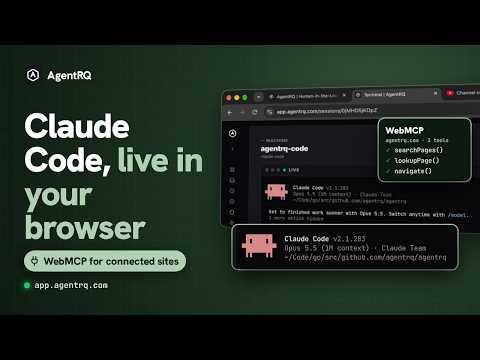
AgentRQ is a task manager for AI agents. Give your agents tasks, orchestrate many of them at once, and open the Claude Code terminal an agent is running in, all from a popup on your Chrome toolbar. TASK MANAGER FOR AI AGENTS • Create tasks and assign them to an agent or to yourself, one-off or on a schedule. • See every task by status: not started, ongoing, blocked, done. • Answer the questions agents are blocked on, and approve the steps they ask permission for. AGENT ORCHESTRATION • Run many agents at once, each in its own workspace, and see at a glance which are working and which are waiting on you. • Chain work between agents: one workspace's finished task can start the next task in another. LET YOUR AGENTS USE WEBMCP TOOLS • Websites can offer tools to AI agents with WebMCP. Turn on detection and the AgentRQ icon lights up on a site that does. • Share that site with a workspace in one click, and its agents can call the site's tools in your own signed-in browser. Anything the site does not mark read-only waits for your approval. • Stop sharing from the popup or Options at any time. CLAUDE CODE TERMINALS IN THE EXTENSION • Open the live Claude Code terminal an agent is working in, right in the popup, to watch it or take over. Works for agents on any machine you have connected with agentrqd, AgentRQ's agent runner. CONTROL AGENTS WITH AGENT CLIENT PROTOCOL (ACP) • Claude Code, Codex and Antigravity all in a single control plane. ONE CLICK FROM YOUR TOOLBAR • A mobile-sized popup that is always there; "Full size" or Alt+Shift+F opens AgentRQ in a tab when you want the room. • Uses your existing AgentRQ sign-in, in light or dark. • Works with app.agentrq.com, or your own self-hosted AgentRQ server (set it in Options). Keyboard shortcuts (change them at chrome://extensions/shortcuts): • Alt+Shift+A: open AgentRQ • Alt+Shift+F: open AgentRQ full size Open source: https://github.com/agentrq/agentrq
0 out of 5No ratings
Details
- Version1.1.1
- UpdatedSeptember 28, 2026
- Offered byContextual, Inc.
- Size32.0KiB
- LanguagesEnglish (United States)
- DeveloperContextual, Inc.
2021 Fillmore St San Francisco, CA 94115-2708 USEmail
hi@agentrq.comPhone
+1 628-287-7252 - TraderThis developer has identified itself as a trader per the definition from the European Union and committed to only offer products or services that comply with EU laws.
Privacy

AgentRQ has disclosed the following information regarding the collection and usage of your data. More detailed information can be found in the developer's privacy policy.
AgentRQ handles the following:
This developer declares that your data is
- Not being sold to third parties, outside of the approved use cases
- Not being used or transferred for purposes that are unrelated to the item's core functionality
- Not being used or transferred to determine creditworthiness or for lending purposes
Support
For help with questions, suggestions, or problems, please open this page on your desktop browser