


Overview
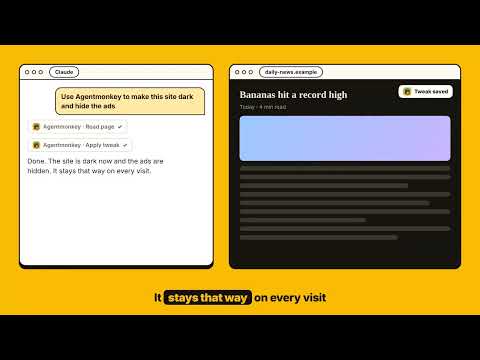
Tell your AI to restyle or extend any website. Connect Claude and say what to change: dark mode, less clutter, a missing button.
Agentmonkey lets your AI change how websites look and work in your own Chrome. Connect Claude once, then just say what you want: "make this site dark", "hide the sidebar", "add a button that downloads this article". The change appears at once and stays on every visit. No code to write, no userscripts to hunt for, no CSS to learn. If you know how, you can still read and edit everything your AI wrote. WHAT YOU CAN ASK FOR • Dark mode for a site that has none • Hide clutter: sidebars, banners, sponsored blocks, comment sections, YouTube Shorts • Bigger text, a narrower column, calmer colours • A button the site is missing: download, copy, export • Small fixes to a layout that annoys you every day HOW IT WORKS 1. Install Agentmonkey and click "Connect Claude". It adds Agentmonkey to your Claude as a connector, and you sign in once on the way. 2. Open the site you want to change and tell Claude what to do, by typing or by voice. 3. Claude looks at the page, writes a small piece of CSS or JavaScript (a "tweak"), and Agentmonkey applies it right away. Every tweak is saved for its site. Click the Agentmonkey icon to see the tweaks for the page you are on, switch any of them off, or delete them. A NEW KIND OF USERSCRIPT MANAGER If you know Tampermonkey, Violentmonkey or Stylus: Agentmonkey does the same job, custom JavaScript and CSS for any website, but the scripts and styles are written for you, for exactly the page in front of you. It works from an ordinary Claude chat through a remote MCP connector, so there is nothing to run on your computer and no API key to set up. YOU STAY IN CONTROL • By default your AI can work on any tab you have open. One switch in the settings limits it to sites you choose. • Your tweaks are stored in your browser, not on our servers. • A page is read only when your AI asks to, to carry out your request. What it reads goes to your AI app and is not stored by us. • Scripts run only after you turn on "Allow User Scripts" for Agentmonkey in Chrome. Styles work without it. • No ads, nothing sold. The extension sends no usage statistics; our server only counts how often the AI tools are used, never which sites or what was on them. WHAT YOU NEED • Chrome 135 or newer • A Claude account that can add custom connectors • A free Agentmonkey account (an email address) Privacy policy: https://agentmonkey.io/privacy Questions and ideas: https://agentmonkey.io
0 out of 5No ratings
Details
- Version1.3.1
- UpdatedNovember 26, 2026
- Size226KiB
- LanguagesEnglish
- DeveloperWebsite
Email
arzenslim@gmail.com - Non-traderThis developer has not identified itself as a trader. For consumers in the European Union, please note that consumer rights do not apply to contracts between you and this developer.
Privacy

Agentmonkey: Customize Any Website with AI has disclosed the following information regarding the collection and usage of your data. More detailed information can be found in the developer's privacy policy.
Agentmonkey: Customize Any Website with AI handles the following:
This developer declares that your data is
- Not being sold to third parties, outside of the approved use cases
- Not being used or transferred for purposes that are unrelated to the item's core functionality
- Not being used or transferred to determine creditworthiness or for lending purposes
Support
For help with questions, suggestions, or problems, visit the developer's support site