


Overview
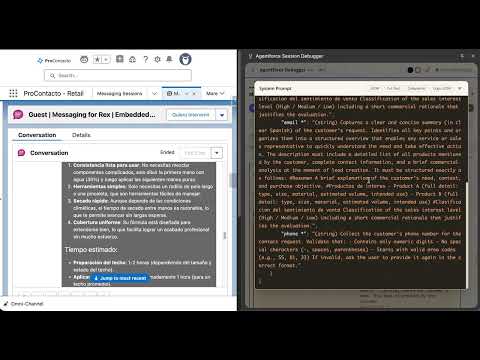
Debug Agentforce messaging sessions in real-time — view conversation messages, LLM reasoning, tokens, and session traces.
Agentforce Session Debugger is a Chrome extension that lets Salesforce developers and AI specialists inspect and debug Agentforce agent sessions in real-time, directly from the browser. What it does: • View the complete chat conversation with rich content (markdown, images, audio, video, attachments, quick-reply buttons) • Inspect every LLM reasoning step: topic classification, response generation, and grounding validation • See the full prompt sent to the LLM — Global Instructions, Topic Instructions, conversation history, and context variables — rendered as an interactive YAML tree • View available tools/actions with their parameters, descriptions, and required fields • Track real token usage (prompt + completion) per step and per session, with model name, provider, and temperature • Monitor Flex Credits consumption (actions × 20) across all sessions without opening each one • Detect and inspect errors with clean messages extracted from nested JSON, with one-click copy and YAML preview • Filter sessions by status, time range, channel (WhatsApp, Embedded, Web), agent, and version • Compare agent performance across versions with draggable analytics cards showing sessions, duration, actions, and Flex Credits • Execute SQL queries directly against Data Cloud with pre-built templates • Export session data to CSV with column selection and date range filters Key features: • Automatic Salesforce org detection — no configuration needed • Full prompt visibility from GenAiGatewayRequest.prompt__c with YAML/JSON toggle • Per-step help tooltips explaining what each LLM call receives and does • Prompt Schema showing the data flow matrix across the 3 LLM calls per turn • 10-worker parallel loading for Flex Credits and tokens • Scales from 1 to 100,000+ sessions with automatic SOQL pagination and batched Data Cloud queries • 3 themes: Light, Dark, and Comfort (low blue light) • Translated into 8 languages: Spanish, English, Portuguese, French, German, Japanese, Chinese, and Korean • Real-time polling with per-tab isolation • Direct links to Agent Builder, Copilot Studio Logs, and MessagingSession records Requirements: • Google Chrome or any Chromium-based browser • A Salesforce org with Agentforce enabled • Data Cloud with Session Tracing enabled (for reasoning steps and token data) Privacy: All data stays between your browser and your Salesforce org. No data is sent to third-party servers. Credentials are stored in browser session memory only and are cleared when the browser closes.
5 out of 51 rating
Details
- Version0.2.0-beta
- UpdatedApril 30, 2026
- Size193KiB
- LanguagesEnglish (United States)
- DeveloperWebsite
Email
ariel.tarsitano@procontacto.com.mx - Non-traderThis developer has not identified itself as a trader. For consumers in the European Union, please note that consumer rights do not apply to contracts between you and this developer.
Privacy

Agentforce Session Debugger has disclosed the following information regarding the collection and usage of your data. More detailed information can be found in the developer's privacy policy.
Agentforce Session Debugger handles the following:
This developer declares that your data is
- Not being sold to third parties, outside of the approved use cases
- Not being used or transferred for purposes that are unrelated to the item's core functionality
- Not being used or transferred to determine creditworthiness or for lending purposes
Support
For help with questions, suggestions, or problems, visit the developer's support site