

Annotate HTML

Overview
Click-to-annotate any page. Generates clean markdown feedback for AI coding agents.
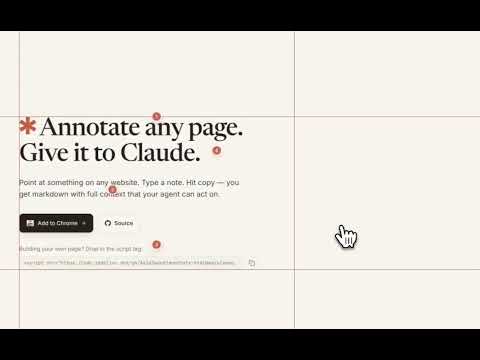
Point at things on any webpage. Tell your AI agent what to change. Annotate HTML adds a small toolbar to any page. Toggle annotation mode, click an element, type your feedback, and copy everything as clean markdown — ready to paste into Claude Code, Cursor, or any AI coding assistant. WHAT IT DOES • Click any element to annotate it — buttons, headings, images, containers, anything\ • Each annotation captures the selector path, CSS classes, computed styles, bounding box, and accessibility info\ • Highlight text before clicking to include the exact selection\ • Markers drop at your click position with numbered pins — hover to preview, click to edit\ • One-click copy produces structured markdown your AI agent can act on immediately\ • Rulers along the viewport edges appear on hover — drag out guide lines for alignment checks\ • Seven accent colors to match your workflow KEYBOARD SHORTCUTS Alt+Shift+A — Toggle toolbar (customizable in chrome://extensions/shortcuts)\ Alt+A — Toggle annotation mode\ C — Copy all annotations as markdown\ M — Open color picker\ H — Show/hide markers and rulers\ Esc — Close popup or exit mode WHAT GETS CAPTURED Each annotation records what an AI agent needs to find and fix the right element: • Element name — button "Download", h2 "Features", image "hero.png"\ • Selector path — .hero > .cta > .btn-primary\ • CSS classes, bounding box, computed styles\ • Selected text (if highlighted)\ • Nearby text context from sibling elements\ • Accessibility info — role, aria-label, focusable PRIVACY Zero data collection. No analytics, no tracking, no network requests. Everything stays in your browser tab and disappears when you close it. Minimal permissions: activeTab and scripting only. OPEN SOURCE MIT licensed. Source code: github.com/AsimSayed/annotate-html
0 out of 5No ratings
Details
- Version1.0.0
- UpdatedApril 24, 2026
- Offered byAsim Sayed
- Size30.38KiB
- LanguagesEnglish (United States)
- Developer
Email
asim.g.sayed@gmail.com - Non-traderThis developer has not identified itself as a trader. For consumers in the European Union, please note that consumer rights do not apply to contracts between you and this developer.
Privacy

This developer declares that your data is
- Not being sold to third parties, outside of the approved use cases
- Not being used or transferred for purposes that are unrelated to the item's core functionality
- Not being used or transferred to determine creditworthiness or for lending purposes