


Overview
Turn any website into a brand kit: logos, named colors, fonts and full-page screenshots — plus markup that becomes one AI prompt.
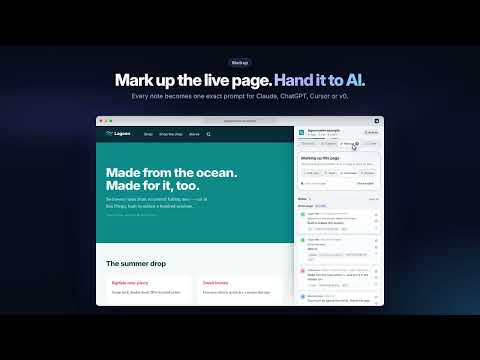
Turn any website into a brand kit — in one click, without leaving the page. Brand Inspector is a side panel for Chrome and Edge. Open it on any site and it reads the brand straight off the page: the real logo, every color named and placed, the fonts behind the headings and body, the layout, and how it all moves. Capture the page as a beautiful screenshot. Mark it up and hand the changes to your AI tool as one exact prompt. Then take the whole brand with you as a brand book, a logo pack, a style guide or a stylesheet. Free. No account. Nothing leaves your browser. BRAND — EVERYTHING THE PAGE IS MADE OF • The real logo, found and ranked: logos declared in structured data, tab and home-screen icons, web-manifest icons, inline SVG — even sprite-based logos that other tools export as an empty box — and logos painted as CSS backgrounds. Partner grids, payment marks and interface icons are filtered out. Vectors stay vectors. • Every color, named and placed. The palette is weighted by the area each color actually paints, so the brand's real color leads instead of whichever one appears most often. Each carries a plain name like Terracotta or Lagoon beside its hex, says where it is used — header background, button fill, heading text — and shows at a glance which text reads on it. One click copies the hex. • The palette, said out loud: "leads with deep Lagoon over Snow; headings in Inter over Charter body" — two plain sentences written from the scan itself. No AI and no server behind them. • Fonts with their full fallback stacks, sizes, weights and letter spacing, and who serves them — Google Fonts, Adobe Fonts, Bunny, the site itself, or your system. • The page's shape: its sections drawn at real proportions, with a small map beside every color showing exactly which sections it paints. One click takes an annotated snapshot of the visible page with that outline beside it. • A colorblind check that shows which color pairs stop being distinguishable. CAPTURE — NEW: A PICTURE OF THE PAGE, THREE WAYS • Visible — exactly what is on screen. • Full page — the whole page, stitched top to bottom, with a pinned header shown once instead of on every screen. • Selection — click any element to capture all of it, even the part scrolled out of view, or drag a box. Esc cancels. • A 3, 5 or 10-second timer, for menus and hover states. • Window frame — present any capture in a browser window on a gradient in the brand's own colors, ready for a slide, a deck or a post. • Copy it to the clipboard, open it full size, or save it as a PNG. Captures stay in the panel until you close it. DOES THE PAGE AGREE WITH ITSELF? A check-up in plain English, with a location on every finding: text that fails WCAG contrast against the background it actually sits on, two colors so close that nobody chose both on purpose, one heading role served by different fonts on different pages, and spacing off the page's own rhythm. When everything holds, it says so in one quiet line. IT REMEMBERS THE SITE, NOT JUST THE PAGE Open more pages and every color says how many pages of this site carry it — "on every page" is a brand color, "this page only" is one page's content. Come back later and the panel tells you what changed since your last visit: a new color, a shifted shade, a swapped font. And any of your last 20 sites can stand side by side — palettes, fonts and page outlines — from scans you have already made. MARKUP — SAY WHAT SHOULD CHANGE, ON THE PAGE ITSELF Open the toolbar and mark up the live page the way you would mark up a printout: • Edit copy — click any headline, button or paragraph and retype it where it sits. • Style — recolor anything from the site's own palette, change its size, weight, corners or padding, and watch it change as you go. • Comment — pin a note to anything, or drag a box around a gap or a crowded row. • Browse — use the site normally; the toolbar and your notes follow you from page to page. Every note keeps its exact place: the words before and after, a selector that matched, the path through the page, its size and position, the font and colors, the section and nearest heading — and on a development build, the source file and line that rendered it. One click turns the lot into a single prompt for Claude, ChatGPT, Cursor or v0, so the change you asked for is the change you get. Notes tick themselves done when the page starts showing the change. SAVE — TAKE THE WHOLE BRAND WITH YOU • Brand book — the whole scan as one interactive HTML file that opens anywhere and phones nobody • Logo pack — the logo trimmed to its real edges, plus white and black versions, as SVG and PNG • Style guide — a PDF of swatches, where each color is used, the page outline and the type • Stylesheet — the colors named for what they do: --color-header-bg, not --brand-3 • Brand sheet — one shareable image of the whole brand • Design brief in Markdown, an HTML skeleton of the page, and the structure as JSON • AI packet — the brief and the skeleton as one paste for Claude, ChatGPT or v0 • ZIP of everything, with a brand-kit.json and ready-to-paste email blocks — header, button and footer in the brand's colors, built for the clients that strip everything else • Any vector as a PNG at 128, 256, 512 or 1024 px Every file carries the details a designer or developer asks for: the spacing rhythm, the type scale, the corner radii, the container width, the breakpoints, the transition timing ("0.2s ease-out"), and the colors things turn on hover — read from the site's own stylesheets, without the hovering. PRIVATE BY DESIGN No account. No telemetry. No analytics. No server. The scan reads the page already open in front of you, and asset downloads come from the site serving them — never through a third-party proxy. Your settings, your notes and the last 20 scans stay on your machine, and one click clears them. Light and dark, full keyboard operation, and screen-reader labels throughout. Made by MailerDot.
0 out of 5No ratings
Details
- Version4.5.0
- UpdatedOctober 23, 2026
- Size178KiB
- LanguagesEnglish
- DeveloperWebsite
Email
early.base9688@fastmail.com - Non-traderThis developer has not identified itself as a trader. For consumers in the European Union, please note that consumer rights do not apply to contracts between you and this developer.
Privacy

Brand Inspector — logos, colors, fonts & screenshots has disclosed the following information regarding the collection and usage of your data. More detailed information can be found in the developer's privacy policy.
Brand Inspector — logos, colors, fonts & screenshots handles the following:
This developer declares that your data is
- Not being sold to third parties, outside of the approved use cases
- Not being used or transferred for purposes that are unrelated to the item's core functionality
- Not being used or transferred to determine creditworthiness or for lending purposes
Support
For help with questions, suggestions, or problems, visit the developer's support site