

AdvisorWorks - Degree Tracking
5 ratings
)
Overview
Integrating with Degree Works to create degree plans, generate waiver forms, & automate form submissions with Adobe Sign.
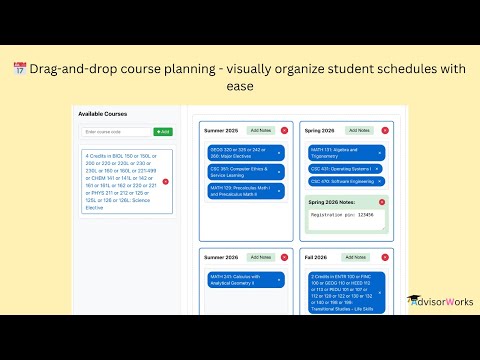
AdvisorWorks: Smarter Advising Starts Here AdvisorWorks is an all-in-one Chrome extension built to simplify and accelerate the academic advising process—so you can spend less time on paperwork and more time supporting students. Why AdvisorWorks? ✅ Instantly generate waiver and substitution forms ✅ Pull real-time student data directly from Degree Works ✅ Drag-and-drop or preview course planning ✅ Auto-fill Adobe Sign signature pages ✅ Create and reuse recipient email groups in Adobe Sign ✅ Secure – no external databases; data stored locally ✅ Designed to save time and reduce manual work ✅ Save degree plans to access later What You Can Do with AdvisorWorks: 📝 Auto-generate waiver or substitution forms using real-time Degree Works data 📘 View and interact with courses exactly as they appear in Degree Works, in a cleaner, more intuitive interface 📅 Plan future terms using drag-and-drop tools or generate email-ready course plans in seconds 🖊️ Create Adobe Sign collections with pre-filled recipient groups for seamless document routing No manual entry. No hassle. Just faster workflows, smarter planning, and more efficient advising—all inside your browser. Jan 27, 2026 Fixed an issue with the Generate Waiver Form “College” field to ensure names are added correctly (user-requested). Feb 12, 2026 - Fixed Academic view in DegreeWorks - You can now access and create student plans through the - Academic tab in DegreeWorks. It was broken, now it's working again! - Fixed saved plan notifications - Clicking "View it" on saved plan notifications now works properly in Academic view - Fixed email copy feature - The "Copy Email" button now works correctly when viewing plans from Academics Tab - Added developer credit - PDFs now include "Software Developer: Shantal Ewell (AdvisorWorks)" in the footer March 4th, 2026 - Fixed the issue where only the first recipient was being filled for Sign Automate in the Adobe New Experience. Now, your recipients are added seamlessly like before. May 22, 2026 - Added a course search bar to quickly find courses while planning - Fixed degree major display, now shows the actual major name instead of the word "Requirements" - Added the ability to type a custom semester name in both the planner and email template - Added semester collapse, group rows of two semesters and expand or collapse them together to save space while planning June 24, 2026 - Replaced "Loading..." placeholders with a dash ("—") when advisor information or other student details are not available. -Fixed the PDF generation bug that was displaying the total accumulated credits across all semesters. The PDF now correctly shows the credits for each individual semester. -Added support for UNC Charlotte in AdvisorWorks. So, students and advisors can use it to plan their degree. - Fayetteville State University remains supported and fully functional.
5 out of 55 ratings
Details
- Version4.0
- UpdatedJune 25, 2026
- Offered byShantal A. Ewell 🇯🇲
- Size1.55MiB
- LanguagesEnglish (United States)
- Developer
Email
quickwaiver@degreetracking.com - Non-traderThis developer has not identified itself as a trader. For consumers in the European Union, please note that consumer rights do not apply to contracts between you and this developer.
Privacy

This developer declares that your data is
- Not being sold to third parties, outside of the approved use cases
- Not being used or transferred for purposes that are unrelated to the item's core functionality
- Not being used or transferred to determine creditworthiness or for lending purposes
Support
For help with questions, suggestions, or problems, visit the developer's support site