

Advanced To-Do List

Overview
Advanced To-Do List Chrome Extension to help you focus on what matters — perfect for tasks, reminders, and office checklists.
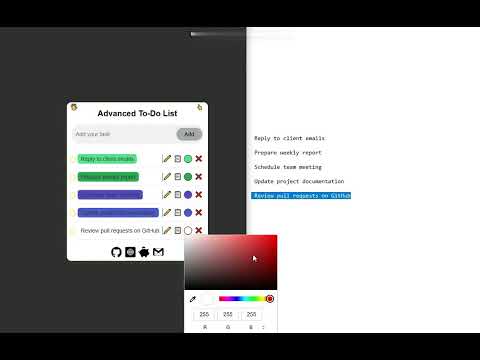
Advanced To-Do List helps you organize your workday and boost productivity with ease. The task panel is fully draggable, so you can place it anywhere on your screen for maximum convenience. Assign colors to tasks to visually separate projects, priorities, and deadlines. Easily edit, duplicate, collapse, or remove tasks to keep your workflow clean and efficient. Designed for both office environments and personal use, this extension supports project planning, daily task tracking, and keeping important reminders always in sight. Whether you’re handling multiple responsibilities or concentrating on a single goal, Advanced To-Do List helps you stay organized, focused, and in control. Manage tasks efficiently and work smarter every day. How to Use 1. Type a task and click Add to include it in your list 2. Use the checkbox to mark tasks as completed 3. Click the ✏️ icon to edit a task 4. Click 📋 to copy the task text to your clipboard 5. Click the ⚪ icon to change the task background color 6. Click ❌ to remove a task from the list 7. Drag and drop tasks to reorder them
5 out of 51 rating
Details
- Version1.1.6
- UpdatedJanuary 6, 2026
- Size4.73MiB
- LanguagesEnglish (United States)
- DeveloperWebsite
Email
autorefreshtasks@gmail.com - Non-traderThis developer has not identified itself as a trader. For consumers in the European Union, please note that consumer rights do not apply to contracts between you and this developer.
Privacy

This developer declares that your data is
- Not being sold to third parties, outside of the approved use cases
- Not being used or transferred for purposes that are unrelated to the item's core functionality
- Not being used or transferred to determine creditworthiness or for lending purposes
Support
For help with questions, suggestions, or problems, visit the developer's support site