

Advanced PDF Batch Processing Workstation
1 rating
)
Overview
Locally process PDF merging, splitting, extraction, rotation, watermarking, and compression.
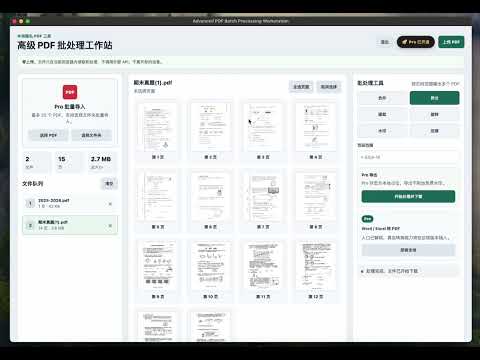
Advanced PDF Batch Processing Workstation A privacy-first, browser-native PDF workstation. Open it like a tab, drop in your PDFs, and get merge / split / extract / rotate / watermark / compress done in seconds - without sending a single byte to any server. 1. What It Is it is a Chrome extension that turns your browser into a full-featured PDF batch processing workstation. Unlike traditional online PDF tools that require uploading your files to a remote server, ext-pdf does everything 100% locally inside the browser sandbox using pdfjs-dist and pdf-lib. Think of it as a lightweight desktop PDF studio — but with zero installation friction, zero account requirement to start, and zero exposure of your documents to the internet. 2. How to Use Install: the extension from the Chrome Web Store and pin it to your toolbar. Open the workstation: by clicking the extension icon — a full-page tab will launch. Drop in PDFs: (or click `Upload PDF` / `Choose Folder`), then pick a tool from the right-hand panel and click "Run & Download". 3. Features Core PDF operations Merge: Combine all queued PDFs in the order shown in the sidebar Split: Output multiple PDFs by page-range expressions (e.g. `1-3,5,8-10`) Extract: Export the pages selected in the page grid into a new PDF Rotate: Rotate selected pages (or all pages) by 90° / 180° / 270° Watermark: Overlay a configurable text watermark — text, font size, opacity, position Compress: Re-save and optimize object streams to reduce file size Format Conversion:PDF to Word and Excel Productivity features Page-thumbnail grid: rendered on demand for fast visual page picking Multi-file queue: with size, page count and total statistics Folder import: drag in an entire folder, non-PDF files are filtered automatically (Pro) Batch processing: operate on up to 20 PDFs in a single run (Pro) One-click download: every export is delivered straight to your local Downloads folder 4. Security & Privacy Zero upload: This is the single most important promise of ext-pdf. All file reading and processing happen inside the browser — your PDFs never leave the device.
5 out of 51 rating
Details
- Version0.0.5
- UpdatedJuly 6, 2026
- Offered bywp569359120
- Size946KiB
- Languages2 languages
- Developer高教园北三街 昌平区, 北京市 102206 CN
Email
wp569359120@gmail.com - Non-traderThis developer has not identified itself as a trader. For consumers in the European Union, please note that consumer rights do not apply to contracts between you and this developer.
Privacy

This developer declares that your data is
- Not being sold to third parties, outside of the approved use cases
- Not being used or transferred for purposes that are unrelated to the item's core functionality
- Not being used or transferred to determine creditworthiness or for lending purposes
Support
For help with questions, suggestions, or problems, please open this page on your desktop browser