

Admin Toolkit for Salesforce
6 ratings
)
Overview
Flows, data deployments between orgs, permission copies, Lightning pages, field cleanup and debug logs — from your open tabs.
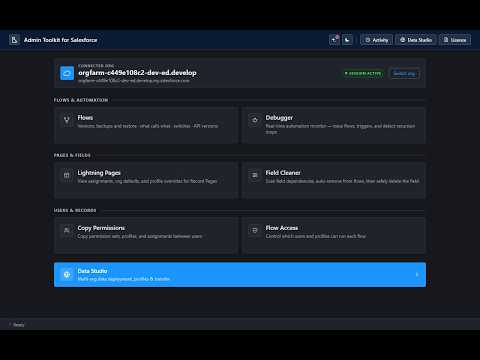
Admin Toolkit for Salesforce works through the Salesforce tabs you already have open — no separate login, no server in between. Nothing about your data leaves your browser except to talk directly to your own orgs. Anything that can change something in Salesforce shows you what it is about to do and asks first: an acknowledgement checkbox, and the org's name when the target is production. Where a tool reads the org back afterwards it says "verified"; where it can only report what Salesforce answered, it says that instead. THE TOOLKIT (the popup) • Flows — every flow with its versions. Delete the versions you tick (backup offered first; paused interviews and calling flows checked), back versions up as a file, restore a backup as a new Draft. • Flows › Dependencies — what calls what, "what uses…" a field or value, blast radius, call chains, export. Flow switches turn record-triggered and scheduled flows off and back on at the version that was active. API versions move flows to a newer API version and verify what runs. • Debugger — start a one-hour trace for a user, read logs line by line with automation analysis, compare two, open one in its own tab. • Lightning Pages — every record page and its assignments (org default, app default, app + record type + profile); add, remove, deactivate, clone; "who sees what". • Field Cleaner — everything that references a field, fixed automatically where it safely can be; replace the field with another one instead of removing it, copy its access and stored values; deprecate first; delete when nothing is left. • Copy Permissions — one user's profile, role, permission sets and groups onto another, adding only. • Flow Access — grant flows to permission sets in one action. DATA STUDIO • Connected Orgs — the orgs open in Chrome; rename, lock writes, treat an org as production. • Data Deployment — a saved deployment opens on one page: both orgs are read, every record sorted into insert / changed / only in target / synced / needs a decision, nothing ticked for you. A whole tree in one run, parents first; lookups connect; record-triggered flows, validation rules and duplicate rules can be paused or bypassed for the run; retry the failed ones; an identity field makes matching exact across orgs; a name that exists twice in one org can be merged into one record, value by value. • All open orgs — every deployment against every open org at a glance. • Activity — everything the Toolkit and Data Studio did, by day, with the actions on each line: Roll back, which deletes what a run created and restores what it changed, then verifies; Retry failed; Undo of a tool's change; a CSV/JSON export. • Org Compare — record counts of any objects between two orgs. • Org health — one card per finding, each with its API cost first. Everything stays on your PC (chrome.storage.local). No analytics, no account, no server. Open source under the Apache License 2.0 — the code, the tests and the fixtures are public: https://github.com/YonatanAshkenazi53/salesforce-toolkit
5 out of 56 ratings
Details
- Version1.0.0
- UpdatedNovember 3, 2026
- Offered byyonash53
- Size1.18MiB
- LanguagesEnglish
- Developer
Email
yonash53@gmail.com - Non-traderThis developer has not identified itself as a trader. For consumers in the European Union, please note that consumer rights do not apply to contracts between you and this developer.
Privacy

This developer declares that your data is
- Not being sold to third parties, outside of the approved use cases
- Not being used or transferred for purposes that are unrelated to the item's core functionality
- Not being used or transferred to determine creditworthiness or for lending purposes
Support
For help with questions, suggestions, or problems, visit the developer's support site