


Обзор
Control your browser's global screen brightness to use sites that do not support the native dark theme
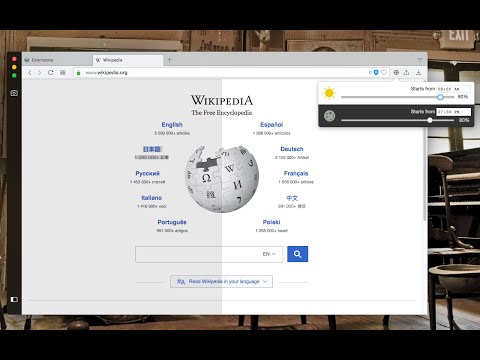
This extension reduces or increases the screen brightness level for both daytime and nighttime periods based on user-defined values. It helps the websites that do not support the native dark theme. Also, it can increase the brightness of websites that are too dark. It reduces the eyestrain while reading documents online when dark mode is not supported. The extension offers two different values for daytime and nighttime duration to enhance usability. Features: 1. Control the darkness level of all websites or just a single hostname 2. You can increase or decrease the brightness level of a website 3. Supports keyboard shortcuts for every action. 4. You can disable the extension on a single website or entirely 5. Control the brightness level from 0% (completely dark) to 120% (20% brighter than the original) 6. Supports two different methods to decrease the brightness level. Notes: 1. By setting the brightness level to 100%, the extension does not affect browser tabs (does not inject any CSS styling) 2. It is recommended to configure the start time for both daytime and nighttime. By default, daytime starts at 08:00, and nighttime starts at 19:00. 3. By adding a website to the exception list, brightness control is turned off for this website. You can use this feature to turn off the extension on websites that support native dark mode. 4. This extension does not reduce the screen brightness when printing a webpage. There is a CSS selector that only affects "screen" type displays. What is the difference between this extension and other dark mode extensions (e.g. "Dark Reader™" or "Turn Off the Lights™" (I do not own these two extensions))? These extensions manipulate the styling of all elements by using custom stylesheets. They convert the light theme to dark. This extension only injects a filter to reduce or increase the original brighness. So it does not perform any resource-intensive operations and does not alter the website's styling.
4,0 из 5185 оценок
Подробности
- Версия0.3.9
- Обновлено9 мая 2026 г.
- Автор:joue.quroi
- Размер119KiB
- ЯзыкиПоддерживаемых языков: 12
- Разработчик
Электронная почта
joue.quroi@gmail.com - Не продавецРазработчик не указал для себя статус продавца. Просим клиентов из Европейского союза обратить внимание, что на сделки между вами и этим разработчиком не распространяются законы о защите прав потребителей.
Конфиденциальность

Этот разработчик утверждает, что ваши данные:
- Не продаются третьим лицам, за исключением разрешенных вариантов использования
- Не используются и не передаются в целях, не связанных с работой основных функций продукта
- Не используются и не передаются для определения платежеспособности или в целях кредитования
Поддержка
Сообщить об ошибках в работе приложения, задать вопрос или поделиться идеями можно на сайте разработчика.