

Add to GiftList Button

Overview
Save products from any website to your GiftList wish list in one click.
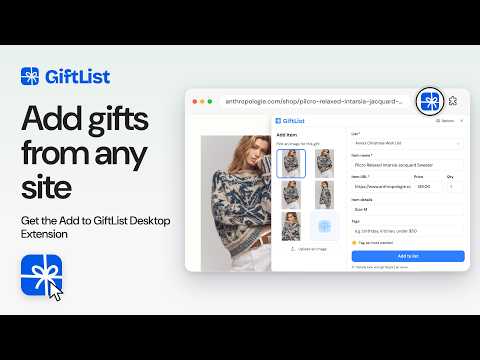
The Add to GiftList Button saves gift ideas from the stores you already shop, straight to your GiftList wish list. Found something you'd love? Click the GiftList button in your toolbar. We fill in the product name, price, link and photo for you. Pick a list, add a note like size or colour, and save. If a page doesn't fill in on its own, you can type the details in yourself. HOW IT WORKS 1. Add the button to Chrome and pin it to your toolbar. 2. On a product page, click the GiftList icon. 3. Choose a list and click "Add to list". That's it. WHAT YOU CAN DO FROM THE BUTTON • Add gifts from any store: big retailers, small shops and handmade marketplaces • Pick which list each gift goes on, or start a new one • Choose the best product photo, or upload your own • Add size, colour or other details for your gift-givers • Set a quantity and tag your most wanted gifts • Add tags to keep long lists organised ONE LIST, EVERY STORE Everything you save lands on one GiftList wish list, whatever store it came from. Share it with one link. Friends and family see your list, buy from whichever store they like, and mark gifts as purchased, so you avoid duplicate gifts. You decide whether to see what's been bought or keep the surprise. MORE THAN A WISH LIST • Lists for birthdays, the holidays and every occasion in between • Secret Santa: draw names, set a budget and share wish lists • Family and friend groups that keep everyone's lists in one place • Birthday reminders for the people you follow • Thank-you cards, drafted for you • Gift ideas for everyone on your list GiftList is free, with 5M+ gifts added so far. Your lists also work on giftlist.com and in the GiftList apps for iPhone and Android. PRIVACY AND PERMISSIONS The extension asks for access to the sites you visit so it can read the product details on a page when you click the GiftList button. It reads a page only when you open the button there. Signing in keeps your lists in sync with your GiftList account. Privacy policy: https://giftlist.com/privacy-policy Questions or feedback? Email support@giftlist.com.
4 out of 512 ratings
Details
- Version2.0.24
- UpdatedOctober 16, 2026
- Size1.39MiB
- LanguagesEnglish
- DeveloperMalibu Vista Ventures, Inc.Website
3731 S Malibu Vista Dr Suite 1 Malibu, CA 90265-5606 USEmail
support@giftlist.comPhone
+1 631-235-2050 - TraderThis developer has identified itself as a trader per the definition from the European Union and committed to only offer products or services that comply with EU laws.
- D-U-N-S124603439
Privacy

Add to GiftList Button has disclosed the following information regarding the collection and usage of your data. More detailed information can be found in the developer's privacy policy.
Add to GiftList Button handles the following:
This developer declares that your data is
- Not being sold to third parties, outside of the approved use cases
- Not being used or transferred for purposes that are unrelated to the item's core functionality
- Not being used or transferred to determine creditworthiness or for lending purposes
Support
For help with questions, suggestions, or problems, please open this page on your desktop browser