

Calendar AI - Text & Screenshot to Event
3 ratings
)
Overview
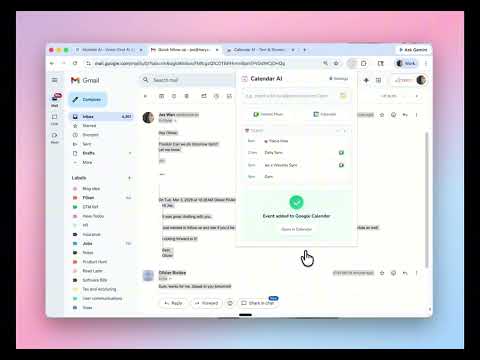
Quickly add events to Google Calendar using natural language or images. Just type or paste a screenshot!
Add events to Google Calendar in seconds — just type naturally or paste a screenshot! 🚀 HOW IT WORKS 1. Simply describe your event in plain language: • "Meet with Sarah tmr 3pm" • "Team lunch Fri noon at Pizza Hut" • "Call john@acme.com next Mon 10am" Then hit Enter, your input will be transformed into a calendar event. 2. You can also paste/upload a screenshot of the event. The AI understands your input and creates a calendar event instantly. • Use (Shift + Ctrl + Cmd + 4) to capture a screenshot, open the extension, add info if needed, then hit Enter. • Also supports uploading images. 3. Another way is to select text about the event -> right click -> choose "Add this to Calendar" in the dropdown list. ✨ KEY FEATURES • Natural Language Input — Type events the way you think • Image Support — Paste screenshots of invites or messages • Smart Time and Attendee Detection — Understands "tmr", "next Tue", "john@acme.com", etc. • Quick Edit — Review and adjust before confirming • Google Calendar Sync — Events appear instantly in your calendar • Auto Google Meet — Automatically creates meeting links when you add attendees • Context Menu — Select text on any webpage and add to calendar with one click • Recurring events — Schedule repeating events using natural language. Say "Gym every Mon, Wed, Fri at 7pm" and it just works. • Edit & delete with words — Modify or remove existing calendar events by simply describing the change. • Multiple AI providers — Use OpenAI, Google Gemini, or Anthropic Claude with your own API key, or try it free with no setup. 📋 CLIPBOARD MAGIC Copy any event info and open the extension — it automatically detects and parses calendar-related content from your clipboard. ⚙️ FLEXIBLE AI OPTIONS • Free Service: Ready to use, no setup needed • Own OpenAI Key: Unlimited usage with your own API key 🔒 PRIVACY • Your data stays local — we don't store your events • Google login uses Chrome's secure authentication • API keys are stored locally on your device Perfect for busy minds who want to capture meetings, appointments, and events without the hassle of manual calendar entry. For questions and feedback: Find me on X: https://x.com/Jeswan22
3.7 out of 53 ratings
Details
- Version1.3.0
- UpdatedMarch 22, 2026
- Offered byJes
- Size73.33KiB
- LanguagesEnglish (United States)
- Developer
Email
wanyujie0122@gmail.com - Non-traderThis developer has not identified itself as a trader. For consumers in the European Union, please note that consumer rights do not apply to contracts between you and this developer.
Privacy

Calendar AI - Text & Screenshot to Event has disclosed the following information regarding the collection and usage of your data. More detailed information can be found in the developer's privacy policy.
Calendar AI - Text & Screenshot to Event handles the following:
This developer declares that your data is
- Not being sold to third parties, outside of the approved use cases
- Not being used or transferred for purposes that are unrelated to the item's core functionality
- Not being used or transferred to determine creditworthiness or for lending purposes
Support
For help with questions, suggestions, or problems, visit the developer's support site