Item logo image for Actions Lens — by RunsOn

Actions Lens — by RunsOn

5.0(

1 rating

)
Item media 5 (screenshot) for Actions Lens — by RunsOn
Item video thumbnail
Item media 2 (screenshot) for Actions Lens — by RunsOn
Item media 3 (screenshot) for Actions Lens — by RunsOn
Item media 4 (screenshot) for Actions Lens — by RunsOn
Item media 5 (screenshot) for Actions Lens — by RunsOn
Item video thumbnail
Item media 2 (screenshot) for Actions Lens — by RunsOn
Item media 3 (screenshot) for Actions Lens — by RunsOn
Item media 4 (screenshot) for Actions Lens — by RunsOn
Item media 5 (screenshot) for Actions Lens — by RunsOn

Overview

Keyboard-first navigation for GitHub repositories, Actions runs, workflow runs, jobs, and annotations.

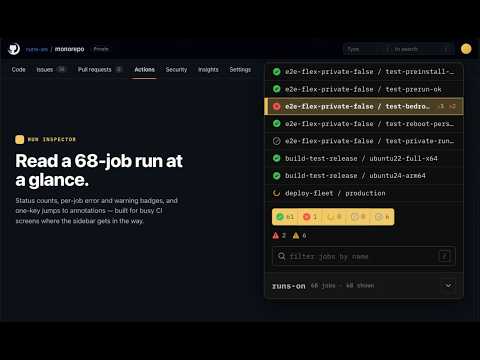
Actions Lens adds a keyboard-first command panel to GitHub repositories and GitHub Actions pages. Open it with Ctrl+/ or Cmd+/ and jump straight to the pages you use most: Actions, pull requests, releases, code, security, settings, and the rest of the repository tabs. Start typing to narrow the menu without accidentally triggering GitHub search. On GitHub Actions pages, Actions Lens becomes a focused TUI for busy CI screens: - Filter workflow runs and jobs by status with digit shortcuts. - Search long job and workflow names, with matches centered so the useful part stays visible. - Preview a job or run first, then hit Enter again to navigate. - Jump back up from a job to its run, from a run to its workflow or pull request, and from a workflow to the Actions index. - Open or scroll to error and warning annotations faster. It is built for engineers who live in GitHub Actions and want fewer clicks, fewer expanded sidebars, and less hunting through long lists. Actions Lens runs only on GitHub pages and does not collect, transmit, or sell your data.

Details

  • Version
    0.1.0
  • Updated
    June 24, 2026
  • Size
    172KiB
  • Languages
    English
  • Developer
    Cyril Rohr
    4 Rue Michel Gérard Thorigné-Fouillard 35235 FR
    Website
    Email
    ops@runs-on.com
    Phone
    +33 6 33 85 83 32
  • Trader
    This developer has identified itself as a trader per the definition from the European Union and committed to only offer products or services that comply with EU laws.
  • D-U-N-S
    264092746

Privacy

Manage extensions and learn how they're being used in your organization
The developer has disclosed that it will not collect or use your data. To learn more, see the developer’s privacy policy.

This developer declares that your data is

  • Not being sold to third parties, outside of the approved use cases
  • Not being used or transferred for purposes that are unrelated to the item's core functionality
  • Not being used or transferred to determine creditworthiness or for lending purposes

Support

For help with questions, suggestions, or problems, visit the developer's support site

Related

GitHub File Uploader

5.0

Upload files to GitHub, manage repositories, change visibility, and create pull requests with drag-and-drop interface

GroupTab

5.0

Group tab is a keyboard driven tab manager to allow you to manage multi page workflows with ease.

GHA Bulk Delete

5.0

Bulk delete workflow runs from GitHub Actions

Better GitHub Dashboard

0.0

GitHubのダッシュボードによく使うリポジトリ・担当Issue/PR・検索バーを追加し、GitHub内ならどこでもCmd+Kで検索ランチャーを開ける拡張機能

Listr - Entrepreneurial Powertools

5.0

Projects, tasks & boards for shipping work. Real-time collab, AI organize, tags, PDF/Sheets export, built-in apps. Local-first.

LazyGitHub: Shortcuts & Automations

0.0

Inject one-click shortcuts & automations into GitHub pages: trigger workflows, post comments, dispatch actions anything with ease.

GitHub Devwatch

0.0

Monitor pull requests, issues, and releases across multiple GitHub repositories. Get notifications and never miss activity.

GitHub PR Quick Approve

0.0

Approve GitHub PRs with a configurable keyboard shortcut (via GitHub API)

Hotkeys for Webflow

4.8

Adds hotkeys and dashboard for Webflow.

TabVault — Context Switcher for Developers | Workspace Manager

1.0

Context switcher for developers. Switch between project workspaces with keyboard shortcuts. Auto-save, tab groups, instant restore.

OpsKey — Browser DevOps CLI

0.0

A keyboard-first command palette for DevOps, IT, and engineering workflows. Run URL, HTTP, and clipboard commands in Chrome.

Conduktor: Command Palette for the browser

4.7

A keyboard-first command bar for browser actions and faster navigation.

GitHub File Uploader

5.0

Upload files to GitHub, manage repositories, change visibility, and create pull requests with drag-and-drop interface

GroupTab

5.0

Group tab is a keyboard driven tab manager to allow you to manage multi page workflows with ease.

GHA Bulk Delete

5.0

Bulk delete workflow runs from GitHub Actions

Better GitHub Dashboard

0.0

GitHubのダッシュボードによく使うリポジトリ・担当Issue/PR・検索バーを追加し、GitHub内ならどこでもCmd+Kで検索ランチャーを開ける拡張機能

Listr - Entrepreneurial Powertools

5.0

Projects, tasks & boards for shipping work. Real-time collab, AI organize, tags, PDF/Sheets export, built-in apps. Local-first.

LazyGitHub: Shortcuts & Automations

0.0

Inject one-click shortcuts & automations into GitHub pages: trigger workflows, post comments, dispatch actions anything with ease.

GitHub Devwatch

0.0

Monitor pull requests, issues, and releases across multiple GitHub repositories. Get notifications and never miss activity.

GitHub PR Quick Approve

0.0

Approve GitHub PRs with a configurable keyboard shortcut (via GitHub API)

Google apps
